Metale Tutorial #7: Launchpad Guide
Metale Protocol
This guide is designed to help everyone understand how to use the Metale Launchpad, whether you're a creator or a merchant. It serves as a crowdfunding platform for content NFT collections, providing all necessary details and supporting tutorials.
On the Metale platform, anyone can create an NFT collection with any type of content and raise funds to develop and launch it. Investors on the Launchpad will automatically mint NFTs from that collection once the crowdfunding target is successfully met. This mechanism is particularly useful for short drama production teams at any phase of their project, including the initial stages of casting and scriptwriting.
Creator: Crowdfund on Launchpad
In this chapter, we guide creators through the whole proccess from creating a content NFT collection to successfully launching it on the Metale Launchpad.
1. Connect wallet:
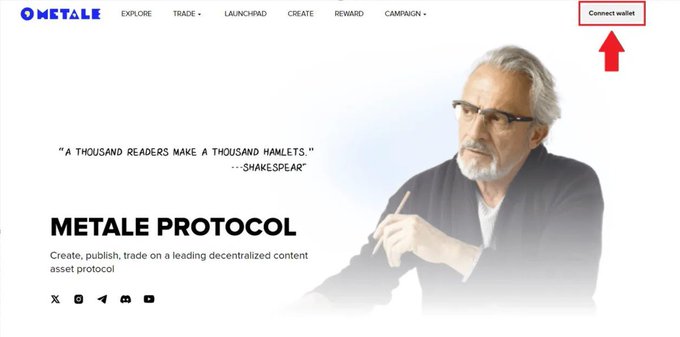
For more information about the different login options, refer to Metale Tutorial #1: Connect Wallet.
2. Click on CREATE:
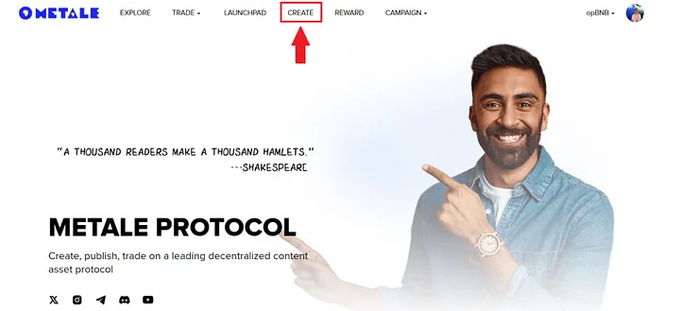
The content publishing console opens.
In this tutorial, an example is presented as a short drama with 1 episode (teaser), modeling a situation where the production team is at the fundraising stage but already has some initial content for marketing and media distribution.
3. Submit your work:
A. Select the content type (here, short drama).
B. Upload the cover.
C. Choose the language.
D. Add the title.
E. Add the NFT collection description.
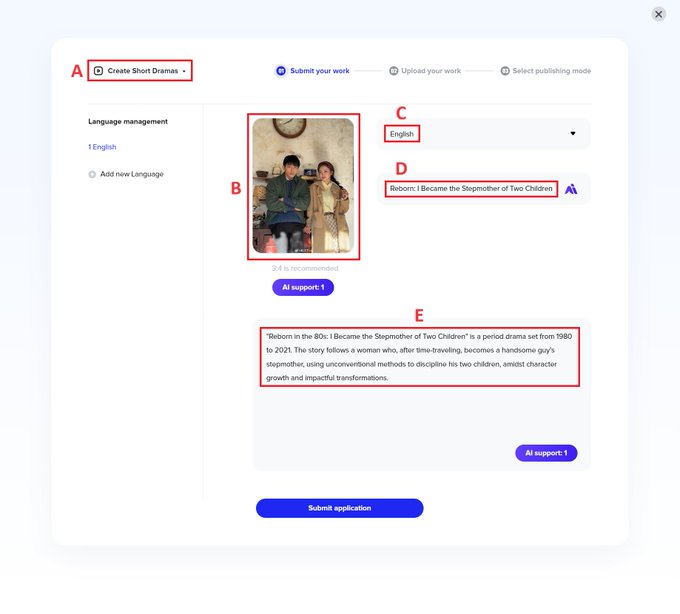
Read Metale Tutorial #3: Create Overview for more details.
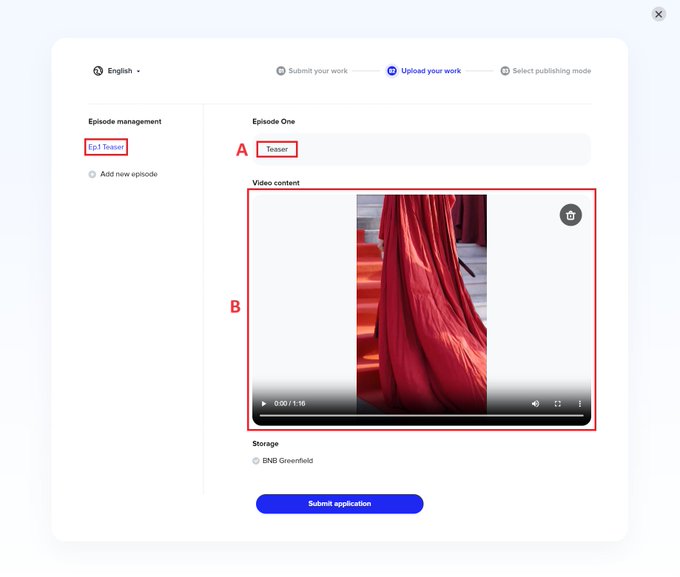
3. Upload your work:
A. Add the title for the first episode.
B. Upload the video (MP4).
3. Select publishing mode:
A. Choose 721 (as of June 16, only this NFT economic model is supported on Metale Launchpad).
B. Upload the cover once again (will be used as the main NFT collection cover as of June 16).
C. The name of the token that is bound to your NFTs. Since this step is mandatory to create an NFT, it is better that you pick a name that fits your NFT collection.
D. Add the total supply of your NFT collection.
E. Select "Launchpad".
F. Upload the cover for the NFT in your collection (it may be different from the main cover).
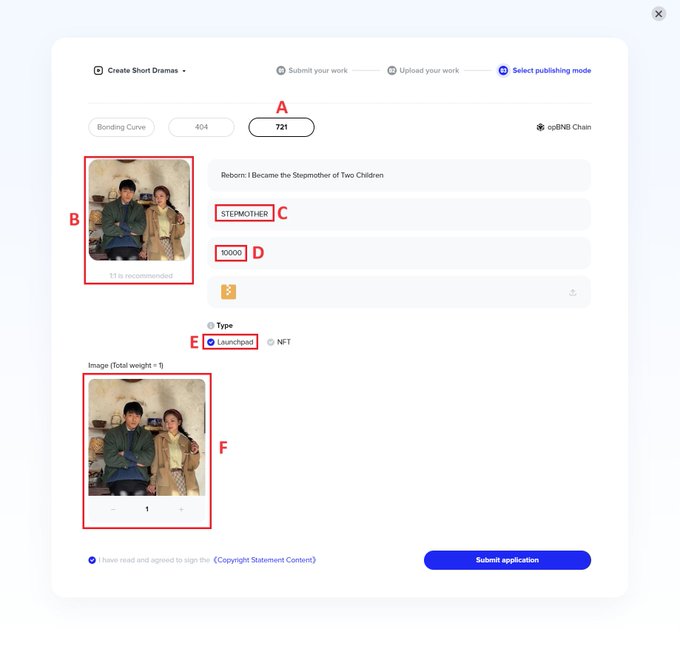
Submit application and move to the next step.
Note that for every transaction on the Metale platform, you need to sign the transaction on the blockchain, which requires you to keep some $BNB in your wallet to pay the transaction gas fee. Publishing the content itself is completely free, as is launching the crowdfunding on Launchpad.
4. Find the "Launch" section in the profile dashboard and open it:
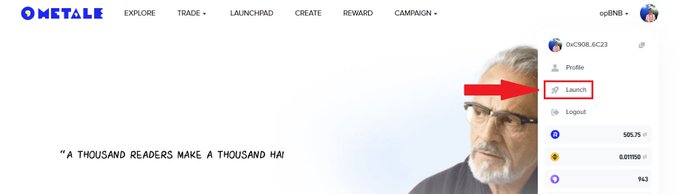
5. Select the NFT collection you want to launch and proceed to the next step:

6. Add the required information, descriptions, and social media links to launch the crowdfunding for your content NFT collection:
A. Set the price per 1 NFT. YOu can select to use either $RCM (Metale Protocol utility token as of June 16) or $BNB.
B. Specify the total number of items (NFTs) you wish to launch in the particular crowdfunding round. You can release as many rounds as you want, separate them, or launch all NFTs (maximum supply) at once.
C. Set the duration of the Launchpad round.
Important notes (as of June 16):
- Once a crowdfunding round reaches 100% of its target, it is considered successful. At that point, all funds are deposited into the Launchpad initiator's (creator's) wallet, and investors receive their NFTs based on their investment results.
- However, the official Metale Protocol team has the right to accelerate the completion of certain Launchpad projects. If required by Launchpad requirements and copyright agreement with launching partners, the official Metale Protocol team reserves the right to declare a funding round successful early, followed by crediting the funds raised to the creator's wallet and minting NFT for all investors. In such cases, official announcements will be executed on Metale Protocol Twitter.
D. Add the short introduction of your product/content.
E. Add the product description.
F. Feel free to include links to your Twitter and Discord.
This will help foster a community around your NFT content collection. Ensure you only include links with the following format:
Twitter: https://x.com/...
Discord: https://discord.com/...
It is also possible to specify any Twitter and Discord even if you don't own it, so be careful when adding your own links. You can also skip this step.
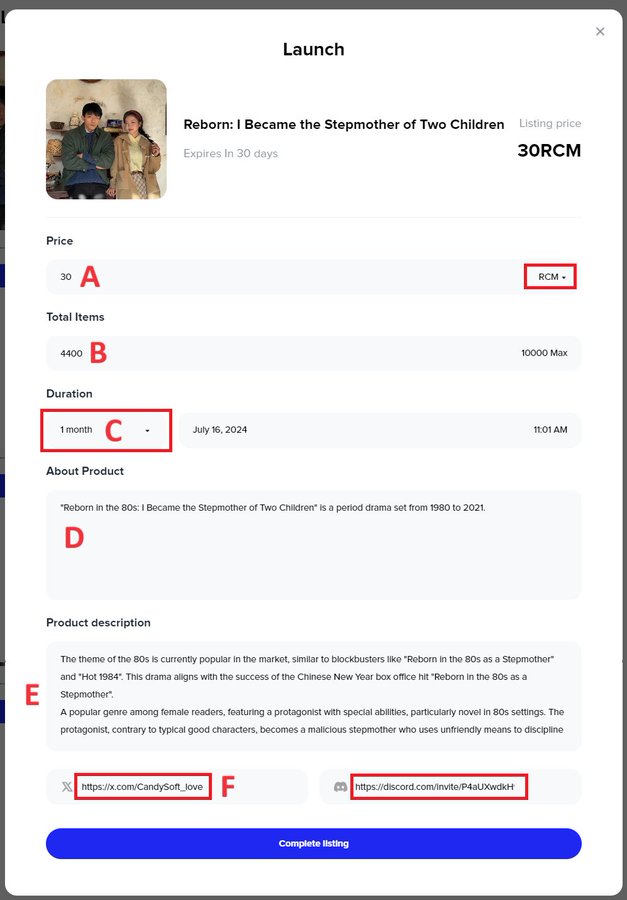
After you are ready, proceed with listing.
7. Now, you can find your NFT collection on the Metale Launchpad page:
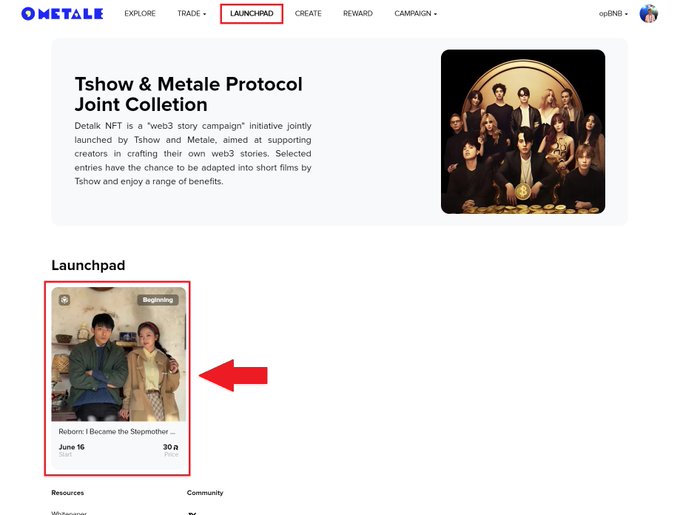
Additionally, you can monitor the Launchpad timer and access your Launchpad NFT collection page from the Launch section in your profile dashboard:
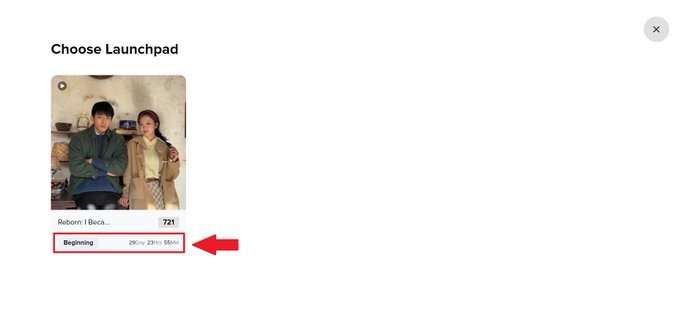
Important notes:
- If you issue a content NFT collection with the "Launchpad" type, you will only be able to put new NFTs of this collection into circulation using the Launch function.
- The number of launches is unlimited. For instance, if your total collection supply is 10,000 NFTs, you can launch NFTs in any configuration (such as 10,000 different launches with 1 NFT each, or 1 launch with all 10,000 NFTs). Metale Launchpad provides maximum flexibility and grants creators complete freedom to launch their content NFT collections.
Merchant: Invest on Launchpad
In this chapter, we guide merchants (investors) through the entire process of investing on the Metale Launchpad and receiving minted NFTs after a successful crowdfunding round.
1. Find the content NFT collection you wish to invest in and open it:
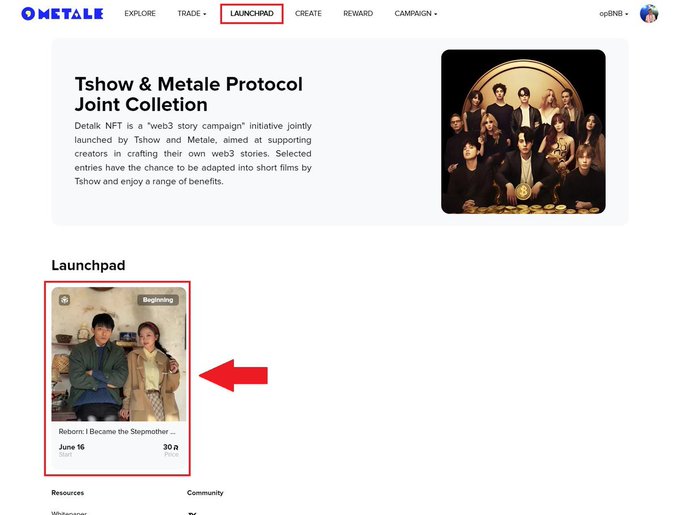
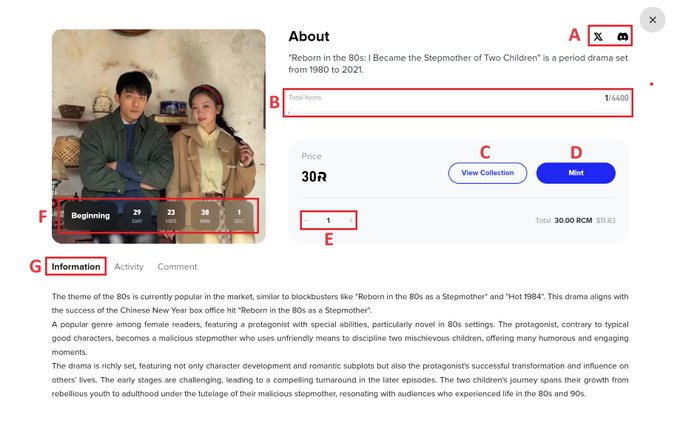
2. Check the unique Launchpad page for this NFT collection:
A. Reach the social media of the content NFT collection set up by the creator.
B. Check the progress bas of the crowdfunding round.
C. Visit the NFT collection page.
D. Join the crowdfunding by clicking "Mint" and proceed with the on-chain transaction.
If the crowdfunding is supported by $RCM (Metale Protocol utility token), make sure to hold it in your wallet. $RCM can be acquired on external platforms/DEX (for example, Pancake Swap) on the opBNB chain using the following address:
$RCM (opBNB): 0xaFC1C35ae28d6A20E837a7bBbFF2807095281fcf
E. Specify the number of NFTs you want to obtain.
F. Check the Launchpad timer for this NFT collection.
G. Read the information about this NFT collection. Note that this information may be different from the content NFT collection description.
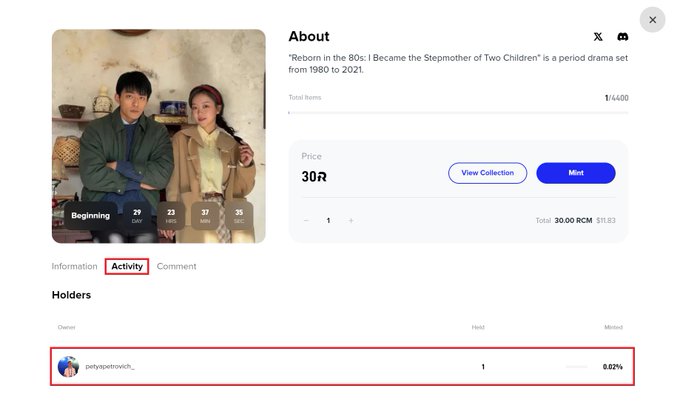
You can also check out the activity of this crowdfunding round (investment history):
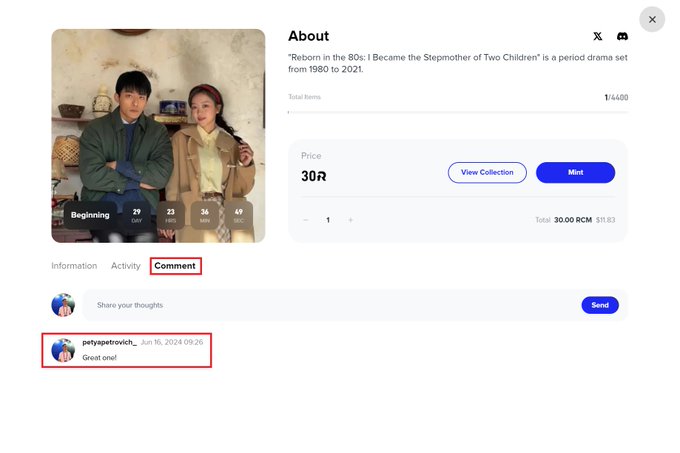
Finally, each unique crowdfunding round has its own comment section for discussions during and after the Launchpad:
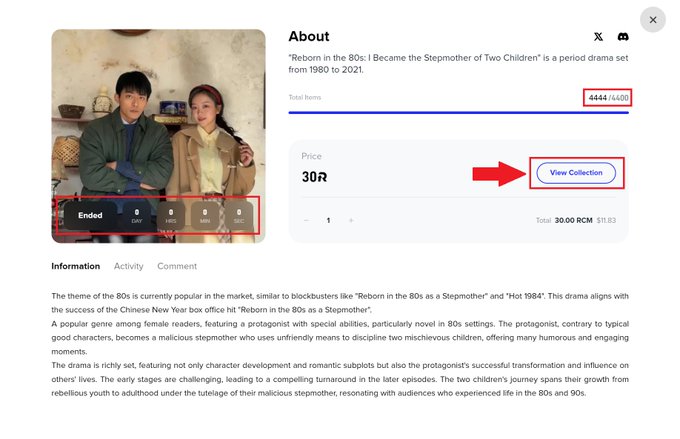
3. Once the crowdfunding round target has been reached, the page will be updated, and everyone will only have access to the NFT collection page for further interaction:
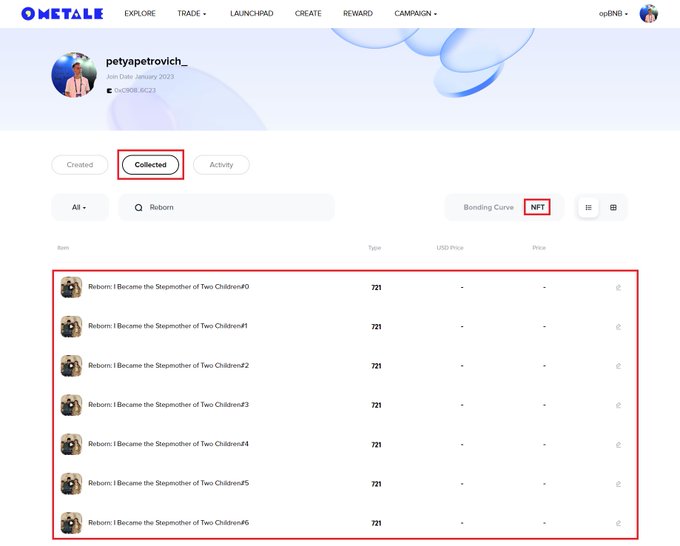
4. Find the minted NFTs in your wallet under your profile (Collected > NFT):
For further NFT trading on the Metale NFT Market, please refer to the necessary tutorials.
[Disclaimer] Not financial advice, always do your own research (DYOR).
About Metale Protocol
A new-era global content distribution protocol that provides on-chain services for content subscription, transparent profit-sharing, and asset transactions.
