Flash fastboot rom on redmi note 12 pro 5G (ruby)
Who?1- download required files
• mi flash or mi flash pro
2-Extract the fastboot rom file with .tgz format ( must be extracted in windows drive = drive C ) and then you will get a folder
3- Install mi flash pro (recommended)
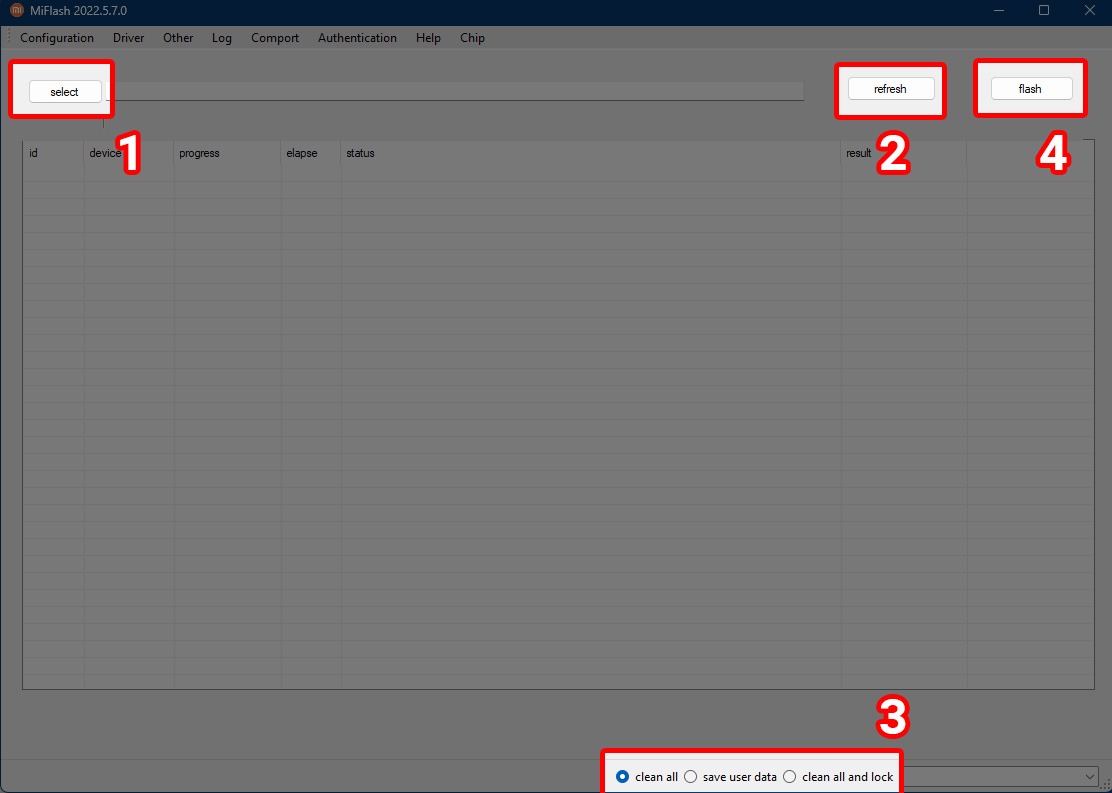
4- Open mi flash pro , then select and run mi flash.
5- give the address of fastboot folder for it
6- Get your phone to fastboot mode ( hold power and vol-) and connect with cable to pc

7- Click refresh ( check and showing your device)
8- from button bellow select "clean all"
Don't select clean all and lock!! ( It's will lock bootloader)
9- Start flash
10- When the flash done ,device will automatically reboot ( ignore the error if it gives after long flash process)
Written and edited by:
• flash fastboot rom ( you are here)