Poco F1 (beryllium) Pixel OS Installation via PixelOS-Recovery
PixelOS PocoF1 | Beryllium
STEP 1 – FLASHING PixelOS-RECOVERY(ADB-PC)
1. On PC, download platform tools SDK for Windows and latest PixelOS-recovery and paste into the platform tools folder. Boot phone into the fastboot mode (hold Vol Down + Power after powering off). CONNECT USB and On PC goto folder of platform tools, and type cmd in the address bar of the folder like so in the image shown below. this will open a Command Prompt window.

2. Once CMD opens up after previous step, Type "fastboot devices" and see if the result shows your device id (if blank install fastboot drivers) and then type “fastboot flash recovery r” press tab until the recovery file name appears, if it doesn’t then drag drop the Recovery Image file onto cmd window and hit enter. If flashed correctly you will see "finished" as shown below in image.

3. Disconnect USB, power off device by long press power button and boot to recovery by holding Vol up while powering on.
STEP 2 – FLASHING PixelOS via PixelOS RECOVERY(ADB-PC)
1. (skip this step, if u are updating to newer PixelOS build) In Recovery, Goto "Factory Reset" and perform “Format data” and “Format system”. Use Volume (Up, Down) and Power(select) Buttons to navigate if touch not working.
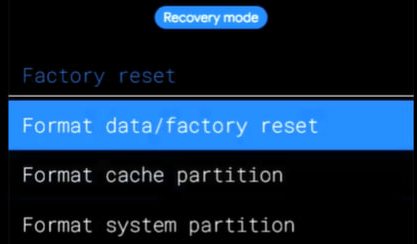
2. Go back to "Apply Update" and “Apply from ADB”. Connect Device to PC via USB and open type “cmd” in the platform tools folder where ROM Zip has been copied to. Type “adb sideload P” , press tab until the rom zip file name appears, if it doesn’t then drag drop the Rom Zip file onto cmd window and hit enter. Once Done, Go back and Select Reboot System Now.
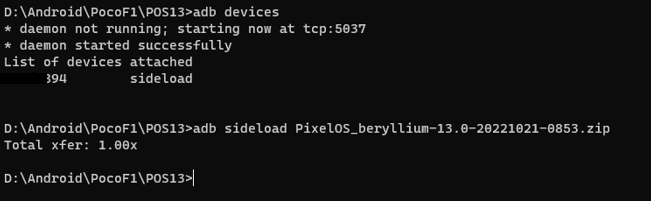
You Will be Greeted with a Welcome and Setup Page for the ROM. Enjoy
FAQ
- Take Backup Before Clean Flashing/Format Data/Factory Reset or updating to different android version/rom
- Skip Format Data,System if dirty flashing to a newer build
- You can also use OTG/SD card for flashing rom zip.
Guides
Official Bootloader Unlocking Guide
Xiaomi Drivers Installation and Bootloader Unlocking Guide