Keep compiled files together
YAJC become Java programmer
Hello dear followers 👋 Hope you are doing well
In this article you will learn how you can compile your Java files in such a way that all the compiled files will be kept in one place.
Let's remember https://telegra.ph/Files-11-22 post about files processing. At the end of the article we've seen the results of all the steps:
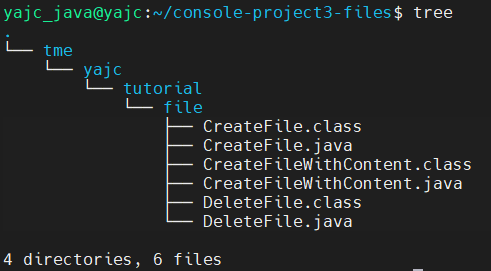
It looks a bit sloppy and we are going to fix it.
javac has a lot of helpful parameters and you always can see them by reading the documentation running man javac command or finding its output on a web resource like https://www.systutorials.com/docs/linux/man/1-javac/
In order to achieve our goal we will use -d parameter and specify the destination directory. So that's it. Yes, this is quite simple 😁
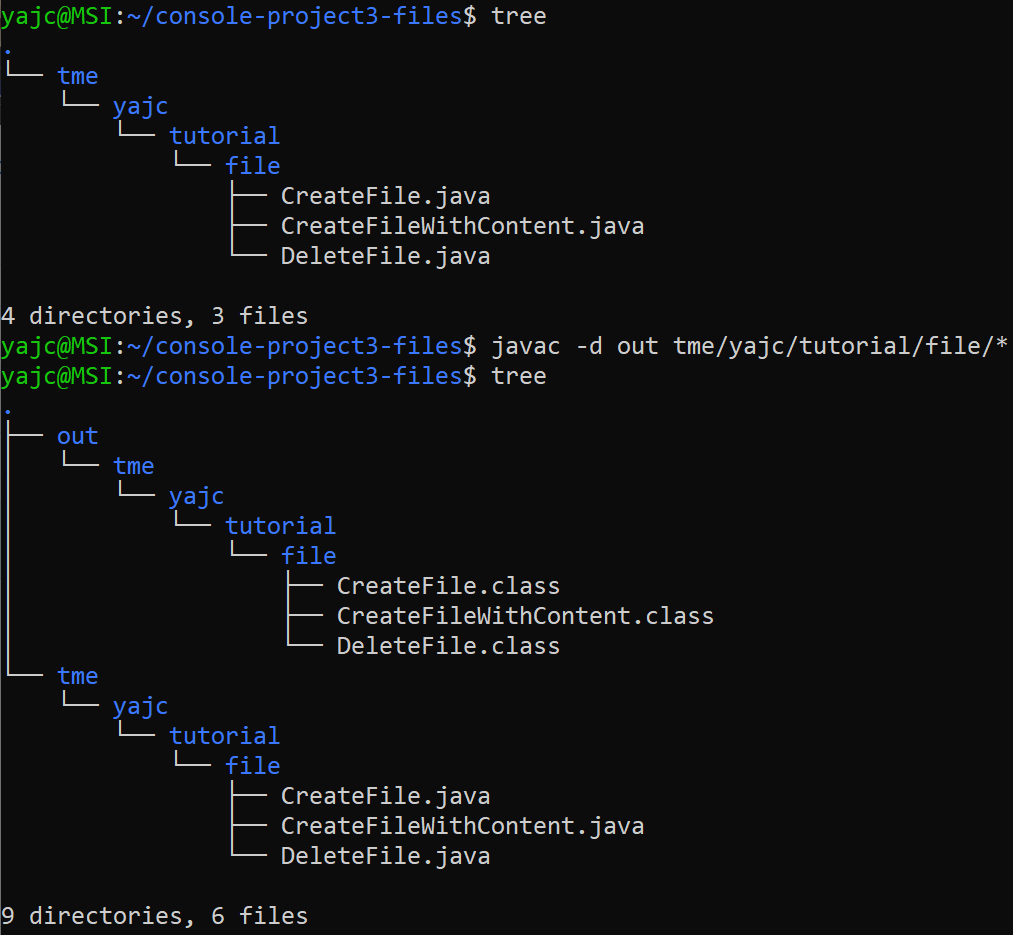
After we have the classes compiled separately we can go to the output directory we specified and run our classes from there. Let's see:

Today we have learnt how to put compiled files into one place. This is a small feature but it's important for those who would like to know how it works internally.
With this knowledge it will be much easier for you to understand how IDE and building tools (Maven, Gradle, SBT, etc.) do their work under the hood. Following this small and incremental steps we will get to IDE and then to Maven (and find advantages of building with Maven compared to IDE).
Hope you enjoy this and find it helpful. Remember please, your likes are the best motivation for us, we're happy to hear any feedback. See you, bye, and keep studying 😉