How to protect your wallets and your chats with a password for additional security
LUB Token SupportOne of the most outstanding features of the Telegram Messenger is its security. The developers are very concerned about the security of the application. You can securely send the most secret information to your family, friends or co-workers without fear of someone intercepting it. The service's founder, Pavel Durov, is so convinced of his product that he has even set a bonus that he will give to anyone who can hack Telegram's security algorithm. To date, no cases of hacking have been registered (apart from other messengers).
We at Lub Token Team strongly recommend setting a password for the Telegram app so that your wallets are not physically attacked.
The telegram password can be changed at any time.
It's easy:
- Go to the Messenger side menu by dragging from the left edge of the screen, or click the three horizontal bars in the upper left corner.
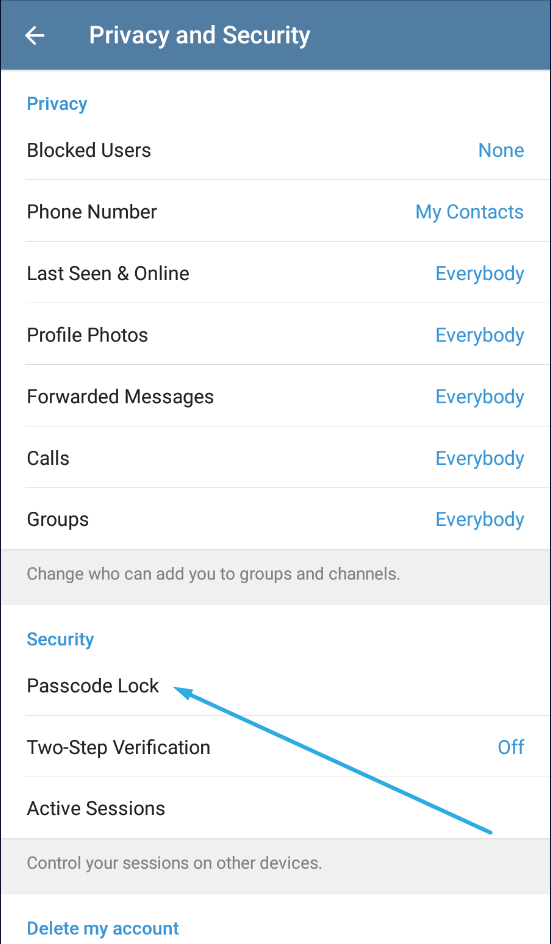
- Go to "Settings" - "Privacy and Security" - "Passcode Lock".
- Check the box next to "Passcode Code" and enter the four-digit security code.
- If you want the code to activate automatically, select the time after which it will be activated in the pop-up menu below.
- Now quit the application. When you start the program again, you will be asked for a password. In addition, at the top of the window, above the list of dialog boxes, you will see an icon in the form of a padlock. If you click on it, you can manually block the messenger without waiting for it to be automatically blocked. The password-protected "telegram" saves your data very securely from the outside.
- To change the access code, select the option "Change Passcode" in the "Settings for privacy and security" section. Then enter the current password and enter the new password twice.
- If you no longer need the code, deactivate the "Passcode Lock" check box in the same area of the menu and enter a valid Passcode.