How to change the Web (Internet) and make it free again
fpoi.orgLast update: September 14, 2022
Index
- The problems of the Web (Internet)
- BAT and Brave: a revolution for the business model of the Web (Internet)
- Brave Ecosystem
- Instructions for installing and configuring Brave
- Instructions for collecting Brave rewards
- Bibliography
- License
Brief history of the Web (Internet)
- Web (Internet) 1.0 (1989-2000) was decentralized, born for the diffusion of knowledge. There was no predominant business model. Each user had his own data.
- Web (Internet) 2.0 (2000-2020) is centralized and knowledge is overwhelmed by misinformation. Management is relegated to a few big GAFA (GAFAM and FAANG) companies and some other multinationals. The predominant business model is that of advertising and the sale of user data. Google and Facebook are advertising agencies that hold more than 60% of the market (respectively 85%-95% of their profits comes from advertising).
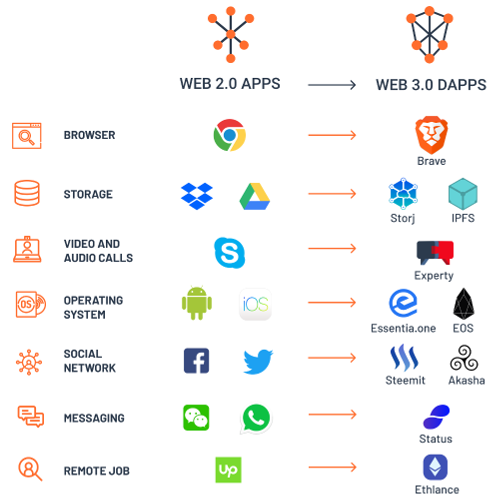
- Web (Internet) 3.0 (2020+) is a return to the origins. The business model is no longer linked to advertising and the data is once again in the possession of users. The inventor of the WWW, Tim Berners-Lee, is struggling together with many people to make the network decentralized again.
BAT and Brave: a revolution for the business model of the Web (Internet)
Basic Attention Token (BAT) is a project that aims to revolutionize the business model of advertising managed only by two intermediaries Google and Facebook. In short, users can decide whether or not to display the advertising and receive a reward (token). The publishers of a website can decide whether or not to host the advertisement and receive a reward. Finally, advertisers can pay publishers directly for their advertisements without the need for intermediaries.
Brave is an open source Web 3.0 browser based on the Chromium project (used by almost all Chrome, Opera, Edge, Vivaldi, etc. except Firefox and Safari) and equipped with integrated anti advertising and anti tracking filters. At the moment Brave is the only browser that supports the BAT project. In particular, users who are willing to see the advertisements, are paid proportionally to their attention and can decide whether to donate the tokens to the most visited websites or whether to convert them into other currencies (€, $, £, etc.). Conversely, uninteresting users can take advantage of the web without advertising and profiling.

Note: the processing of advertisements is performed by the browser entirely on the user side and therefore the project BAT and Brave do not require any data collection.
Note: a comparison of privacy respect among different browsers.
There are three types of advertisements in Brave:
- User advertisements: are delivered directly to a separate tab of the browser at specific times of browsing. The user receives a notification of the ad and can choose whether to accept it or not. If so, the user earns 70% of the advertising revenue (the remaining 30% is used to keep Brave up and running).
- Advertisements integrated by the publisher: are displayed by the user while browsing the publisher's website (advertising banners). Publishers earn 70% of advertising revenue while users earn 15% (the remaining 15% is used to keep Brave active and running).
- Sponsored images: are displayed by the user while using Brave in the background of the new tabs. The user can choose whether to keep them active or not. If so, the user earns 70% of the advertising revenue (the remaining 30% is used to keep Brave active and running).

Brave Ecosystem
- Brave Browser: is an open source Web 3.0 browser based on the Chromium and equipped with integrated anti advertising and anti tracking filters.
- Brave Search: is a private, independent and user-first search engine. The real alternative to Google Search.
- Brave Today: is the privacy-preserving news reader integrated into the Brave Browser.
- Brave Talk: is a private and unlimited video calling service based on Jitsi.
Instructions for installing and configuring Brave
- Download the browser via the official link.
- On first start-up, follow the instructions for configuring your browser and enable the Brave rewards. So click yes, I'm in!
- Enable Brave rewards and configure the advertisements as in the figure.
- Note: activate the self contribution only if you want to donate tokens to the most visited Web sites.
- In the advertisement settings section, choose the amount of advertisements you are willing to display every hour (1-5 advertisements/hour).
- Use the Brave browser normally like any other browser (Firefox, Chrome, Opera, Edge, Vivaldi, Safari, etc.).


Note: if you did not enable the rewards on first boot, follow these steps:
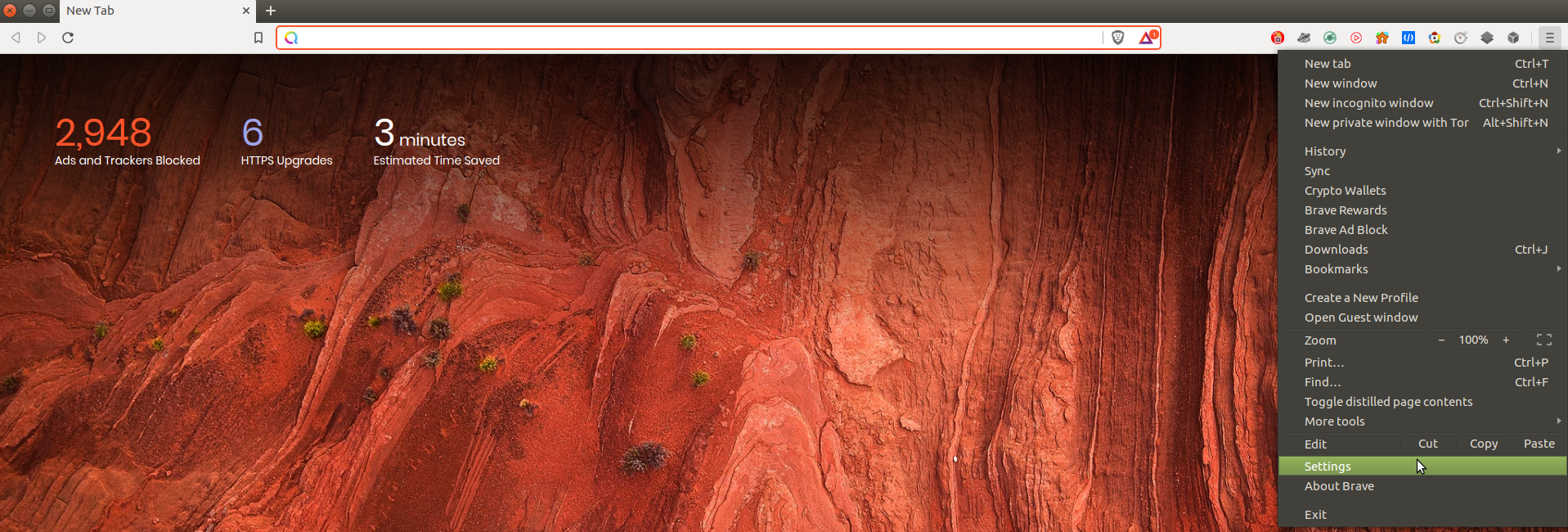
- Open the "toast" menu (three lines) at the top right and then open the settings.
- Click on the triangle Brave Rewards icon at the top center as in the figure.
- Enable Brave rewards and advertisements as described in the previous point 3 on the page 4.


Note: in order to enable a donation to a Web site (publisher) that is a member of the BAT project.
- Check for the Brave reward triangle with the blue confirmation mark at the top right of the address bar. Then click on it and send a tip.
- Select the tip amount (1, 5, 10 BAT) and possibly make it monthly. Note: in case of insufficient funds, the donation will not be executed.


Instructions for collecting Brave rewards
Users who enable Brave rewards generate a wallet for BAT tokens within the browser. The wallet can be filled through Brave rewards or other funding options (BAT, ETH, etc.). In addition, Brave allows users to withdraw BAT tokens from the portfolio for personal use and convert them to a local currency (€, $, £, etc.) following a verification of their identity with the Uphold or Gemini exchange service. For example, the procedure with Uphold is as follows:
- Open the "toast" menu (three lines) at the top right and then open the settings.
- Click on Brave Rewards and then on verify your wallet.
- Read the conditions and click on check the wallet.
- Complete registration with Uphold by following the instructions. Note: personal information such as telephone number and ID is required during registration (video tutorial).
- Once registration is complete, you can send BAT tokens from the Brave wallet to Uphold. Click on the Brave Rewards triangle icon in the top right corner of the address bar to confirm the verification.
- Go to the Uphold Web site and click send to bank account and follow the instructions to convert the BAT tokens to a local currency (€, $, £, etc.).


Bibliography
- Freedom Privacy over Internet (FPoI)
- BAT growth
- BAT watch
- Brave transparency
- Brave vs Chrome
- 6 Reasons Why You Must Switch To Brave Browser Now
License
This document is released under the license Creative Commons Attribution-ShareAlike CC BY-SA.