Free For Under IB DevAlgo
DevAlgo
📥 How to Get the DevAlgo Trading Robot (Expert Advisor)
To receive the DevAlgo trading robot, please follow the appropriate steps below:
A. For New Users Without an Exness Account:
- Register using the following link:
- https://one.exnesstrack.org/a/bejt6ffx8h
- Open a trading account on Exness, and make sure to choose the MetaTrader 5 platform.
- Make a minimum deposit of $500 into your account.
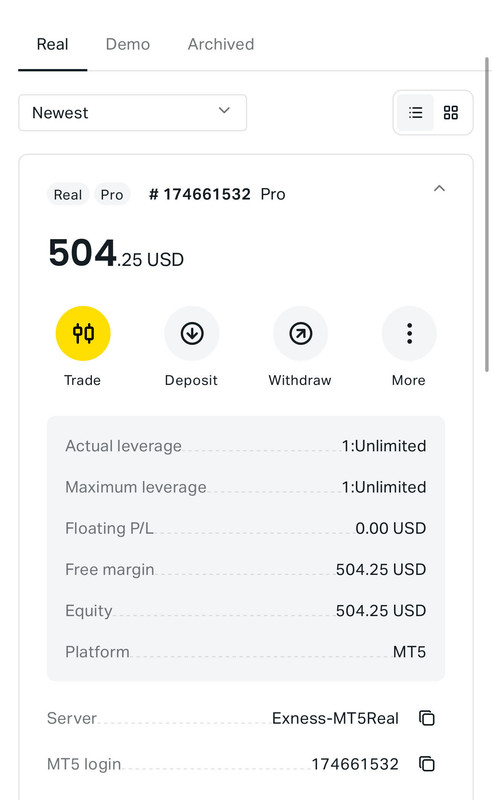
- Take a screenshot of your account ID and deposit confirmation, which will be required for verification.
B. For Existing Exness Users:
- Update your Introducing Broker (IB) to:
- https://one.exnesstrack.org/a/bejt6ffx8h
- Alternatively, you may contact Exness customer support to assist with the IB partner change request.
- Wait until the IB change process is fully completed (up to 3 business days).
- Once the IB partner change is confirmed, open a new trading account and select the MetaTrader 5 platform.
- Make a minimum deposit of $500 into your account.
- Take a screenshot of your account ID and deposit confirmation, which will be required for verification.
✅ After completing the steps above, please click the link below to verify your account ID:
📌 Make sure the information and screenshots you provide are accurate and clearly visible.
Refer to the example screenshot below for guidance.