gitlab CI/CD over SSH
denisio from https://cylab.be/blog/229/continuous-deployment-with-gitlab-and-docker-composeOn the deployment server, we can create a dedicated user that will be used to perform the deployment:
sudo adduser <project>

# allow user to manage docker
sudo adduser <project> docker
Create a SSH key pair for the user:
sudo su <project>
cd ~
ssh-keygen -t rsa -b 4096
The private key of the user will be used to connect using ssh, so it must be added to the list of authorized_keys:
cat .ssh/id_rsa.pub > .ssh/authorized_keys
GitLab environment variables
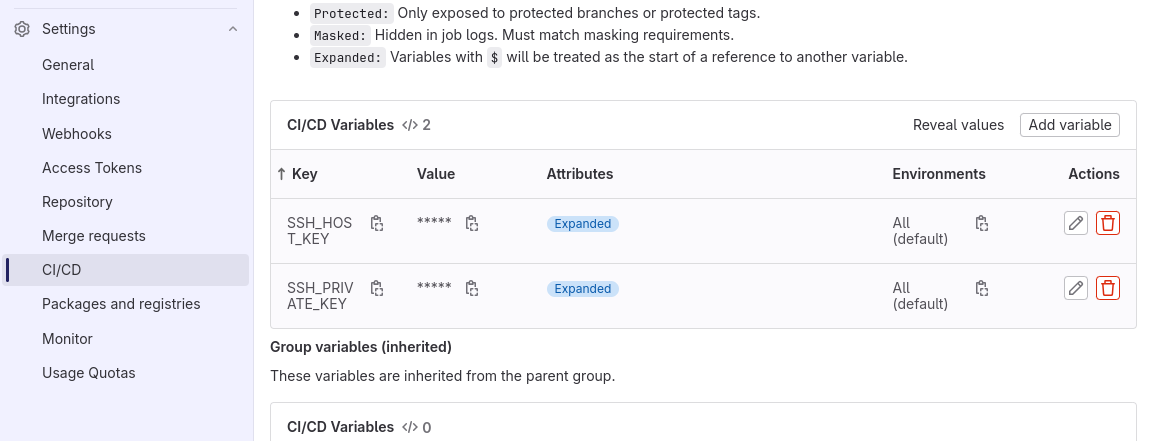
The private key will be used to connect to the deployment server. This key should remain secret, so we will add the key as an environment variable: on the web interface of GitLab, head to Settings > CI/CD > Variables.
There you can add a variable with name SSH_PRIVATE_KEY, and the value is the content of the private SSH key on the deployment server. You can get the content of the private key with:
cat .ssh/id_rsa
Get the SSH fingerprint of the deploy server:
ssh-keyscan -t rsa -H <deploy.server>
Create an other variable with name SSH_HOST_KEY and the value of the fingerprint of the server.
docker-compose.tmpl
Now, in the source code of the project (next to the Dockerfile), we can create a template with name docker-compose.tmpl. As you can see, the template contains some variables like $CI_COMMIT_SHA, that will be replaced before the deployment. The example below is for a Laravel project. You can tune it for your needs:
#
# docker-compose.tmpl
# https://cylab.be/blog/229/continuous-deployment-with-gitlab-and-docker
# $CI_REGISTRY_IMAGE:$CI_COMMIT_SHA
#

version: "3.7"

services:
  web:
    image: $CI_REGISTRY_IMAGE:$CI_COMMIT_SHA
    depends_on:
      - redis
      - mysql
    ports:
      - "80"
    volumes:
      - ./volumes/web:/var/www/html/storage
    restart: "unless-stopped"
    environment:
      WAIT_HOSTS: mysql:3306

  queue:
    image: $CI_REGISTRY_IMAGE:$CI_COMMIT_SHA
    depends_on:
      - web
    volumes:
      - ./volumes/web:/var/www/html/storage
    command: ["php", "artisan", "queue:work", "--verbose"]
    restart: "unless-stopped"
    environment:
      WAIT_HOSTS: web:80

  scheduler:
    image: $CI_REGISTRY_IMAGE:$CI_COMMIT_SHA
    depends_on:
      - web
    volumes:
      - ./volumes/web:/var/www/html/storage
    entrypoint: sh -c "while true;
     do php /var/www/html/artisan schedule:run --verbose & sleep 60; done"
    restart: "unless-stopped"
    environment:
      WAIT_HOSTS: web:80

  redis:
    image: redis:4-alpine
    volumes:
      - ./volumes/redis:/data
    restart: "unless-stopped"

  mysql:
    image: mysql:5.7
    volumes:
      - ./volumes/mysql:/var/lib/mysql
    environment:
      MYSQL_ROOT_PASSWORD: root
      MYSQL_DATABASE: laravel
    restart: "unless-stopped"
This template will be used during the gitlab-ci pipeline to create the deployment docker-compose.yaml
gitlab-ci.yaml
Finally, we can create the .gitlab-ci.yaml.
The first stage of the pipeline is to build and save the docker image:
#
# .gitlab-ci.yaml
# https://cylab.be/blog/229/continuous-deployment-with-gitlab-and-docker
#
stages:
  - build
  - deploy

build:
  stage: build
  ## Run on a gitlab-runner that is configured with docker-in-docker
  tags:
    - dind
  image: docker:20.10.16
  services:
    - docker:20.10.16-dind
  variables:
    DOCKER_TLS_CERTDIR: "/certs"
  before_script:
    - docker login -u $CI_REGISTRY_USER
                              -p $CI_REGISTRY_PASSWORD $CI_REGISTRY
  script:
    - docker pull $CI_REGISTRY_IMAGE:latest || true
    - docker build --cache-from $CI_REGISTRY_IMAGE:latest
        --tag $CI_REGISTRY_IMAGE:$CI_COMMIT_SHA
        --tag $CI_REGISTRY_IMAGE:latest .
    - docker push $CI_REGISTRY_IMAGE:$CI_COMMIT_SHA
    - docker push $CI_REGISTRY_IMAGE:latest
The second stage of the pipeline is to create and upload the new docker-compose.yml, then use SSH to restart the docker containers. In the example below, don’t forget to replace the project and server name:
deploy:
  stage: deploy
  image: alpine
  before_script:
    # install envsubst and ssh-add
    - apk add gettext openssh-client
  script:
    # create the new docker-compose.yml
    - envsubst < docker-compose.tmpl > docker-compose.yml
    # start ssh-agent and import ssh private key
    - eval `ssh-agent`
    - ssh-add <(echo "$SSH_PRIVATE_KEY")
    # add server to list of known hosts
    - mkdir -p ~/.ssh
    - chmod 700 ~/.ssh
    - touch ~/.ssh/known_hosts
    - chmod 600 ~/.ssh/known_hosts
    - echo $SSH_HOST_KEY >> ~/.ssh/known_hosts
    # upload docker-compose to the server
    - scp docker-compose.yml <project@server>:/home/project/
    # docker login and restart services
    - ssh <project@sserver> "cd /home/project;
        docker login -u $CI_REGISTRY_USER
          -p $CI_REGISTRY_PASSWORD $CI_REGISTRY;
        docker compose up -d"
From now, at each git push, the new version of your app will be automatically built and deployed on your server…