FR BOOTANIMATION [COMPLETE GUIDE]
@fr_bootanimationbotHow to create your own Bootanimation with only one command ? #ROOT
Visit :
• @FrBootanimation (Group)
• @CloudsFR (Channel)
- You are required to join the group, to get full bot access and updates and support within the Channel. after:
• Send Formatted Video files:
- GIF, .AVI, .MKV or .MP4 to group chats.
- Execute the command /b after the file is received by the bot. by replying to the message that you have sent. If the file has not been received, please wait until the file is received by the bot, then follow the instructions given by the bot.
• Time limit and size :
- Max Duration 50 Seconds & Max File size 50MB.
- Outside of these 2 options will not be processed by bots.
• How do I know if the file I sent is being processed or not by bots?
- If you have sent the file according to the supported format and other conditions, the file will definitely be processed, wait until the file is received by the bot for further processing.
• See this Example:
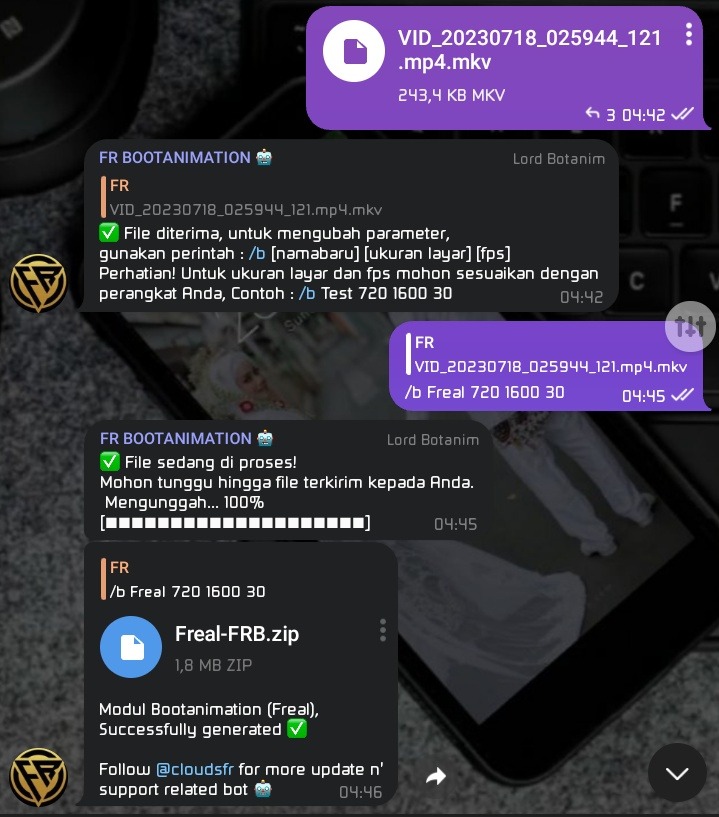
• Take note !
- Please adjust the parameters according to the wishes and specifications of your device, it is very, very important to pay attention to the size and fps options to be checked and adjusted first on your respective device.
- That [name] should be something that describes your video. Some examples are:
" /b Realme 720 1600 30 " [ without quotes ]
" /b Narzo30a 1700 1900 60 " [ without quotes ]
• Explanation :
- [/b] is a command key.
- [Realme] is an example bootanimation name that you will create and use. [Customize yourself, give a worthy Name to your best bootanimation]
- [720 1600] is an example of the size of your screen resolution [Adjust yourself to the size of your device's screen resolution]
- [30] is an example of the fps you will produce on your bootanimation video. [Self-adjust to the fps supported on your device]
• Notes :
- Please first check your device specifications such as screen size and fps supported on your respective device. because if you don't customize it, there may be problems when you use the bootanimation module generated by the bot.
[*] [*]
• Every bootanimation created with the bot will be a Magisk module!
- So just flash your files in Magisk Manager and reboot your device!
• How to replace/change the module with a new one?
- If you have a similar Module generated by BOT repeatedly and want to replace it with a new one you can simply flash it again without erasing it or reboot your device again, if it's new you can reboot your device again to apply the new module.
- This applies only to similar modules not from outside the group or other BOTs, only for bootanimation produced by BOT @Fr_bootanimationbot.
• How to Restore Original Bootanimation ?
- You can simply remove the Bootanimation module you flashed then reboot, it's that easy.
• By default :
- Screen size will be 720 x 1600 and will have fps (frames per second) 30 fps. [please adjust yourself to your device]
• Optionally :
- You can adjust those value parameters to your own liking, by using command /b then Adjust name, height and width size, along with fps, and this is highly recommended if your video is a horizontal video.
• How to set the animation quality to the maximum?
- The bot will maintain the quality of the videos you provide, so .MP4 files compressed by Telegram are better than GIFs, and Telegram Documents files or files from Telegram gallery, uncompressed .MP4 will give you the maximum and best quality available.
How to submit your file, from Telegram Documents or via Telegram Gallery ?
- You can choose between the two because both can be processed (recommended via Telegram Documents, or files with .MP4 format, to get the best results for your Bootanimation.

- Press the 📎 icon on the message bar, then choose one of the methods you will use "Document File" or "Gallery File" and press your choice again, then find your video or file through your choice. And send your file in group chat, bot will process it and give you instructions automatically.
• Rule :
- Give your bootanimation a decent name that describes your video.
- Strictly no porn or any explicit content, this will straight lead to permanent ban.
- Don't make useless bootanimation for screen recording, or random shitty videos. Make something that you are actually gonna use & others can also use .
• Disclaimer :
- This is a 100% orignal bot based on our own source. The bot makes bootanimations using videos, this videos are posted by users, so we are not responsible if any copyrighted video is used. Report to any admin or owner @frobiantony if your video is posted and you want to take it down. Users are solely responsible for the videos they send.