🟠 XIAOMI UNLOCK BOOTLOADER GUIDE (WORKING 2025)
Xiaomi average user

⚠️ WARNING: This method only automates and facilitates the official procedure for obtaining Xiaomi bootloader unlock authorization. Recommended to use if you cannot use Mi community procedure. ⚠️
⚠️ WARNING: Unlocking the bootloader will can make the phone insecure to attacks and limit access to apps or phone functions. ⚠️
=======================
> In the last part of the guide, under 'SOURCES' section; you can find all the references/sources I used here if you need more details.
> Also, check the 'NOTES+' section; it may provide additional helpful information.
=======================
> Compatible: HyperOS 1, 2, Global devices (& variants) only (no CN model).
> Requirements:
- PC with drivers installed
- MI/Xiaomi account (30 days at least)
- Python, Firefox & Chrome.
> Note: The files/programs of "Requirements" are attached below in the steps (This guide is simple)
====== PROCEDURE ======

1. Download file 'Archivos Real.rar':
https://www.mediafire.com/file/cmsmh13py4fzdna/Archivos+Real.rar/file
2. Extract 'Archivos Real.rar'
Then open the folder 'Archivos Real'
3. Run 'python-3.13.5-amd64.exe'
install Python, select these options:
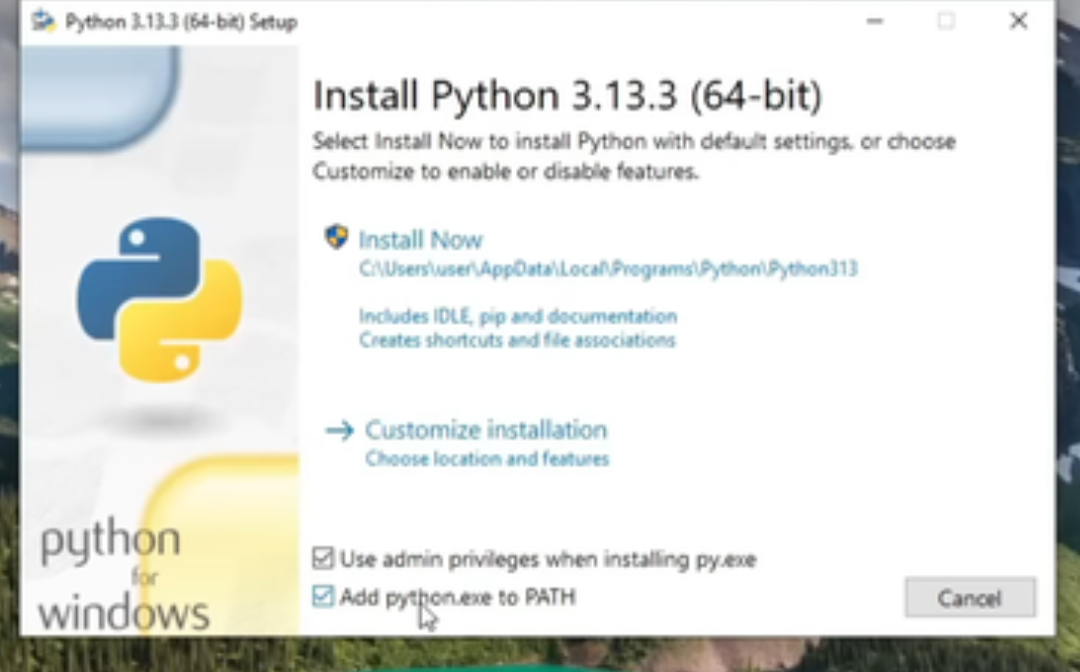
Then Install Python by pressing "Install Now".
4. Install Firefox Browser:
https://www.firefox.com/es-ES/browsers/desktop/windows/
After installing Firefox, install/add this 'Cookie Editor 'Add-On Inside Firefox:
https://addons.mozilla.org/en-US/firefox/addon/cookie-editor/
(This is like an extension, so no problem)
5. Open Official Xiaomi site on Firefox:
You can use https://c.mi.com/global/ or https://new.c.mi.com/global/
Then Log in with your MI account
6. Once logged in
search using the Add-On for "new_bbs_serviceToken"
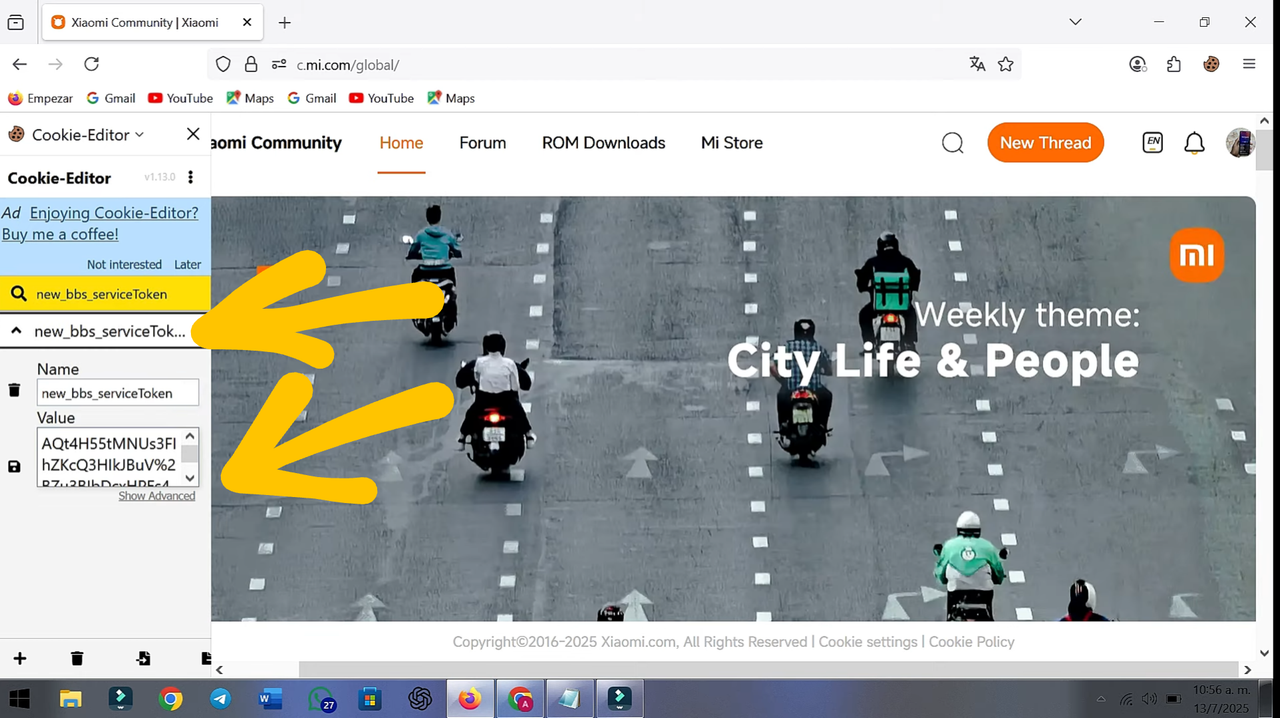
EXPAND the result and COPY the entire Token VALUE (use select all and Copy)
7. Open Folder 'Archivos Real'
then extract "AQLR.7z" and look folders and open "token.txt" file (use Windows notepad). Paste the token Value you copied from STEP 6 where it says 1 and 3 (deleting the numbers 1 and 3)
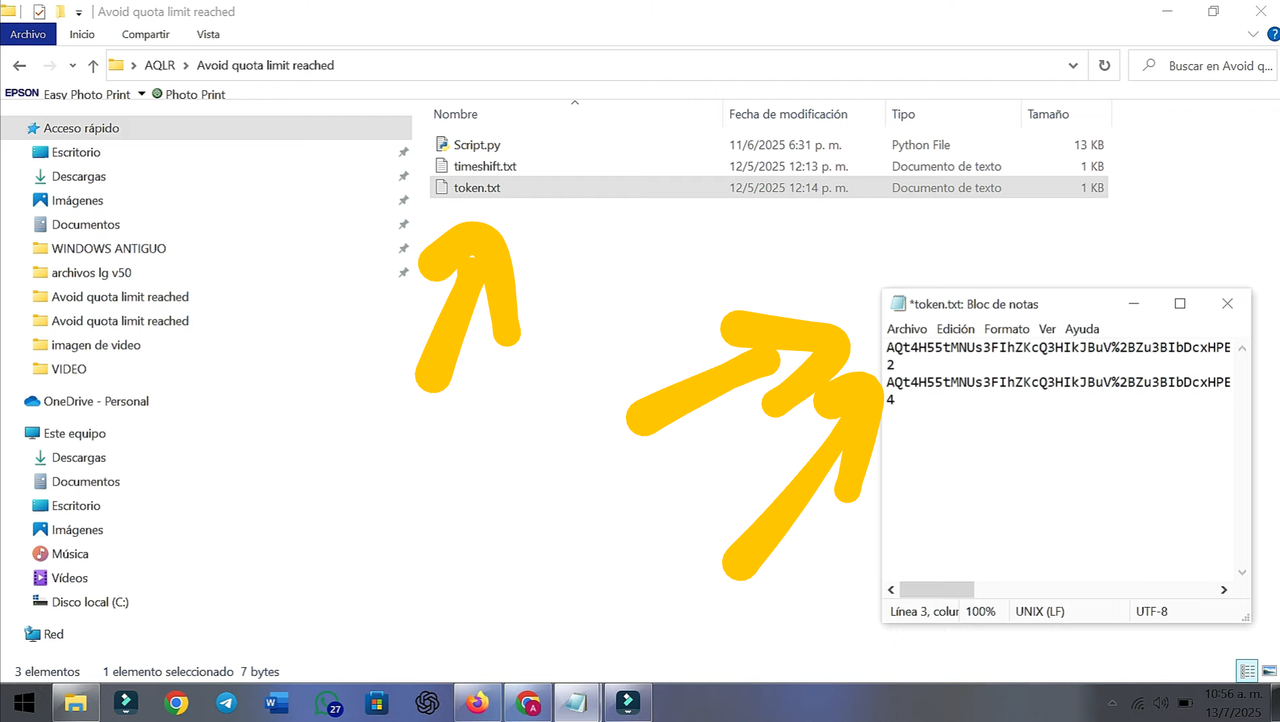
Save file with changes.
8. Open Google Chrome
Use https://c.mi.com/global/ or https://new.c.mi.com/global/
Then log in with your XIAOMI/MI Account
- It's practically the same as step 5 but in chrome
9. In the page URL delete everything and paste this:
javascript : (function(){var token=document.cookie.match(/popRunToken=([^;]+)/);if(token){prompt("Copy the token:", token[1]);}else{alert("Token not found");}})()
It is very important that you remove the space between "javascript" and ":" after press enter in the URL bar, just that space.
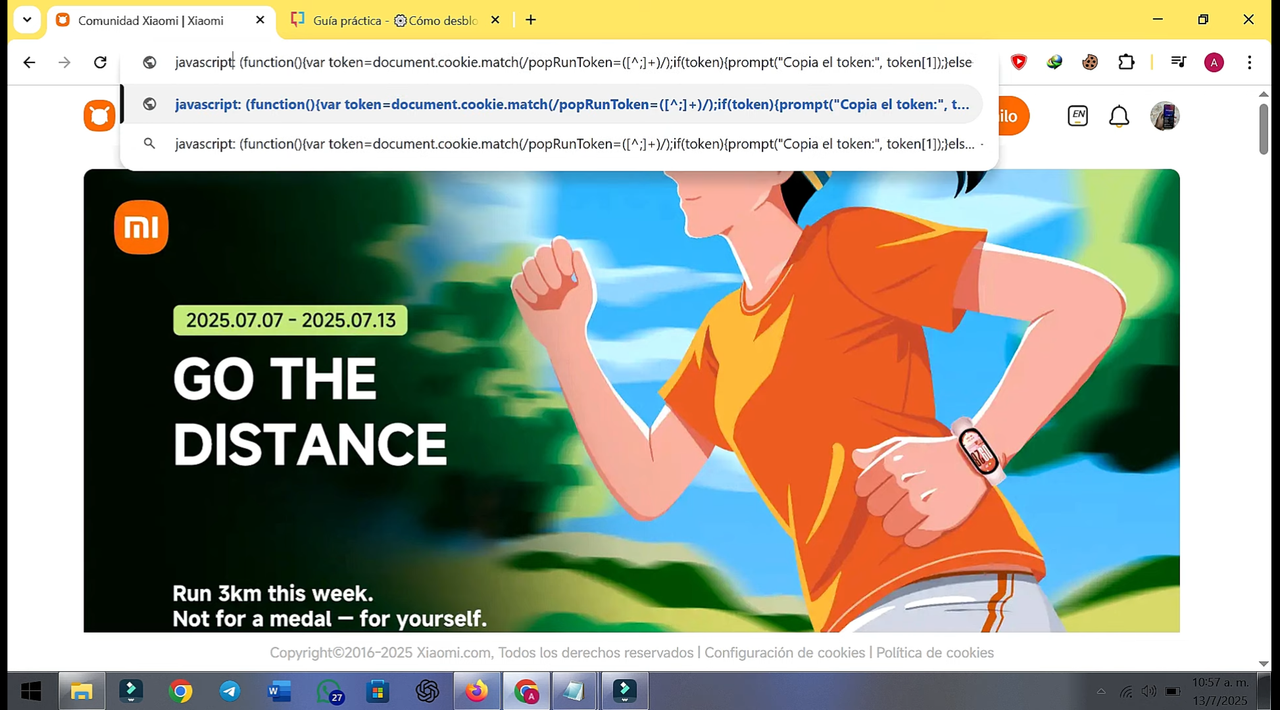
press enter, and you will get a pop-up:
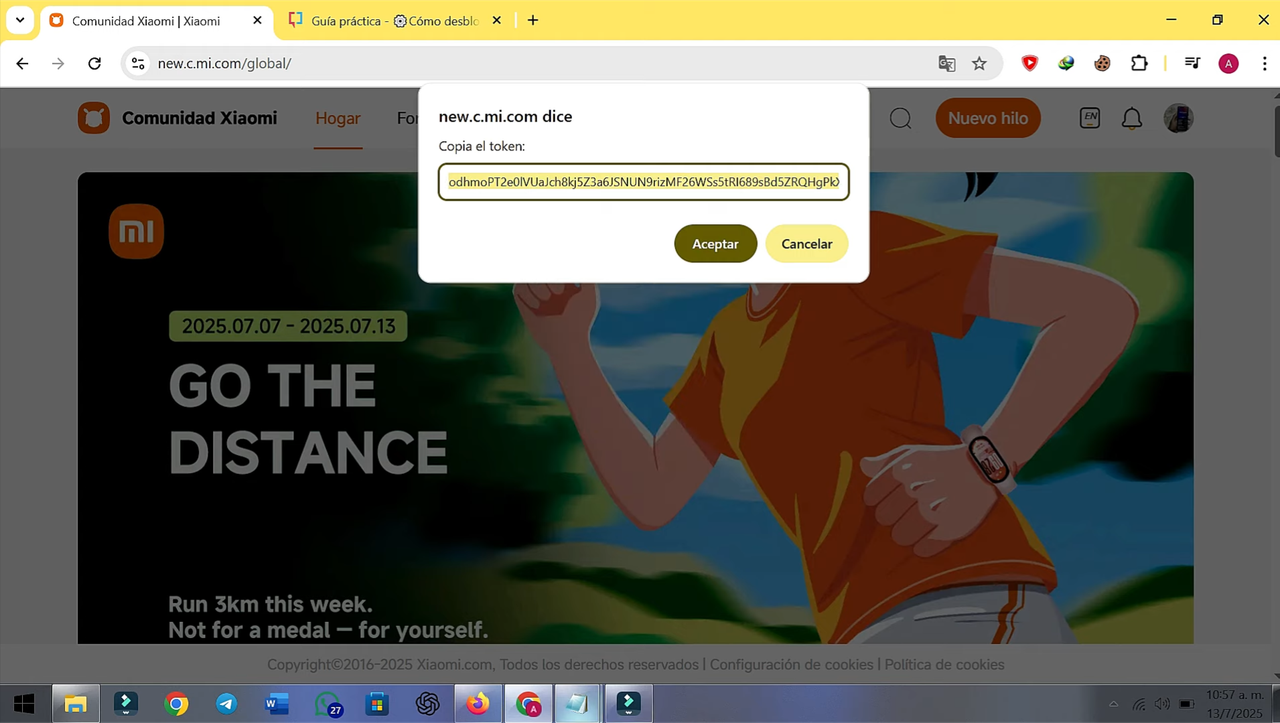
Copy that token (Select all and Copy)
10. Open "token.txt" file (Look STEP 7).
Paste the Token Value you get from STEP 9 on it says 2 and 4 (deleting the numbers 2 and 4)
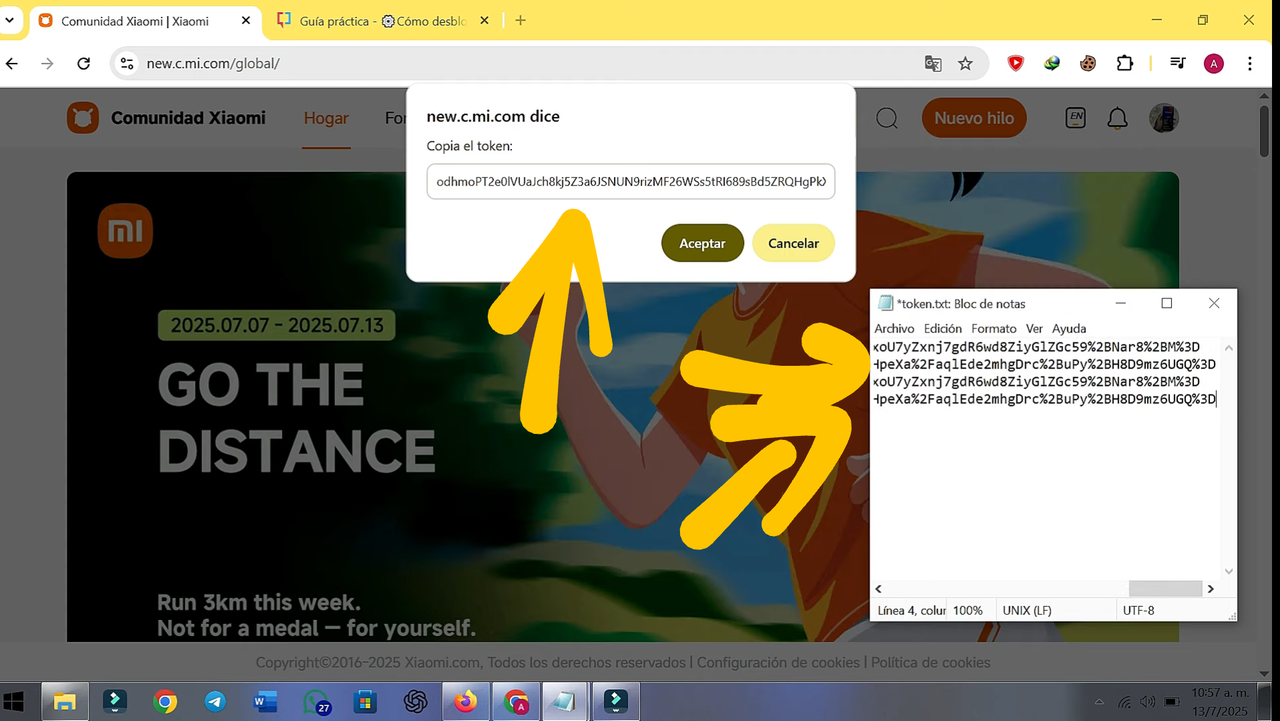
Save file with the changes.
11. Run the Script following these steps:
Search in the 'AQLR' extracted folders (STEP 7) the file "Script.py", then do this:
> Run "Script.py" (A CMD will be opened)
> Enter 1 (keyboard Button), and press Enter.
Without closing the previous CMD window
> Run "Script.py" again:
> Enter 2 . And press Enter.
Without closing the previous CMD windows
> Run "Script.py" again:
> Enter 3 . And press Enter.
Without closing the previous CMD windows
> run "Script.py" again:
and enter 4. And press Enter.
In the end it will look like this (You can move the windows):
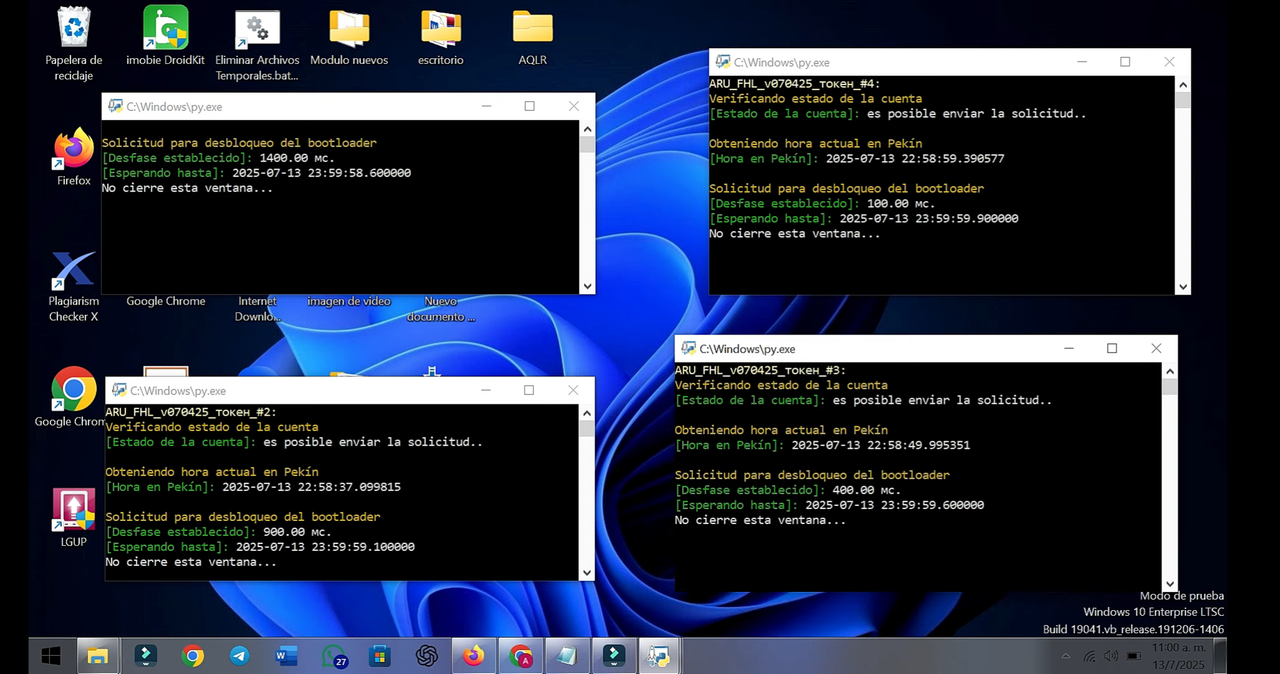
12. DONE!
Now just wait until 00:00 Chinese time (Beijing/Pekín) and the script only will run automatically when the hour arrives 00:00.

Here you can see the current time in Beijing/Pekín:
https://time.is/en/Beijing,_China

Depending on your country or continent you must wait for the time at 00:00 (China) without closing browsers/sessions/CMD/ Windows(script) or turning off the PC because need avoid resetting data or resetting cookies.
If you need to, you can try to do the process from step 5 at a closer time.
> After waiting for the time the script will automatically send unlock request:
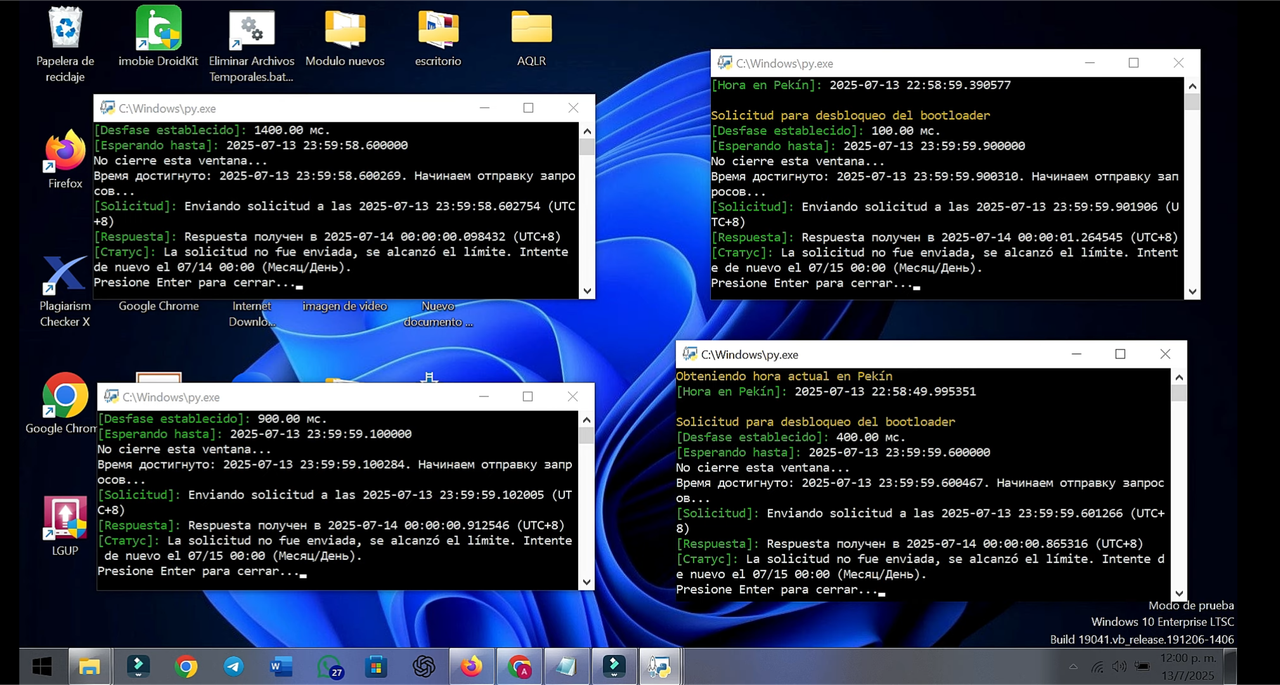
After getting a result similar to the image your account is authorized to unlock bootloader, you should continue with the EXTRA STEPS.
====== EXTRA STEPS ======
- After complete STEP 12. It's very important that no matter what the script results (Sometimes you get "authorization granted successfully" or something like that, and other times you get "limit reached" or "unlock not sent")

1. You should ALWAYS do the following on your phone:
📲 Go to Settings » Advanced/Additional Settings » For Developers » Mi Unlock Status»
2. Then press "Link Account to Device"
(You need to have a SIM with mobile data (You must disable WiFi) and previously SIM activated, and the other steps indicated in » My Unlock Status, according to Xiaomi)
⚠️ If you get an error or failure message like: "cannot be verified":
> You will need to Sign out your Xiaomi/MI Account on your phone.
> Then Log in again your Xiaomi/MI Account, then:
📲 Go to Settings » Advanced/Additional Settings » For Developers » Mi Unlock Status»
> press "Link Account to Device" again
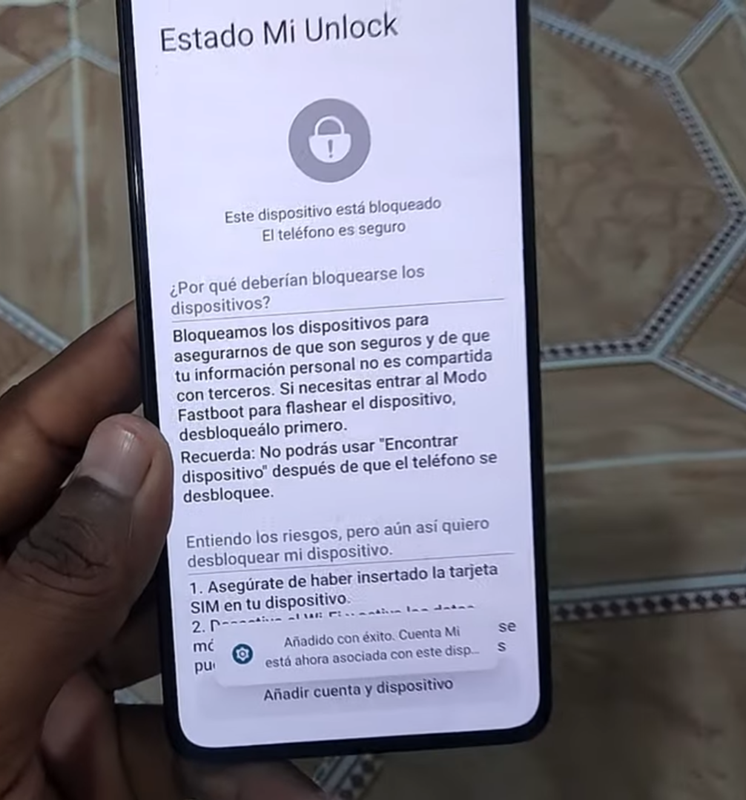
If you are here, your device is already added for unlocking.
⚠️ Otherwise read NOTES section ⚠️
==== MI UNLOCK STEPS ====
1. Enter Fastboot mode on your phone
You can follow a tutorial for your phone model if you don't know how.
2. Download Official MI UNLOCK:
https://en.miui.com/unlock/index.html
3. Run 'MI UNLOCK'
4. Login your MI/XIAOMI ACCOUNT on 'MI UNLOCK'
5. Connect your phone to your PC (USB)
6. Phone CONNECTED, Now press Unlock
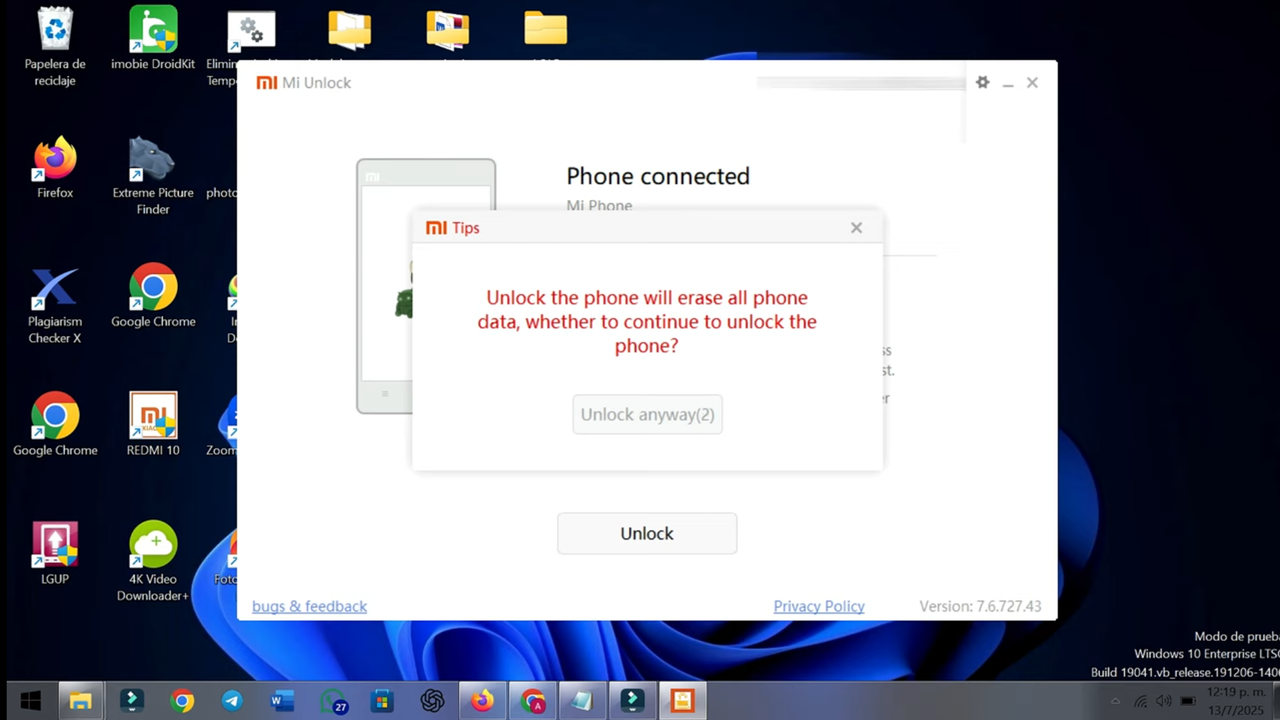
7. Accept and confirm the warnings and proceed to unlock:
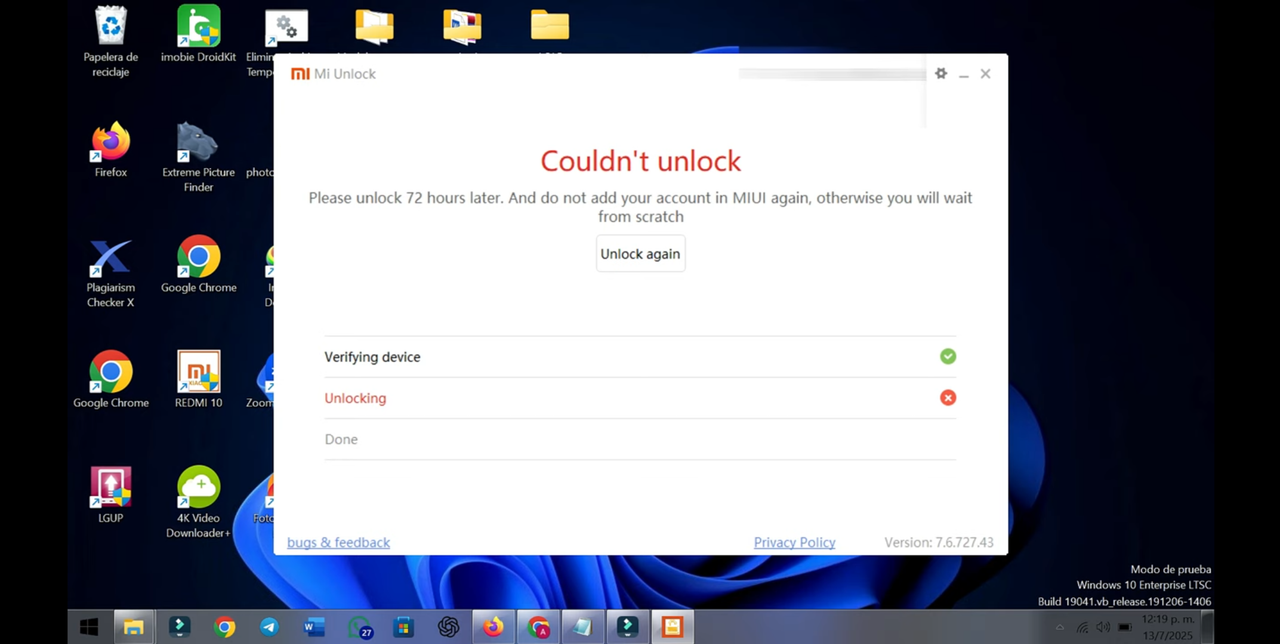

DONE! Now you just have to wait the time indicated (Normally it should be 72 hours, don't worry if it's another time or even if you don't have time to wait)
- You can turn off your PC now
- You can continue using your phone but it is prohibited to log out of XIAOMI/Mi Account on the phone now, unless you want to wait 72 hours or more again.
8. AFTER 72 HOURS
> You probably will need to open 'Mi Unlock' and Log in again.
> Prepare your phone for unlock
> Connect phone to the PC
> Confirm and press unlock:
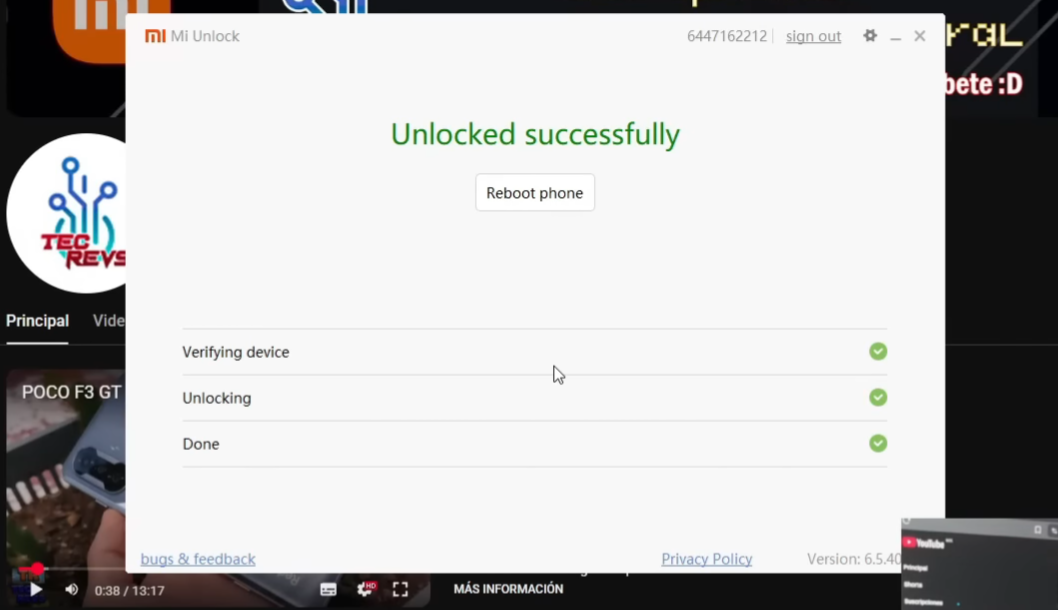
⚠️ otherwise try read NOTES section ⚠️
9. Reboot Device

After restarting your phone it will be unlocked and it can be unsafe. If you are newbie to roms/root/flash/brick/recovery/backups I recommend you join groups dedicated to your phone model or Xiaomi (like Telegram groups or forums).
=======================
⚠️ WARNING: If you need to lock the bootloader again MAKE SURE TO CHECK THE STEPS TO LOCK YOUR PHONE MODEL BOOTLOADER, In some cases if you fail to lock the bootloader, need unlocking bootloader again (USE =*MI UNLOCK STEPS*= ) ⚠️

🔴 NOTES
- If https://c.mi.com/global/ or https://new.c.mi.com/global/ not works, use vpn & connect to United States.
- This should be avoidable if you do not close the pages, otherwise on some cases get the cookies a short while before running the script (30 minutes max). Cookies are your session time on the website and expire the same as your session.
- Inside 'Archivos Real.zip' you will probably find "Nuevo documento de texto.txt", There are the codes you need to copy for some steps in case you can't copy it from here (Telegra.ph)
- The script used in this guide (zip file) is a translated version of the original, If you need you can go to the original source)
- In some rare cases this guide doesn't work you will need to create a new account and do the steps again from scrath with that new account, look https://xdaforums.com/t/how-to-unlock-bootloader-on-xiaomi-hyperos-all-devices-except-cn.4654009/ for more info (You must expand the sections selecting "spoiler")
- Maybe only if you need, For PC-phone connection problems:
Or you can search for another relationated tutorial
- The selected country of your account must not be China, to be verified on the PC.
- Activation of the Xiaomi account on the phone: Sim activated, sending an international SMS is necessary, check that your mobile plan allows it, activate roaming and exceptions on always. Normally this is done when configuring the phone at the first use with the data activated. To check if the sim is activated, go to the synchronization of SMS / MMS and calls on the device and check if activated. Find my device must also be activated, normally no problem to activate this.
- These steps in this guide should work, in other cases they are probably user issues (Things like missing drivers, old PC, Security of your PC, anti-virus, or problems with your MI account, IDK, see previous notes), you can ask the person who sent you this guide if they know a solution to your problem or look elsewhere.
🟡 SOURCES
Sources, Reference images, Acknowledgments or original developers cites which were used in this guide:
https://xdaforums.com/t/how-to-unlock-bootloader-on-xiaomi-hyperos-all-devices-except-cn.4654009/
https://www.behance.net/gallery/93712739/Mi-Bunny-Official-Xiaomi-Stickers-for-Telegram?locale=es_ES