WordPress - READING SETTING
Blog HacksReading Setting is used to set the number of post to be displayed on the main page. Following are the steps to access reading settings:
Step (1): Click on Settings > Reading option in WordPress .
Step (2): The Reading Settings page is displayed as shown in the following screen.
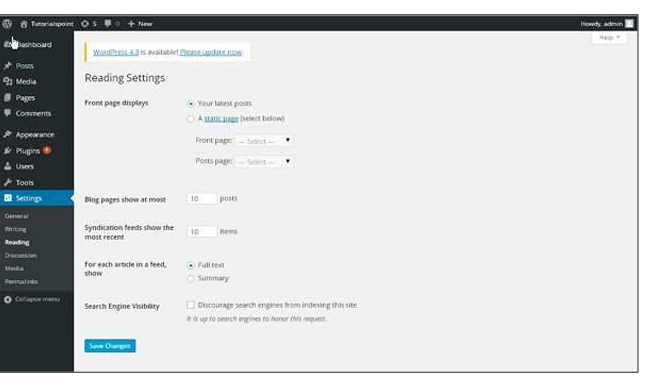
Following are the details of the fields on reading settings.
Front page displays: This section is used to display the front page in any of the following format:
Your latest posts: It displays latest posts on the front page.
A static page: It displays the static pages on the front page.
Front Page: You can select the actual page you want to display on front page from the drop down.
Posts Page: You can select the page from the drop down which contains posts.
Blog pages show at most: The number of posts to be displayed per page or site. By default, it is set as 10.
Syndication feeds show the most recent: The user can view the number of posts when they download one of the site feeds. By default, it is set as 10.
For each article in a feed, show: This section is used to display the post by selecting any of the following formats:
Full Text: It displays the complete post. It is set as default.
Summary: It displays the summary of the post.
Search Engine Visibility: After clicking on the checkbox, Discourage search engines , from indexing this site, your site will be ignored by the search engines.
Step (3): After filling all the information, click on Save Changes button to save your information.