WEB COMPONENTS
The absolute beginners Guide
WEB COMPONENTS
what are web components?
- they are set of API's that allow us to create custom, reusable and encapsulated html tags to use in web pages and web apps.
- web component's do not require any special 3rd party libraries or frameworks but can certainly be used with them. you can integrate web component with a front-end framework like with React, Vue, Angular ... if we want to.
Their are 3 main building block's when it comes to web components we have
- custom elements
- shadow DOM
- html templates
so this all work together you can use them individually but for the most part when you create web components you'r going to be using all three.
1. Custom elements
- they give us the capability to create our own custom HTML tags just like you have a <header> tag a <footer> <p> paragraph, <img/>, we can create completely custom tags as well we can also extend HTML tag's as well so this is done by creating a class within our JavaScript that extends some HTMLElement you can also extend existing elements say like HTML paragraph elements but we're not going to get into that we are going to create our own custom ones.
* the convention to name a custom element tag is to have a - minus or hyphen between each word of our components lets say we have Side Navbar then we name it <side-navbar> this is because in html no element has the - symbol in html5 and also for the coming html versions they will not use an element with the name containing - hyphen *
ES6 Syntax here...
class ComponentName extends HTMLElement {
// TODO code goes here...
}
- you create a custom html tag
- and the class can have a constructor and other method's
- we can also create custom class that also have life cycle available to it... which we will see
attach it(defining the element)
window.customElements.define('component-tag-name', ComponentClassName);
// The lifecycle methods for creating a custom element using classes
constructor() - called when an instance of the element is created or upgraded.
connectedCallback() - called every time when the element is inserted into the DOM.
disconnectedCallback() - called every time the element is removed from the DOM.
attributeChangedCallback(attributeName, oldValue, newValue) - called when an attribute is added, removed, updated or replaced. when we have a custom element we can pretty much pass custom attribute to it much like props in something like react.
2. Shadow DOM
the shadow dom is basically self containment it allows us to encapsulate all of our markup and our styles in our custom element so basically it's own entity apart from the regular DOM. so the styling is separate from the global CSS of the webpage so if we have like an h3 inside of our webcomponent and it's styed in certain way that style is gonna stick and if their's any global styles on the webpage it's not gonna affect our h3 or whatever element that we are talking about so we have scope styles.
we create the shadow dom inside of the class by using what ever our custom element is and then using the attachShadow method and for most part we add ({ mode: open }) so that we have access to the shadow dom within for instance our browser devtools and this create what's called the shadow root that we can actually reference through out our class and we can interact with all.
- used for self contained elements
- encapsulate styles and markups
- created with element.attachShadow({ mode: open });
- create a 'shadowRoot' that can reference and interact with
3. We also have HTML templates:
this is how we define the encapsulated markup, the <template> tag allow us to store some markup on the page you can letter clone and reuse so we can include both HTML and CSS in our template we can also make use of some thing called slots which allow us to make the template dynamic and add output to it or add custom text to it.
- define encapsulated markup for our component
- template tag source markup on page
- include both HTML and CSS in templates
- use slots to add custom text
Phew, now The Concept out of the way let create our first web component nd learn all the concepts that we have just raised... it will be easy through practicing...
let's start
- first we need a folder give it name what ever you like we named our's WebComponents and we have opened it using vs-code code editor.
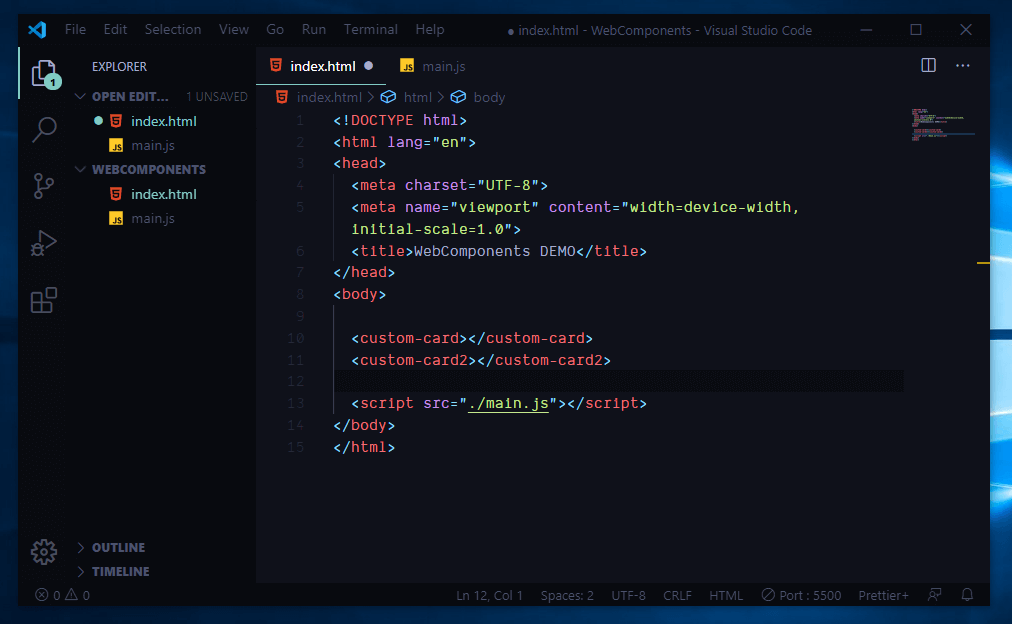
as you might see in the snapshot that we have taken we have two files
- index.html
- main.js
inside index.html we have a basic boiler plate we give our title then their's weard html like tag but not html syntax if you can notice which is
<custom-card></custom-card> if you know html theirs nothing so called like this component and after that we have a <script> linking to main.js whar our javascript code lives.
Time for custom COMPONENTS
so custom elements are defined inside JavaScript we consider that we will create two custom elements which are for now the browser can't read or know what they are
- <custom-card></custom-card> and
- <custom-card1></cusrom-card1>
now as we have discussed hopefully if you remember by now in order to make this tag's a custom component we need to tell the browser that they are custom elements.
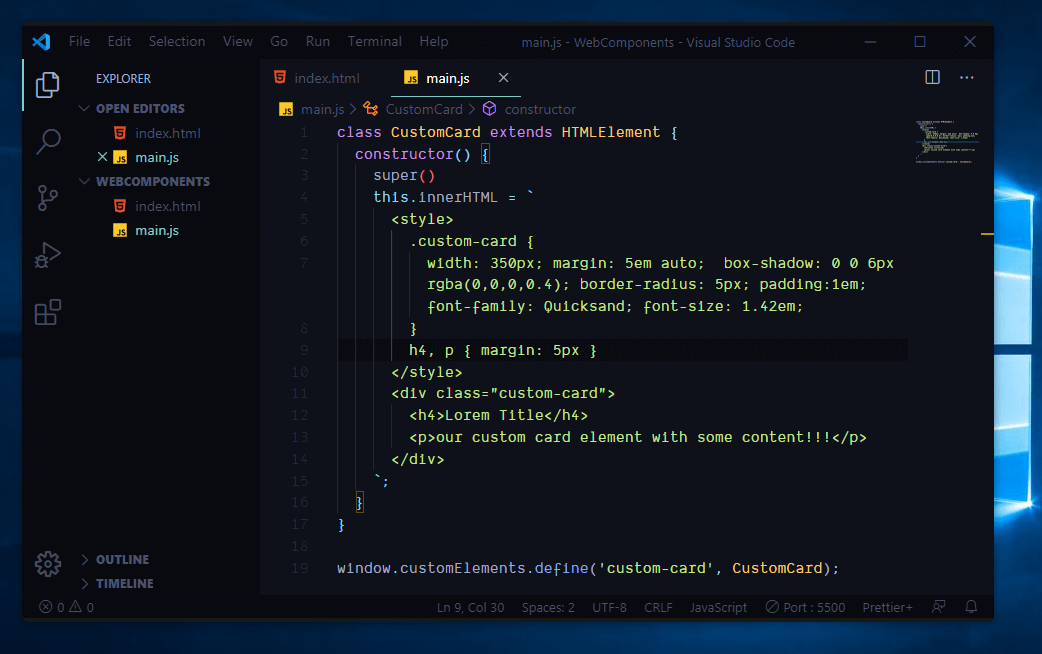
this is what our javascript file look's like it contain class some html markup and at the bottom if you can see we have
window.customElements.define('custom-card', CustomCard);
so what happened !!!
1st we define a class which is a javascript ES6 class which is supported by all major new browsers by the way web components only work on new browsers... should have told you in the first place ya! but let's get back to track so we have created a class which extends HTMLElement make sure to spell correctly then we can now create our component inside this class the first thing to do is to create a constructor method and inside of it call the super() method which will call the parent class constructor in our case HTMLElement class constructor to init our task, then what then our class becomes HTMLElement so if you have done some JS DOM then in our case the 'this' is a DOM ELEMENT consider it like that so if it's a dom element we can access it's propertys whare one of them is .innerHTML which allow us to put html content inside a DOM element so we use `` backtiks which you can found them to the left top before 1 the backtiks allow us to write string multi-line and also include variables using ${} this syntax which implicate we dont have to use concatination...
so we added div style and h4 with p after that we added this class or regester it to be our component
window.customElements.define('component-name', ClassName)
so we define it with component-name=custom-card and ClassName=CustomCard
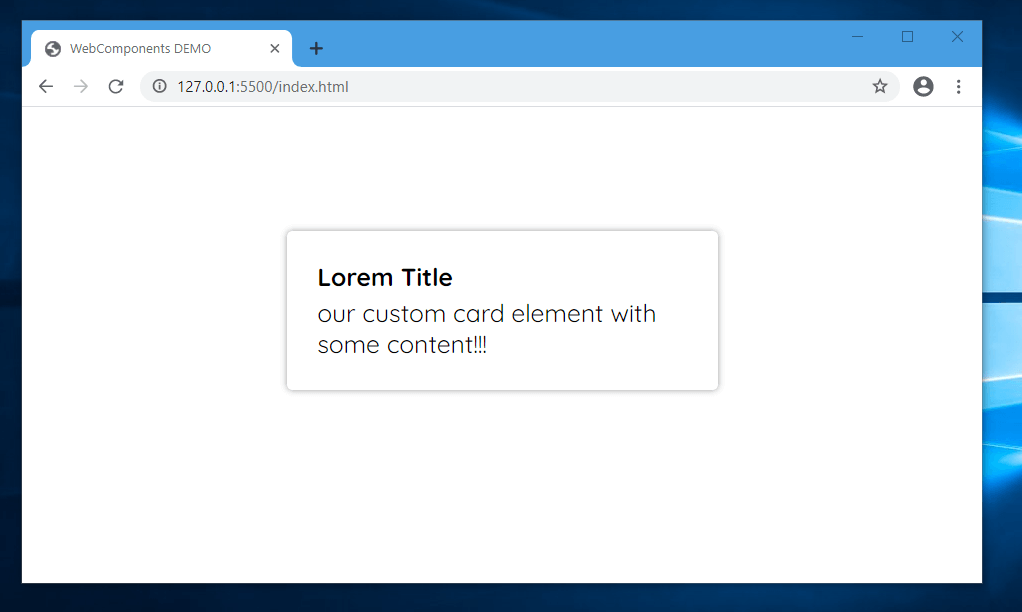
and the out put looks by the way i am using live-serve extension on vs-code but you dont have to if you don't have it you can just double click and open it but make sure you open it in latest browser if not it will not work i am using chrome canary which the latest and i highly recommend you using this browser if you are developing latest features in web development...
going deep and inspecting it...
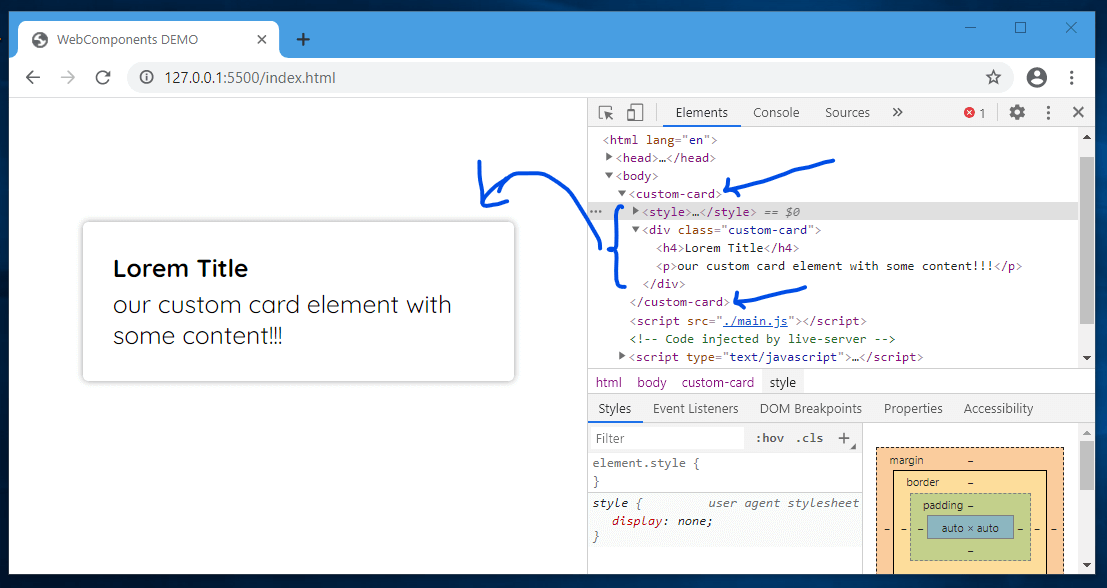
Wallah we have created our first custom element...
so as you can see our <custom-card> has been registered and in next lesson well do a lot...
we will post the code if you want ask on the comment below but this is just the begging their's a lot on web components we haven't even look event, life-cycle hooks, templates, shadow dom this is just introduction, live a like and seya on our second web components tut...
one last thing try to duplicate the <custom-card> and see the effect
<custom-card></custom-card>
<custom-card><custom-card>