User guide: Tron Cool Cats marketplace (for buyers)
😻😺🙀
Wow! The Tron Cool Cats marketplace has been launched! Let me show you how it works and how you can benefit from using it!
In this guide we will cover the following topics:
- What's a marketplace and how it works?
- How to check Cool Cats available in the marketplace?
- How to buy a Cool Cat?
- How the bid price is formed?
- How to make a bid?
- How to change a bid?
- How to delete a bid?
- How to check the rarity of your Cool Cat?
If you want to learn more about selling Tron Cool Cats, please refer to that page instead.
What's a marketplace and how it works?
In two words, the marketplace is the place where you can benefit from selling your cool cats or from buying more cats for your collection per the offered price.
It basically works as a kind of auction: the seller offers an item per the asking price, and a buyer can agree with it and pay the full price or provide a seller with an incoming offer, defining a big price for the item. That said, everyone gets its benefits.
How to check Cool Cats available in the marketplace?
For both, selling and buying Cool Cats to your collection, you need to open the Marketplace. To do so, click on the Marketplace tab in the upper part of the webpage
Once you do that, you can see all the listed kitties.
Don't forget to use filters and sorting options to adjust the result of your query.

How to buy a Cool Cat?
All the available Cool Cats are having a party in the Marketplace. Open it and use filters to search for the poshest Cat for your collection!

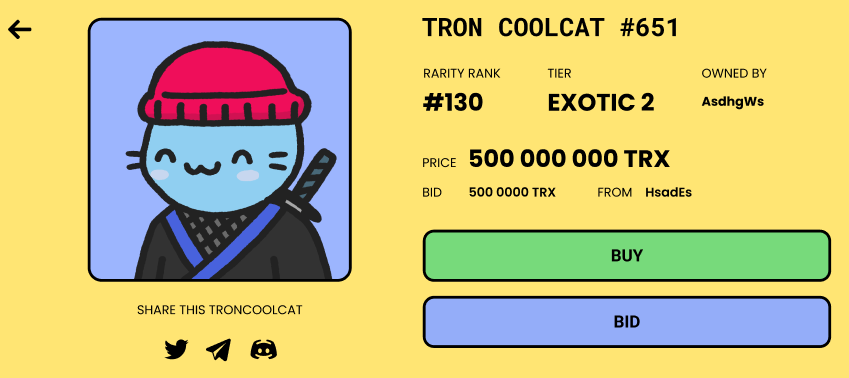
Once you've found it, click on the cat's profile to see its properties: body type, hat type, rarity rank, tier, and ask price, defined by the current cat-owner.

From now on you have 2 options:
- you can click on the green Buy button to proceed with the purchase. In this case, you will pay the amount, request by the cat-seller (500 000 000 TRX, in case)
- you can suggest your price to the cat-seller by clicking on the Bid button.
If you opt for the instant purchase, then you will just need to confirm the action in your TRX wallet, and voilá, the cat is yours! 🎉
If you go for the second option, then you run a risk to miss the cat, in case someone has a better option or the seller doesn't agree with your offer.
How the bid price is formed?
The bid price is the price, offered by a buyer for the chosen item.
You, are a buyer can suggest basically any price, however, having in mind the following rules:
- a Cool Cat can never cost under 5 000 TRX;
- your bid price should be higher than the current bid price, suggested for the Cat.
To check the current bid price, have a look at the BID line right under the asking price.
In the Tron Cool Card card, you can only see the highest bid. That said, all the bids below the current one will not be accepted by the system.
How to make a bid?
Found a pretty pussy-cat, but doesn't agree with the asking price? Then, let's make a bid!
To make it, please open the Cool Cat card and click on the Bid button:

Then, insert the TRX amount you want to pay for the item. After that, tick the I agree to the bid and click on the Bid button:

Note that you will need to confirm the transaction in your wallet since the sale process might be completed at any moment.
When your bid is accepted, you will see the Bid placed message right below the Bid button. Apart from that, the list of available options will also change:
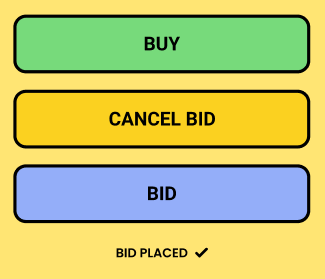
Don't forget to stay tuned to your bid: it might be canceled automatically if someone offers a higher price or/and the seller removes the cat from the marketplace.
How to change a bid?
If you want to change your bid, you just need to make a few clicks of your mouse!
Open the Cool Cat card where your bid needs to be adjusted in some way. After that, please click on the Bid button:

This will give you a box for inserting a new bid price. Put the corrected TRX amount and don't forget to tick the I agree to the bid and click on the Bid button:
Note that you will need to confirm the transaction in your wallet since the sale process might be completed at any moment.
When your bid is accepted, you will see the Bid placed message right below the Bid button. Apart from that, the list of available options will also change:

How to delete a bid?
Open the Cool Cat profile, that is not interesting for you anymore.
After that, please click on the Cancel bid button:

Note that you might need to confirm your action in your wallet.
Once your bid is removed, the cat's card interface will change to the initial one:

How to check the rarity of your Cool Cat?
Not sure about your Cool Cat rarity and coolness? No worries! There are 2 ways to check its status:
- have a look at your Cat's card. There is a rank in it, showing how chic your kitty is:

or
- click on the Rarity rank of your Cat or follow this page (both work pretty the same) to learn more about its properties (still, all the Cool Cats are cool by default).
Club Discussion 😻😺🙀
WEBSITE: https://coolcatstron.com
TWITTER: https://twitter.com/coolcatsnft
DISCORD: https://discord.com/invite/X6A4AXrKaR
TELEGRAM: https://t.me/TronCoolCats