Understanding Web Applications: A Complete Picture for Beginners
As a beginner web developer, it's crucial to understand how web applications work as a whole before diving into specific techno…What Is a Web Application?
At its core, a web application is a program that runs on a web server and is accessed through a web browser. Unlike static websites that merely display fixed content, web applications are interactive systems that process data, respond to user actions, and deliver personalized experiences.
Think of a web application as a restaurant:
- Users (customers) make requests (place orders)
- Servers (kitchen staff) process these requests
- Data (ingredients) is stored and transformed
- Responses (prepared meals) are served back to users
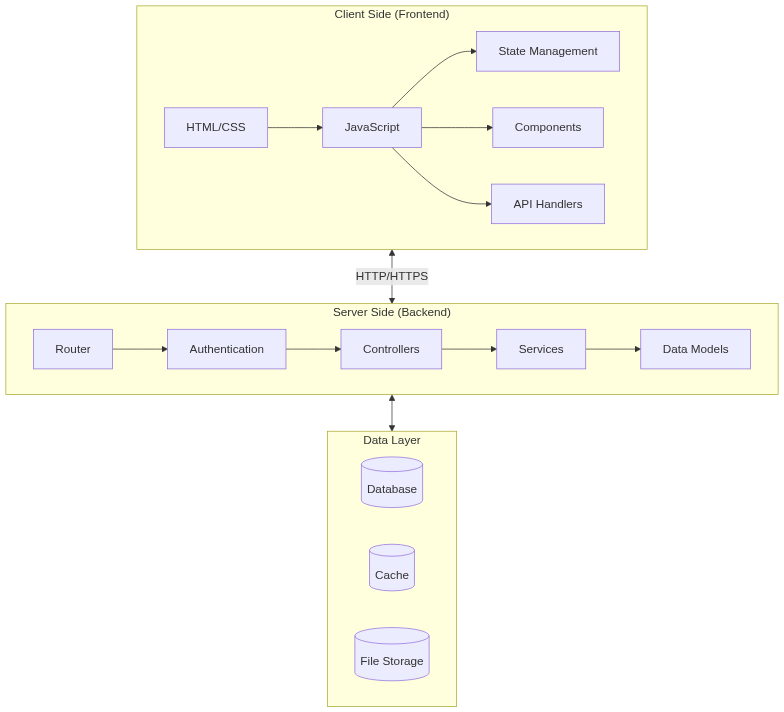
The Request Lifecycle
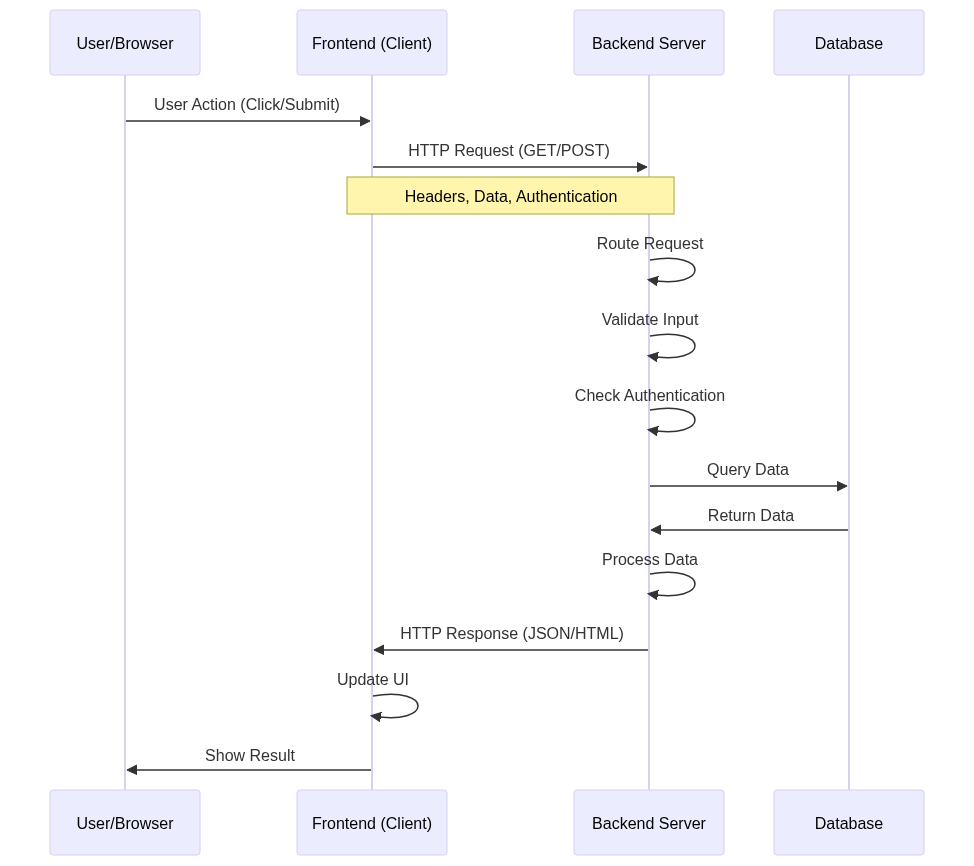
When you type a URL or click a button in a web application, you trigger what's known as the request lifecycle:
- Client Request: Your browser sends an HTTP request to a specific URL
- Routing: The server receives the request and determines which code should handle it
- Processing: The application processes the request, often involving:
- Authentication (checking if you're allowed to access the resource)
- Data retrieval from databases
- Business logic execution
4. Response: The server sends back the processed data, usually as HTML, JSON, or other formats
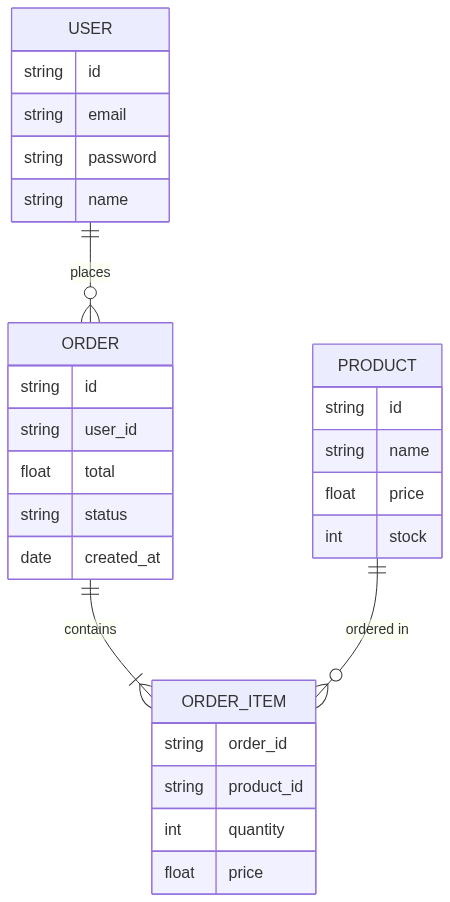
Data Modeling: The Foundation
- Data modeling is like creating blueprints for your application's information structure. It involves:
Database Design
- Identifying entities (users, products, orders)
- Defining relationships between entities
- Establishing data types and constraints
- Planning for data integrity and efficiency
Example Data Model
User
  - ID
  - Email
  - Password
  - Profile
    - Name
    - Address
    - Phone

Order
  - ID
  - UserID (relates to User)
  - Items
  - Total
  - Status
Server-Side Components
The server side is where your application's core logic lives:
Key Components
- Web Server: Handles HTTP requests (Apache, Nginx)
- Application Server: Runs your backend code (Node.js, Python, PHP)
- Database Server: Stores and manages data (MySQL, PostgreSQL, MongoDB)
Common Tasks
- User authentication and authorization
- Database operations
- Business logic processing
- API endpoint management
- File handling
- Security implementation
Client-Side Architecture
The client side is what users interact with directly:
Components
- HTML: Structure and content
- CSS: Styling and layout
- JavaScript: Interactivity and dynamic behavior
Modern Client-Side Concepts
- Single Page Applications (SPAs): Applications that update content without full page reloads
- State Management: Keeping track of application data on the client
- Component-Based Architecture: Building interfaces with reusable components
- Responsive Design: Adapting to different screen sizes
How Everything Connects
Let's look at a typical user interaction:
- User Action
- User clicks "Add to Cart" button
- Client-side JavaScript captures the click event
2. API Request
- Frontend sends HTTP POST request to /api/cart
- Includes product ID and quantity
3. Server Processing
- Server validates the request
- Checks inventory availability
- Updates database
- Calculates new cart total
4. Response
- Server sends back updated cart data
- Frontend updates the UI to show new cart state
Essential Considerations
Security
- HTTPS encryption
- Input validation
- Cross-Site Scripting (XSS) prevention
- SQL injection protection
- Authentication/Authorization
Performance
- Database optimization
- Caching strategies
- Asset optimization
- Load balancing
User Experience
- Loading states
- Error handling
- Responsive design
- Accessibility
Development Workflow
A typical development workflow includes:
- Planning
- Requirements gathering
- System design
- Data modeling
- API design
2. Development
- Setting up development environment
- Writing code
- Local testing
- Version control
3. Testing
- Unit testing
- Integration testing
- User acceptance testing
4. Deployment
- Staging environment testing
- Production deployment
- Monitoring
- Maintenance

Conclusion
Web applications are complex systems with many moving parts, but understanding the big picture helps you make better decisions as a developer. Start by mastering the fundamentals of each component, then gradually explore more advanced concepts as you build your skills.
Remember that modern web development is constantly evolving, so focus on understanding these core concepts that remain relatively stable, even as specific technologies change. This foundation will serve you well throughout your web development journey.