Understanding Gradle in Flutter: A Complete Guide to Android Build Issues
FlutterPulseThis article was translated specially for the channel FlutterPulseYou'll find lots of interesting things related to Flutter on this channel. Don't hesitate to subscribe!🚀
Introduction: The Error That Started It All
You've just created a new Flutter project, excited to build your app. You run flutter run, and then...
FAILURE: Build failed with an exception.
Error: Your project's Android Gradle Plugin version (8.1.0) is lower than
Flutter's minimum supported version of 8.1.1.
Sound familiar? If you're reading this, you've probably stared at this error (or something similar) for way too long. You're not alone. Gradle-related issues are among the most common frustrations Flutter developers face, especially when starting out.
In this comprehensive guide, I'll explain what Gradle actually is, why these errors happen, and most importantly — how to fix them permanently.
What is Gradle? (The Simple Explanation)
Before we dive into fixes, let's understand what we're dealing with.
Think of Gradle as a construction manager for your app.
When you write Flutter code, you're essentially creating blueprints. But to build an actual Android app (an APK file), you need:
- Dart code compiled to native code
- Android resources packaged
- Dependencies downloaded and linked
- Everything bundled into an installable format
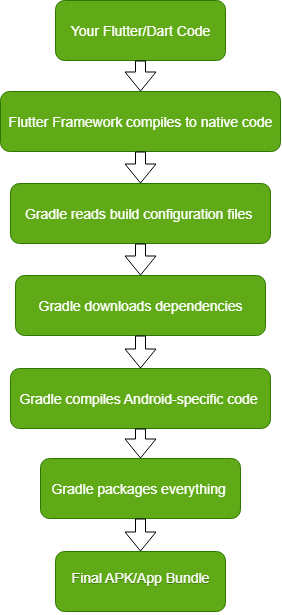
Gradle orchestrates this entire process. It's a build automation tool that:
- Reads your configuration files
- Downloads necessary dependencies
- Compiles your code
- Packages everything into an APK or App Bundle
The Build Process Flow
What is Android Gradle Plugin (AGP)?
Here's where it gets slightly more complex. Gradle itself is language-agnostic it can build Java, Kotlin, Scala, and more. But building Android apps requires specific knowledge about Android SDK, resources, manifest files, etc.
Enter the Android Gradle Plugin (AGP).
AGP is a plugin that teaches Gradle how to build Android apps specifically. It adds Android-specific capabilities like:
- Compiling Android resources (layouts, drawables, strings)
- Managing build variants (debug, release, flavors)
- Creating APK and App Bundle files
- Handling Android SDK integration
The Relationship
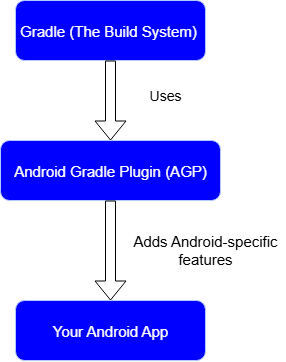
Analogy: If Gradle is a construction foreman who manages any building project, AGP is the specialized contractor who knows specifically how to build houses (Android apps).
The Key Files: Where Everything is Configured
Understanding where these versions are defined is crucial. Here are the main files:
1. gradle-wrapper.properties
Location:android/gradle/wrapper/gradle-wrapper.properties
What it controls: The Gradle version itself
distributionUrl=https\://services.gradle.org/distributions/gradle-8.8-all.zip
This file tells your project which version of Gradle to download and use.
2. settings.gradle
Location:android/settings.gradle
What it controls: Project settings, including AGP and Kotlin versions
plugins {
    id "com.android.application" version "8.6.0" apply false
    id "org.jetbrains.kotlin.android" version "2.0.0" apply false
}
This is the modern way to define plugin versions (Flutter 3.0+).
3. build.gradle (Project-level)
Location:android/build.gradle
What it controls: Project-wide build configuration (older projects)
dependencies {
    classpath 'com.android.tools.build:gradle:8.6.0'
}
This is the older way to define AGP version (pre-Flutter 3.0 projects).
4. AndroidManifest.xml
Location:android/app/src/main/AndroidManifest.xml
What it controls: App metadata and configuration
This file occasionally causes issues with invalid configurations.
Why Are These Files Outdated From the Start?
Great question! Here's the truth:
1. Flutter Template Versioning
When you run flutter create my_app, Flutter uses a template that was created and tested when that Flutter SDK version was released.
Timeline example:
January 2024: Flutter 3.16 released
    └─ Template includes: Gradle 8.3, AGP 8.1.0

March 2024: Gradle 8.8 released
    └─ Your Flutter template still has 8.3

October 2024: You create a new project
    └─ Still gets the January 2024 template
2. Conservative Approach
Flutter doesn't automatically use the latest versions because:
- Stability: New versions might have bugs
- Testing: Each combination needs thorough testing
- Compatibility: Must work across all supported Flutter versions
- Breaking changes: Updates could break existing projects
3. Your Flutter SDK Version
Even if you update Flutter itself (flutter upgrade), existing projects retain their original configuration. Only NEW projects get updated templates.
Common Gradle Errors and Solutions
Let's tackle the most common errors you'll encounter:
Error 1: AGP Version Too Low
Error: Your project's Android Gradle Plugin version (8.1.0) is lower
than Flutter's minimum supported version of 8.1.1.
Solution: Update AGP version
In settings.gradle:
plugins {
    id "com.android.application" version "8.6.0" apply false
}
Or in build.gradle (older projects):
dependencies {
    classpath 'com.android.tools.build:gradle:8.6.0'
}
Error 2: Gradle Version Warning
Warning: Flutter support for your project's Gradle version (8.3.0)
will soon be dropped. Please upgrade to at least 8.7.0.
Solution: Update Gradle version
In gradle-wrapper.properties:
distributionUrl=https\://services.gradle.org/distributions/gradle-8.8-all.zip
Important: Notice the escaped colon \:. This is required in properties files.
Error 3: FileNotFoundException for Gradle Download
Exception in thread "main" java.io.FileNotFoundException:
https://github.com/gradle/gradle-distributions/...
Cause: Wrong Gradle download URL or version doesn't exist
Solution: Use the correct official Gradle URL
# Correct URL format
distributionUrl=https\://services.gradle.org/distributions/gradle-8.8-all.zip

# NOT from GitHub!
Pro Tip: Verify the version exists by checking: https://gradle.org/releases/
Error 4: Invalid AndroidManifest
error: attribute 'android:name' in <application> tag must be
a valid Java class name.
Cause: Invalid or placeholder value in AndroidManifest.xml
Solution: Remove or fix the invalid line
In android/app/src/main/AndroidManifest.xml:
❌ Wrong:
<application
    android:name="${applicationName}"
    android:label="my_app">
✅ Correct:
<application
    android:label="my_app"
    android:icon="@mipmap/ic_launcher">
Error 5: Kotlin Version Warning
Warning: Flutter support for your project's Kotlin version (1.8.22)
will soon be dropped. Please upgrade to at least 2.0.0.
Solution: Update Kotlin version
In settings.gradle:
plugins {
    id "org.jetbrains.kotlin.android" version "2.0.0" apply false
}
Version Compatibility Matrix
Here's a quick reference for compatible versions:

Current Recommended Versions (October 2024):
- Gradle: 8.8 or 8.9
- AGP: 8.6.0 or 8.7.0
- Kotlin: 2.0.0 or 2.0.20
How to Update Properly: Step-by-Step Guide
Follow these steps in order:
Step 1: Backup Your Project
# Always a good idea before major changes
git commit -am "Before Gradle update"
Step 2: Update Gradle Version
Edit android/gradle/wrapper/gradle-wrapper.properties:
distributionUrl=https\://services.gradle.org/distributions/gradle-8.8-all.zip
Step 3: Update AGP Version
Edit android/settings.gradle:
plugins {
    id "com.android.application" version "8.6.0" apply false
    id "org.jetbrains.kotlin.android" version "2.0.0" apply false
}
Step 4: Clean and Rebuild
flutter clean
flutter pub get
flutter run
Step 5: Verify Success
If it builds successfully, commit your changes:
git commit -am "Updated Gradle to 8.8, AGP to 8.6.0"
Alternative Update Methods
Method 1: Using Android Studio
- Open your project in Android Studio
- Go to File → Project Structure
- Under Project, update:
- Android Gradle Plugin Version
- Gradle Version
4. Click Apply and OK
Method 2: Recreate Android Folder (Nuclear Option)
⚠️ Warning: This deletes all custom Android configurations!
cd your_project
rm -rf android
flutter create .
Only use this if you haven't made custom Android changes.
Method 3: Use Flutter Doctor
Check for recommendations
flutter doctor -v
Sometimes Flutter suggests specific versions.
Best Practices
1. Keep Flutter Updated
flutter upgrade
2. Update New Projects Immediately
When creating a new project, update Gradle/AGP right away:
flutter create my_app
cd my_app
# Update gradle files immediately
flutter run
3. Document Your Versions
Keep a VERSIONS.md file in your project:
# Build Versions
- Flutter: 3.24.0
- Dart: 3.5.0
- Gradle: 8.8
- AGP: 8.6.0
- Kotlin: 2.0.0
4. Test After Updates
Always test thoroughly after version updates:
flutter clean
flutter pub get
flutter build apk --debug
flutter build apk --release
5. Update Gradually
Don't jump to bleeding-edge versions immediately. Wait for community validation.
Troubleshooting Checklist
If you're still having issues, work through this checklist:
- Is your Flutter SDK up to date? (
flutter upgrade) - Did you run
flutter clean? - Are you using valid version numbers? (Check https://gradle.org/releases/)
- Is the Gradle URL correct? (Should be
services.gradle.org, not GitHub) - Are there any typos in your configuration files?
- Is your AndroidManifest.xml valid?
- Are you behind a corporate firewall? (Try VPN or mobile hotspot)
- Did you check
flutter doctor -vfor warnings?
Essential Files
android/
├── gradle/wrapper/
│   └── gradle-wrapper.properties    # Gradle version
├── settings.gradle                   # AGP & Kotlin versions (new)
├── build.gradle                      # AGP version (old)
└── app/
    └── src/main/
        └── AndroidManifest.xml       # App configuration
Version Check URLs
- Gradle versions: https://gradle.org/releases/
- AGP versions: https://developer.android.com/studio/releases/gradle-plugin
- Flutter requirements: https://docs.flutter.dev/release/breaking-changes/android-gradle-plugin-version
Conclusion
Gradle issues in Flutter development can be frustrating, but they're manageable once you understand the underlying system. Remember:
- Gradle is the build system
- AGP is the Android-specific plugin for Gradle
- Version mismatches are the most common issue
- Updates are manual by design (for stability)
- Clean and rebuild after any configuration changes
The key is understanding why these files exist and how they work together. With this knowledge, you can confidently troubleshoot and fix Gradle issues in your Flutter projects.