Creating Twig templates with Shiiinabot
@shiiinabot
Hi there! 👋🏻 This is a brief explanation about how you can use Twig in @shiiinabot.
Remember, if you can use Regex, use it. Regex is easier and faster.
Introduction
1) First of all, read all the Twig Documentation for Template Designers.
2) Second of all, take just a quick look at the Twig Reference. You don't need to read them all, just need to have an idea about some of the avaiable tags and functions.
3) Take a look at the avaiable message update types Shiiina can receive.
Great! If you read the documentation you are half step away to write your own Twig Templates.
How it works
When you submit a new Template to Shiiina, she will take a look on it to see if everything is alright. If something is wrong (if you mistyped a function name for example) she will try to tell you what happened. If there is nothing wrong with your template, Shiiina will accept it.
Every time someone send a message in your group, Shiiina will run your Template. She will automatically set some variables, for example ", message (containing the received BotAPI message), admins (an array with the IDs of group admins), db (a constant variable you can use as a simple Database), etc.
If your template return any errors, Shiiina will send a notification to the admin who submitted it, and will remove the template (Don't worry your Database won't be lost, if you want to erase your Database, press the "Erase Twig Database" button).
Global Variables
Currently there are 5 Global Variables:
update: An array with the exact update received from Telegram. Currently Shiiina receives message, edited_message, callback_query and message_reaction updates.
message: An array with the message received from Telegram, it can be a message, a edited_message, or false (in case you receive a message_reaction update).
admins: An array with the IDs of the group administrators
user_channel: If the message has an username of a channel, this variable will contain it. If not, this variable will be "false". (This variable will be discontinued! Please, remove it from your code, it will stop working soon.)
db: A consistent variable that can be used as a Database. That means, if you change this variable to "12345" it's value will remain "12345" for all the other updates you receive. If you Erase the Database, this variable will return to it's default value: "false".
Deleting messages
To delete a message, just use the command {{true}}.
For example, if you want to delete all messages, submite the template:
{{true}}
When you reply to the received update with the command {{true}}, Shiiina will instantly delete the message. That means if you submite the template:
{{false}}
{{true}}
{{false}}
Shiiina will also delete all the messages.
Sending messages
To send a message use the function "sendMessage" with an array with the data.
For example, if you want to reply to all messages an user sent with "Hi", and some url buttons bellow, submite the template:
{% set resp = sendMessage({
  "text": "<b>Hi</b>",
  "parse_mode": "HTML",
  "disable_web_page_preview": 1,
  "disable_notification": 1,
  "protect_content": 0,
  "reply_to_message_id": message.message_id,
  "allow_sending_without_reply": 1,
  "reply_markup": {"inline_keyboard": [
    [{"text":"bitly","url":"bit.ly"},{"text":"Tg","url":"t.me"}],
    [{"text":"Telegram","url":"telegram.org"}]
  ]}|json_encode
}) %}
You don't need to use the "chat_id" field. Shiiina will only send message to your group.
Limitations:
-You can only run the command sendMessage once in the Twig.
Examples:
All right, you already knows the basic stuff, here I will put a few examples of what is possible for you to do using Twig. Let's begin with the simple ones, and keep making it better 😺.
➲ Is possible to delete messages with apk files? (@xeniun)
Too easy. Take a look:
{% if message.document.file_name ends with '.apk'%}
  {{true}}
{% endif %}
You think 3 lines is a lot? You can do it using just one. Check it out:
{{ message.document.file_name ends with '.apk'}}
Simple, isn't it?
➲ Can you add up to 100mb files locking feature to shiiina? (@Ericjohnn)
Too easy. Take a look:
{% if message.document.file_size >100000000 %}
  {{true}}
{% endif %}
➲ Can you add whitelists for stickers? (@AdemGuz)
Yes, it's possible! For example, if you want to only alow the t.me/addstickers/PikachuDetective and t.me/addstickers/docedesenho sticker pack:
{% if message.sticker %}
   {% set whitelist = ['PikachuDetective', 'docedesenho'] %}
   {% if message.sticker.set_name in whitelist %}
      {{false}}
   {% else %}
      {{true}} {# deletes the message #}
   {% endif %}
{% endif %}
Seven lines is a lot? No problem, you can do it in one:
{{ message.sticker and message.sticker.set_name not in ['PikachuDetective', 'docedesenho'] }}
➲ Can I programate Shiina to block with Arabic language nickname? (Tammy)
Yes, it's possible! Remember you should escape Regex characters twice. Check bellow:
{% if update.message.from.first_name matches "/[\\p{Arabic}]/u" %}
 {{true}}
{% endif %}
➲ Is it possible to remove all posts except those forwarded of a specific channel? (@bayernminga)
Yeap, it's possible. Check template below, it will delete all messages forwarded from public channels, except the one with the ID -1001234567890.
{% if message.forward_from_chat.username and message.forward_from_chat.id != -1001234567890 %}
   {{true}}
{% endif %}
➲ Delete all messages between 10 PM and 9 AM. (@tWiTfAcE)
Sure, just change the "UTC" variable to the UTC code of your country. Brazil for example is UTC -3.
{% set UTC = -3 %}
{% set from = 22 %}
{% set to = 9 %}

{% set hour = (message.date+(UTC*3600))|date("H") %}
{% if to-from > 0 %}
 {{ hour >= from and hour < to }}
{% else %}
 {{ hour >= from or hour < to }}
{% endif %}
➲ How to block 2 consecutive stickers? (@gabriel)
If someone send a sticker, set db to "1", if someone send something else, set db to "0". If db is "1" and a sticker was received, delete it. The template will be like this:
{% if db is not iterable %}
       {% set db = [] %}
{% endif %}
{% if message.sticker and db.consecutive_stickers==1 %}
  {{true}}
{% elseif message.sticker and db.consecutive_stickers==0 %}
  {% set db = db|merge({"consecutive_stickers":1}) %}
{% else %}
  {% set db = db|merge({"consecutive_stickers":0}) %}
{% endif %}
➲ If the same text message is sent twice by the same user, Shiiina must delete. Is this possible? (@RazaQuadri)
Sure! Check it out:
{% if db is not iterable %}
      {% set db = [] %}
{% endif %}
{% if db.text_message==message.text and db.id_user==message.from.id %}
 {{true}}
{% elseif message.text %}
 {% set db = db|merge({"id_user":message.from.id}) %}
 {% set db = db|merge({"text_message":message.text}) %}
{% endif %}
➲ How can I whitelist a channel link in my channel? (@zaidALKH)
You can do it like this:
{% if message.entities %}
   {% for value in message.entities %}
      {% if
         (value.type=='url' or value.type=='text_link')
         and
         (value.url matches '/t\\.me\\//' or message.text matches '/t\\.me\\//')
      %}
         {% if value.url matches '/t\\.me\\/ShiiinaGroup/i' or message.text matches '/t\\.me\\/ShiiinaGroup/i' %}
           {{false}}
         {% else %}
            {{true}}
         {% endif %}
      {% endif %}
   {% endfor %}
{% endif %}
It may looks complex, but it's really simple:
1) If there are entities in Telegram update, check if there are entities from "url" or "text_link".
2) If there are entities from "url" or "text_link", check if they have "t.me".
3) If they have "t.me", check if they have "t.me/Shiiinagroup".
4) If they have "t.me/ShiiinaGroup" do not delete. Else, delete the message.
*Remember in Twig you should escape regex characters twice.
➲ How do I whitelist links? (@gabriel)
This Twig will delete all links except whitelisted. In this example, it only allows example.com and telegram.org.
{% set whitelist = [
"telegram.org",
"example.com",
]%}

{% set text = message.text ?? message.caption ?? false %}

{% if message.entities is defined or message.caption_entities is defined %}
 {% set entities = message.entities ?? message.caption_entities %}
 {% set url_not_white=true %}
 {% set link_not_white=true %}
 {% for entity in entities %}
  {% if entity.type == "url" %}
      {% set url_not_white=true %}
      {% for whiteurl in whitelist %}
          {% if whiteurl in text|slice(entity.offset, entity.length)|lower %}
            {% set url_not_white = false %}
          {% endif %}
      {% endfor %}
      {{ url_not_white }}
  {% elseif entity.type == "text_link" %}
      {% set link_not_white = true %}
      {% for whiteurl in whitelist %}
          {% if whiteurl in entity.url|lower %}
              {% set link_not_white = false %}
          {% endif %}
      {% endfor %}
      {{ link_not_white }}
  {% endif %}
 {% endfor %}
{% endif %}
➲ How we can configure Shiiina to delete the sticker if an user try to send more than 1 sticker in less than 30 seconds? (@gabriel)
For that we will need to use the db global variable. Check the template below:
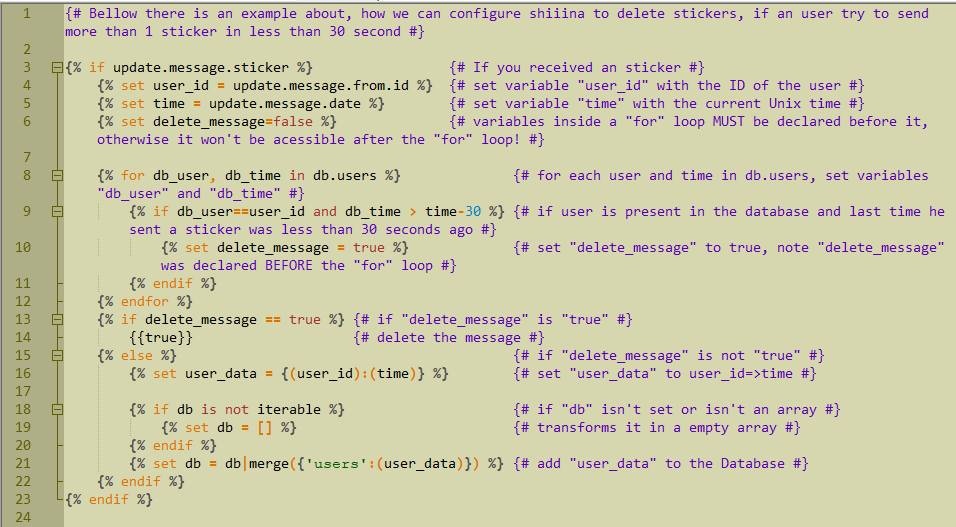
If you want to copy the code to try it by yourself:
{% if message.sticker %}
   {% set user_id = message.from.id %}
   {% set time = message.date %}
   {% set delete_message=false %}
      {% for db_user, db_time in db.users %}
         {% if db_user==user_id and db_time > time-30 %}
            {% set delete_message = true %}
         {% endif %}
      {% endfor %}
      {% if delete_message == true %}
        {{true}}
      {% else %}
      {% set user_data = {(user_id):(time)} %}
      {% if db is not iterable %}
        {% set db = [] %}
      {% endif %}
      {% set db = db|merge({'users':(user_data)}) %}
   {% endif %}
{% endif %}
➲ How can I delete messages with urls if it's one of the user's first 2 messages after join the group? (@gabriel)
You can do it like this:
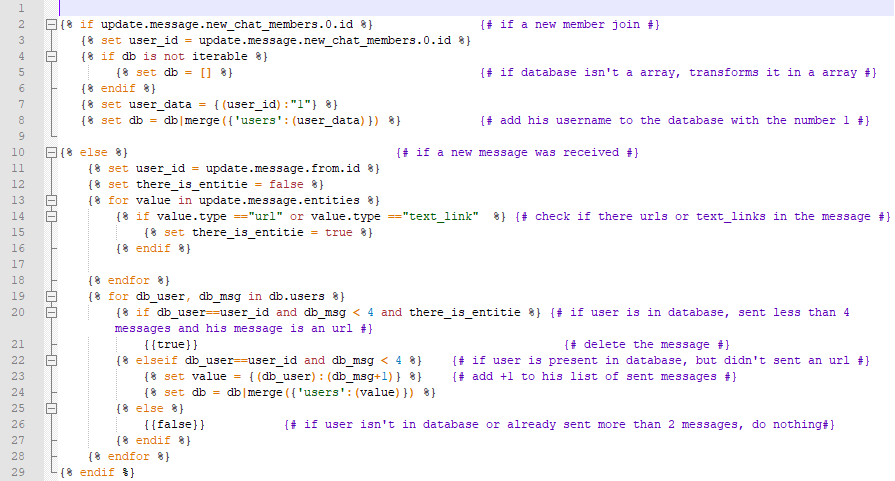
If you want to copy the code to try it by yourself:
{% if message.new_chat_members.0.id %}
 {% set user_id = "u"~message.new_chat_members.0.id %}
 {% set user_data = {(user_id):"1"} %}
 {% if db is not iterable %}
     {% set db = [] %}
 {% endif %}
 {% set user_data = db.user_data|merge(user_data)) %}
 {% set db = db|merge({'users':(user_data)}) %}
{% else %}
  {% set user_id = message.from.id %}
  {% set there_is_entitie = false %}
  {% for value in message.entities %}
     {% if value.type =="url" or value.type =="text_link" %}
        {% set there_is_entitie = true %}
     {% endif %}
  {% endfor %}
  {% for db_user, db_msg in db.users %}
     {% if db_user==user_id and db_msg < 5 and there_is_entitie %}
        {{true}}
     {% elseif db_user==user_id and db_msg < 5 %}
        {% set value = {(db_user):(db_msg+1)} %}
        {% set db = db|merge({'users':(value)}) %}
     {% else %}
        {{false}}
     {% endif %}
  {% endfor %}
{% endif %}
➲ How about delete flood? (@usernein)
Yeah! That's also possible to create an antiflood using Twig! For example, if you want to allow people so send a max of 4 messages every 5 seconds you can do like this:
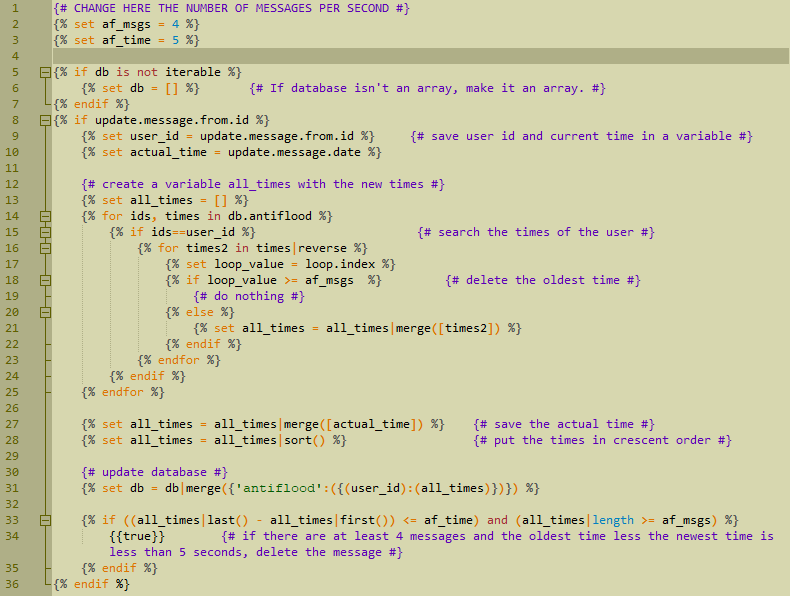
Copy the code bellow and try it by yourself:
{# CHANGE HERE THE NUMBER OF MESSAGES PER SECOND #}
{% set af_msgs = 4 %}
{% set af_time = 5 %}

{% if db is not iterable %}
   {% set db = [] %}
{% endif %}
{% if update.message.from.id %}
   {% set user_id = update.message.from.id %}
   {% set actual_time = update.message.date %}
   {% set all_times = [] %}
   {% for ids, times in db.antiflood %}
      {% if ids==user_id %}
         {% for times2 in times|reverse %}
            {% set loop_value = loop.index %}
            {% if loop_value >= af_msgs %}
               {# do nothing #}
            {% else %}
               {% set all_times = all_times|merge([times2]) %}
            {% endif %}
         {% endfor %}
      {% endif %}
   {% endfor %}
   {% set all_times = all_times|merge([actual_time]) %}
   {% set all_times = all_times|sort() %}

   {# update database #}
   {% set db = db|merge({'antiflood':({(user_id):(all_times)})}) %}

   {% if ((all_times|last() - all_times|first()) <= af_time) and (all_times|length >= af_msgs) %}
      {{true}}
   {% endif %}
{% endif %}
➲ I want any user to message only 5 msg a day. After 5 msg the rest would be deleted until next day. (@Bohthardbohthard)
Yes, thats possible.
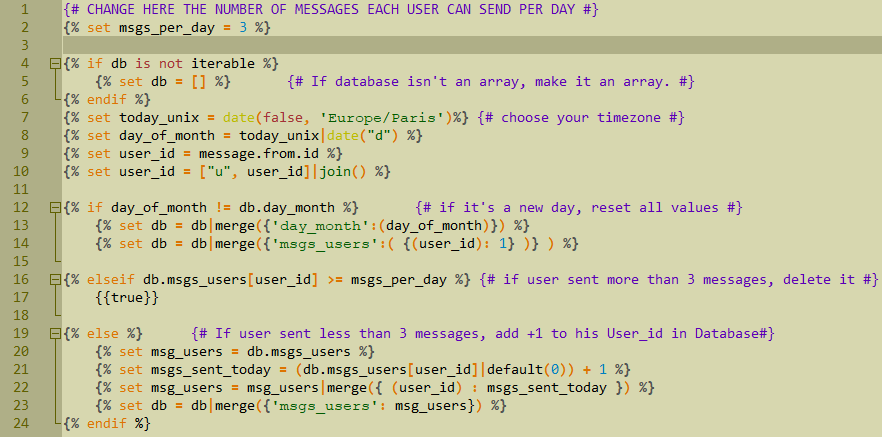
Copy the code bellow and try it by yourself:
{# CHANGE HERE THE NUMBER OF MESSAGES EACH USER CAN SEND PER DAY #}
{% set msgs_per_day = 3 %}

{% if db is not iterable %}
   {% set db = [] %}
{% endif %}
{% set today_unix = date(false, 'Europe/Paris')%}
{% set day_of_month = today_unix|date("d") %}
{% set user_id = message.from.id %}
{% set user_id = ["u", user_id]|join() %}
{% if day_of_month != db.day_month %}
   {% set db = db|merge({'day_month':(day_of_month)}) %}
   {% set db = db|merge({'msgs_users':( {(user_id): 1} )} ) %}
{% elseif db.msgs_users[user_id] >= msgs_per_day %}
   {{true}}
{% else %}
   {% set msg_users = db.msgs_users %}
   {% set msgs_sent_today = (db.msgs_users[user_id]|default(0)) + 1 %}
   {% set msg_users = msg_users|merge({ (user_id) : msgs_sent_today }) %}
   {% set db = db|merge({'msgs_users': msg_users}) %}
{% endif %}
Things people asks
➲ Can I submit 2 templates to Shiiina?
No. You can only use 1 template per group. But you can mix as many templates you want in just one. Just put one bellow the other, it will work most of the time ;)
➲ I've build a huge template, I can't send it in only one message. How do I send it to Shiiina?
No problem! Put your template in a .twig, .txt, or .iloveshiiina file. Go to the Twig section and reply to Shiiina's message with the file. Shiiina will download it and read it.
➲ I made this Regex and it isn't working in the Twig template. I've received a "fatal_error". What should I do?
Probably your Regex is wrong. Remember in Twig's Regex you should escape some characters twice. That means you can't use /t\.me\//, you should use /t\.me\\//.
➲ My template has a "for" statement and isn't working as it should.
Variables declared inside a for loop are not accessible outside the loop itself. If you want to access the variable, declare it before the loop and just edit it inside the loop.
➲ I've tried to set a array like this: {% set db.index=variable %}. But it didn't work.
In Twig you can't do it like this. You should use the merge filter instead, see:
{% set db = db|merge({"index":(variable)}) %}
➲ I've received a "Database was too big" error. What should I do?
If your db variable got too big (something like 50kb) Shiiina will disable your template and erase the db variable. The recomendation is: if it's possible that your database becomes too huge, erase the useless data as soon as you can.
➲ What's the best way to debug my template?
1) Reply to any message in your group with "/jsondump", (if you are admin and Shiiina isn't set to delete this kind of message) Shiiina will send you the Json data of the message you replied to.
2) Acess https://twigfiddle.com.
3) In the left put your template, in the right put the Json Shiiina gave you
4) Choose the option "JSON"
5) Press "RUN"!
Advanced Stuff
With twig you can also make Shiiina use a few Telegram methods. They are:
- sendMessage
- deleteMessage
- editMessageText
- answerCallbackQuery
- getChatAdministrators
1) sendMessage: You can make Shiiina send 1 message every time she process a Twig (every time someone send a message or edit one). For example:
{%set response = sendMessage({
   "text": "Hello world!",
   "parse_mode": "HTML",
   "disable_web_page_preview": 1,
   "disable_notification": 1,
   "reply_to_message_id": message.message_id,
   "allow_sending_without_reply": 1,
   "protect_content": 1,
   "reply_markup": {"inline_keyboard": [
      [{"text":"ShiiinaGroup","url":"t.me/ShiiinaGroup"}]
    ]}|json_encode
 })%}
2) deleteMessage: You can make Shiiina delete up to 10 old messages message every time she process a Twig (every time someone send a message or edit one). For example:
{%set response = deleteMessage({
  "message_id": message.message_id,
})%}
This method should not be used by default! Answering "true" is more simple and faster!
The deleteMessage is very slow compared to just answering " {{true}}".
When you delete the message by answering "true", Shiiina will use the already oppened HTTP connection with Telegram to delete the message.
When you use deleteMessage method, Shiiina will have to keep the current HTTP connection open and open another HTTP connection to delete the old message (this will take longer and will make Shiiina slower in your group.
Remember bots can only delete messages that are up to 48 hours old.
3) getChatAdministrators: You can make Shiiina get the list of admins of the group and their permissions. For example:
{%set response = getChatAdministrators()%}
This method is extremelly fast! Shiiina already keeps the administrators list of all groups cached on her database, so she gives you the answer of this the method by herself, without even contacting Telegram!
4) editMessageText: You can make Shiiina edit 1 message every time she process a Twig (every time someone send a message, edits a message or send a reaction). For example:
{% set resp = editMessageText({
   "text": "<b>Hello World 2</b>",
   "parse_mode": "HTML",
   "disable_web_page_preview": 1,
   "disable_notification": 1,
   "reply_markup":
    {"inline_keyboard": [
      [
        {"text":"Yes","callback_data": "any data"},
        {"text":"No","callback_data":"other data"}
      ],
      [
        {"text":"ShiiinaGroup","url":"https://t.me/shiiinagroup"}
      ]
    ]}|json_encode
 }) %}
5) answerCallbackQuery: You can use this method when Shiiina receives a CallbackQuery update to answer the received CallbackQuery. For example:
 {% set resp = answerCallbackQuery({
   "text": "Callback answered!",
   "show_alert": true,
   "cache_time": 5
 })%}
Support Group
As you can see, most of the time it's very easy to create your own Templates, sometimes it's hard, sometimes you just don't know how finish a template, sometimes the template doesn't work cause you mistyped a variable name... Who knows?
These guys: @ShiiinaGroup
Do you have any question about Shiiina, Regex or Twig? Don't hesitate in sending the question in the group. They are cool! 😸
Oh, if you have a good question, it may appear here in the Examples section. 👍🏻