The Raspberry Pi Platform and Python Programming for the Raspberry Pi
@n3m351daЗакончила курс, делюсь полезным.
https://www.coursera.org/learn/raspberry-pi-platform/
Week 1.
Тест.

Задача.
Setup your Raspberry Pi by usingNOOBSto install Raspbian on the micro SD card. Boot your Raspberry Pi to the desktop and take a picture (with a regular camera/phone) of the desktop. Submit the picture as evidence that you completed the task.
Ссылки.
https://www.raspberrypi.org/learning/noobs-install/
Week 2.
Тест.

Задача.
Boot the Raspberry Pi and install the “scrot” program to take screen shots. You can install it by typing “sudo apt-get install scrot” in a terminal window. Use the scrot program to take a screenshot of your Raspberry Pi.
Ссылки.
https://learn.sparkfun.com/tutorials/setting-up-raspbian-and-doom
Week 3.
Тест.
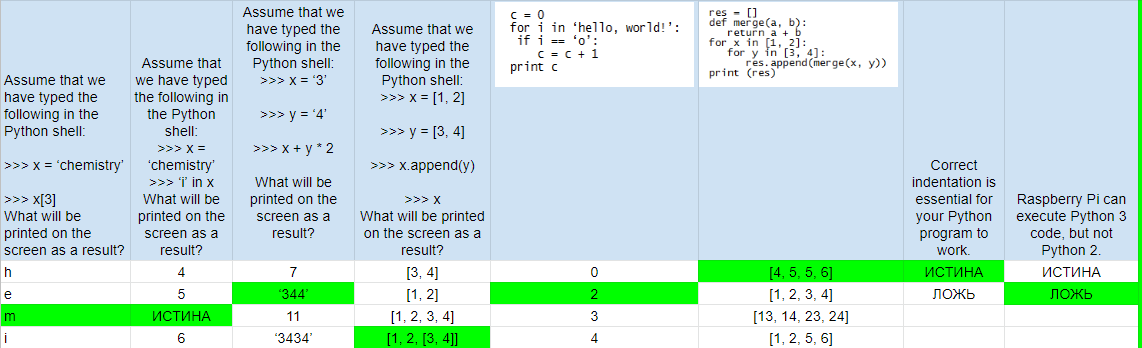
Задача.
Write a Python program that prompts the user to input 3 numbers, one at a time. The Python program should put the numbers in a list, sort the list, and print the sorted list. Executing the program should produce results something like this:
Enter a number:
5
Enter a number:
4
Enter a number:
3
3, 4, 5
>>>
Hints:
Python lists have a built-in sort() method that you could use. The input() function will accept input from the user at the command line.
Решение:
x = int(input("Enter a number: "))
y = int(input("Enter a number: "))
z = int(input("Enter a number: "))
numbers = [x, y, z]
print(sorted(numbers))
Ссылки.
https://www.raspberrypi.org/learning/python-intro/
Week 4.
Тест.

Задача.
Build a circuit using your Raspberry Pi that causes an LED to blink when a push button is NOT pressed. However, the LED should stay on continually when the push button IS pressed.
import RPi.GPIO as GPIO
from time import sleep
GPIO.setwarnings(False)
GPIO.setmode(GPIO.BCM)
pinNumLED = 5
pinNumBTN = 16
GPIO.setup(pinNumLED,GPIO.OUT)
GPIO.setup(pinNumBTN,GPIO.IN)
while True:
if (GPIO.input(pinNumBTN)):
GPIO.output(pinNumLED,GPIO.HIGH)
else:
GPIO.output(pinNumLED,GPIO.HIGH)
sleep(0.2)
GPIO.output(pinNumLED,GPIO.LOW)
sleep(0.2)
Ссылки.
https://learn.sparkfun.com/tutorials/raspberry-gpio
___________________________________________________________________________