💡 The Hidden iOS File That Broke My Flutter Notifications (and How I Finally Fixed It)
FlutterPulseThis article was translated specially for the channel FlutterPulseYou'll find lots of interesting things related to Flutter on this channel. Don't hesitate to subscribe!🚀
After hours of debugging Firebase Messaging, APNs, and iOS settings, I discovered the missing piece was hiding in plain sight: my…
After hours of debugging Firebase Messaging, APNs, and iOS settings, I discovered the missing piece was hiding in plain sight: my Runner.entitlements file.
For days, I was convinced my Flutter notification setup was perfect.
I had configured Firebase Messaging, set up Info.plist, updated my AppDelegate.swift, tested on real iPhones — yet, no push notification would appear.
Even worse, the console kept whispering this cryptic message:
[firebase_messaging/apns-token-not-set] APNS token has not been set yet.
If you've ever seen this line in your debug console, you know the pain.
You start wondering:
Did I mess up my Firebase setup?Do I need new certificates?Is Apple blocking my app somehow?
Well, here's the truth I wish I knew earlier.
It wasn't Firebase. It wasn't the network. It wasn't permissions.
It was a missing key in my iOS entitlements file.
🧩 The Missing Piece: Runner.entitlements
Every iOS app built with Flutter has a set of hidden "permit files" called entitlements.
Think of them like digital badges that prove your app is allowed to use certain Apple services — notifications, iCloud, Apple Pay, Sign in with Apple, and more.
The file lives inside your Flutter project at:
ios/Runner/Runner.entitlements
When I opened mine, I realized something shocking:
It didn't even have an entry for Push Notifications.
To enable push notifications on iOS, Apple requires a special key inside this file:
<key>aps-environment</key>
<string>development</string>
That tiny snippet tells iOS, "Hey, this app wants to receive remote notifications while using the development environment."
Without it, iOS simply refuses to register your app for push notifications — no APNs token, no messages from Firebase, no nothing.
🚀 The Fix That Changed Everything
Here's what I did to finally fix my issue:
- Opened Xcode → Runner → Signing & Capabilities tab.
- Clicked the + Capability button.
- Added Push Notifications to my app.
- Xcode automatically inserted the right key (
aps-environment) insideRunnerDebug.entitlements. - For my release build, I added the same key but changed the value to
"production"insideRunnerRelease.entitlements.
But in rare cases like my situation where the file did not exist, you will have to create the file and the ios/Runner directory and add the file there
✅ Debug builds use:
<string>development</string>
✅ Release builds use:
<string>production</string>
After doing this, I ran the app again, and boom — Firebase printed:
[FirebaseMessaging] APNs token retrieved successfully.
Moments later, my test notification popped up on my screen. 🎉
💭 What I Learned
This small discovery taught me a big lesson:
When debugging iOS-specific features in Flutter, the problem is often not in your Dart code — it's in your iOS configuration.
Here are the takeaways I wish I had from the start:
- Understand entitlements. They control which Apple services your app can access.
- Use separate files for Debug and Release builds when using services like APNs.
- Always check Xcode's Signing & Capabilities tab. If a capability isn't added there, iOS won't honor it.
- Don't trust just Firebase setup guides — cross-check Apple's requirements too.
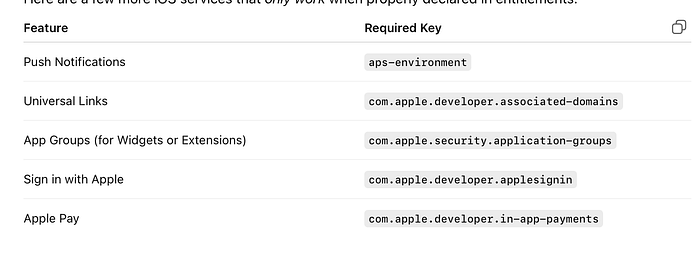
🧠 Bonus: Other Features That Need Entitlements
Here are a few more iOS services that only work when properly declared in entitlements:
✨ Final Thoughts
If your notifications aren't working on iOS, don't panic.
Before tearing apart your Dart code or reconfiguring Firebase, take a moment to check your entitlement files.
Sometimes, the solution isn't about writing more code — it's about flipping the right switch in Xcode.
If this helped you understand iOS entitlements oe fix your Flutter notifications,
👏 give this article a few claps and
💬 follow me @funwikelseandohnwi for more hands-on insights about Flutter and modern software engineering.