The Arduino Platform and C Programming (спойлеры)
@n3m351dahttps://www.coursera.org/learn/arduino-platform/
Закончила курс, делюсь полезным.
Week 1.
Тест.

Задача - ну это сами.
Install the Arduino IDE on your computer, compile the "Blink" example, upload the example to the board, and ensure that the LED blinks. Turn in 2 screen shots of the Arduino IDE. The first screen shot should show the "Done compiling" message & the byte number information in the message area. The second screen shot should show the message area after successfully uploading the sketch.
Week 2.
Тест.

Задача.
Write a program in C that computes and prints out the first six digits in the Fibonacci sequence. You will need to look up the definition of the Fibonacci sequence if you don't know it. The first two numbers in the sequence are 0 and 1, but your program should compute the next four digits. Turn in your C program. Your C program must compile in order for it to be tested.

Полезные ссылки.
http://www.cprogramming.com/tutorial/c/lesson1.html
http://www.cprogramming.com/tutorial/c/lesson2.html
http://www.cprogramming.com/tutorial/c/lesson3.html
http://www.cprogramming.com/tutorial/c/lesson4.html
http://www.cprogramming.com/tutorial/c/lesson5.html
Week 3.
Тест.

Задача.
Write a program that causes the built-in LED connected to pin 13 on the Arduino to blink, alternating between fast blinks and slow blinks. The LED should blink 5 times quickly and then it should blink 5 more times slowly. When blinking quickly, the LED should have a 1 second period, so it should be high for 0.5 seconds and low for 0.5 seconds. When blinking slowly, the LED should have a 4 second period, so it should be high for 2 seconds and low for 2 seconds. The LED should continue to blink in this alternating fashion for as long as the Arduino receives power. If you do not have an Arduino, you can use the web-based Arduino simulator at www.tinkercad.com. You will need to create an account for free. There are instructional videos on that website that will teach you how to use the simulator.

Полезные ссылки.
https://www.arduino.cc/en/Reference.setup
https://www.arduino.cc/en/Reference.loop
https://www.arduino.cc/en/Reference.pinMode
https://www.arduino.cc/en/Reference.digitalWrite
https://www.arduino.cc/en/Reference.digitalRead
Week 4.
Тест.

Задача.
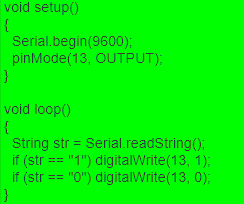
Write a program that allows the user to control the LED connected to pin 13 of the Arduino. When the program is started, the LED should be off. The user should open the serial monitor to communicate with the Arduino. If the user sends the character '1' through the serial monitor then the LED should turn on. If the user sends the character '0' through the serial monitor then the LED should turn off.
Полезные ссылки.