The 5 Common Web Caching & Detailed Explanation For HTTP Caching
JINMost of us understand of web caching is when the browser determines if to use the cache, but the cache is not something that the browser itself can complete because the browser cannot determine if a resource is expired without other information on the server side.
If you are a front-end developer, it seems that it is not much you can do about the caching mechanism of the application or the webpage, but you will concern about the performance. Downloading and rendering become very slow, but most of us complain about front-end developers rather than back-end developers. So, you can understand the relevant caching mechanism.
Before the client browser displays a complete web page, it has to access the server’s database to obtain the necessary data (js, CSS, image, etc) through network transmission. Although the current network speed is still relatively fast, it takes less than 1s to download a 1M file, it is still very slow compared to accessing files from the local disk. The browser’s data processing and rendering are very fast if you open web pages every time. If you access the acquired resources locally, the system doesn’t need to access the database from the server each time, so the processing speed will be much faster.
There are 5 types of Web cache.
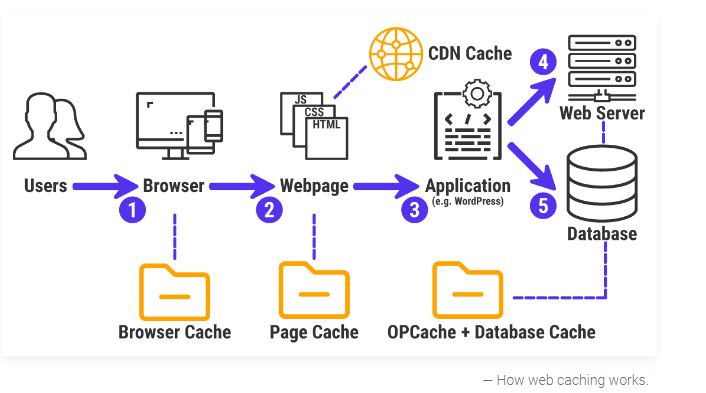
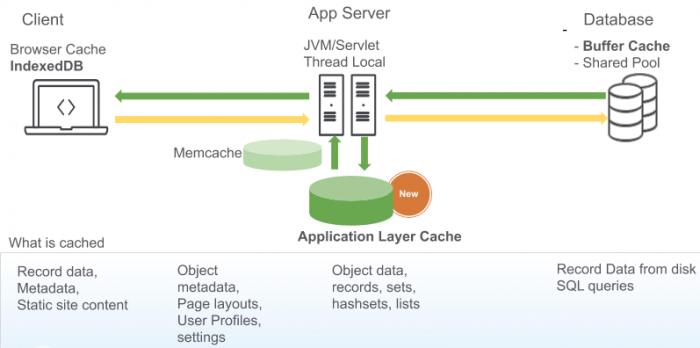
- Database Cache — Generally common web applications, the database has many data tables and a large amount of data. It takes a certain amount of time to query data. In order to avoid frequent data queries, the queried data is temporarily stored in the memory, and return the same data from the memory next time. It greatly improves performance and response efficiency. The common database caching technologies are Memcache and Redis.
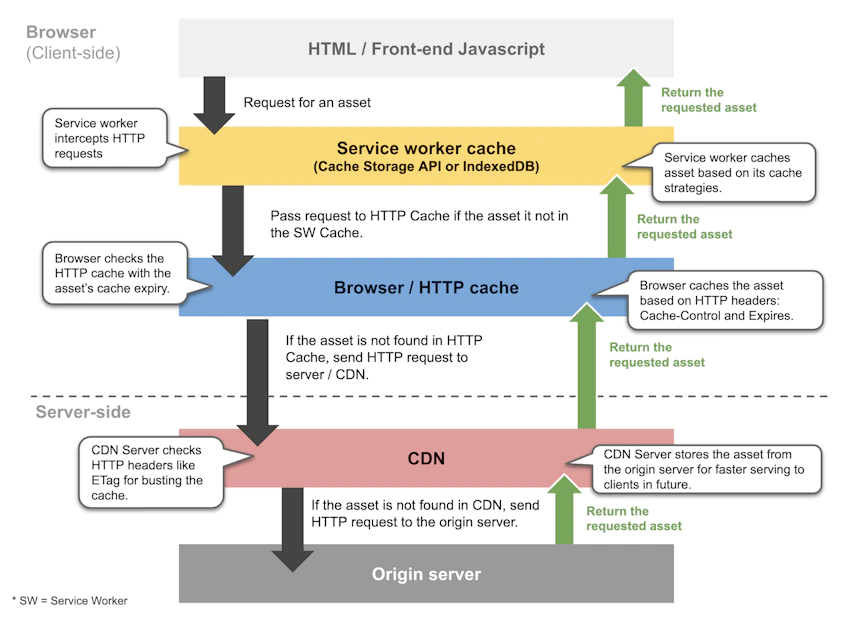
2. CDN Cache — When the client’s browser interacts with the server and accesses the CDN, the client’s browser first checks if the local cache has expired. If it expires, the browser initiates a request to the CDN edge node. The CDN edge node will detect if the cache (the data the user wants to access) has expired. If it has not expired, it will directly respond to the user's request. If the cache has expired, the CDN will initiate a source request to the origin site to pull the latest data. Usually, the browser initiates a web request to the CDN gateway which corresponds to one or several load balancing servers, and dynamically forwards the request to the appropriate origin server according to their load requests.

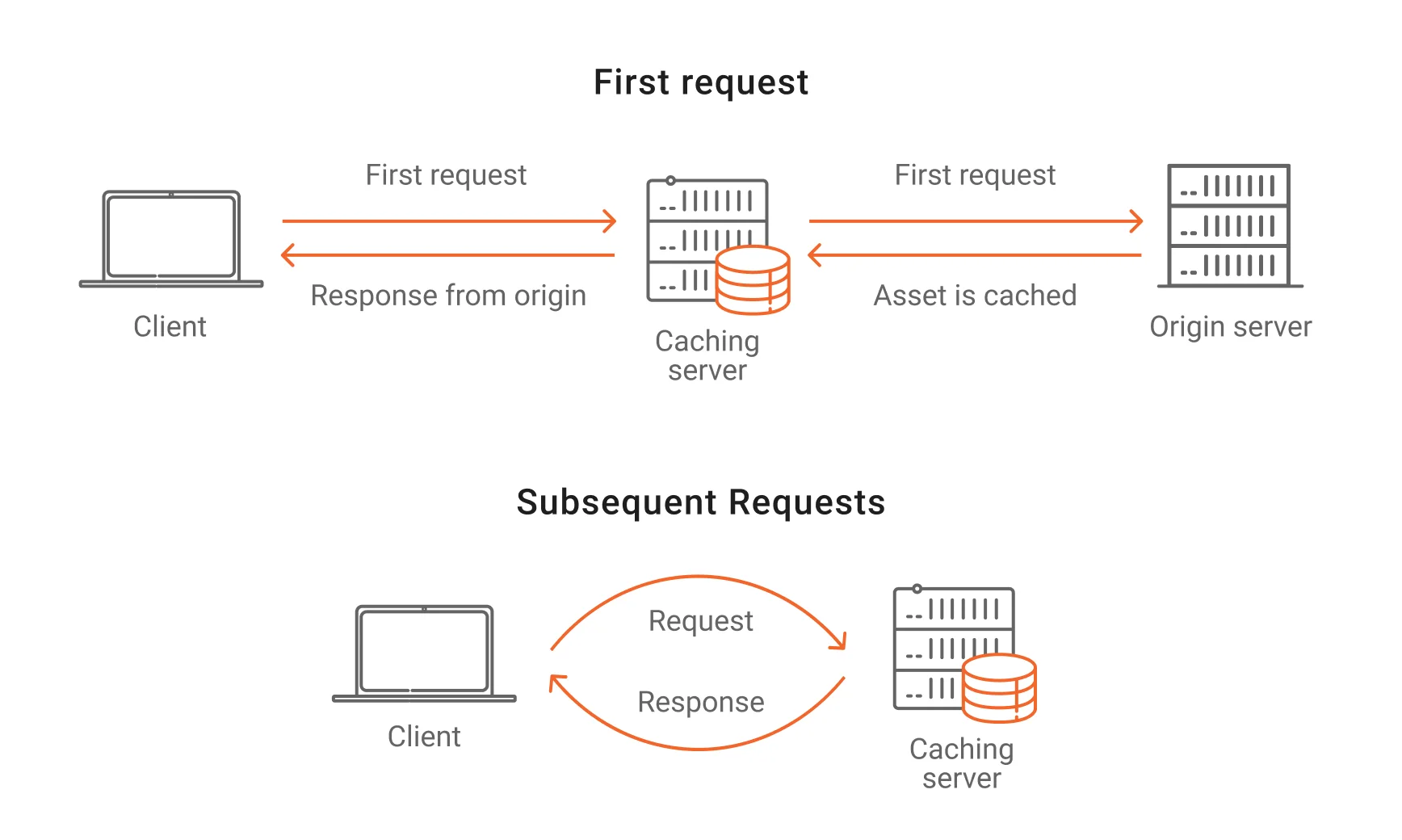
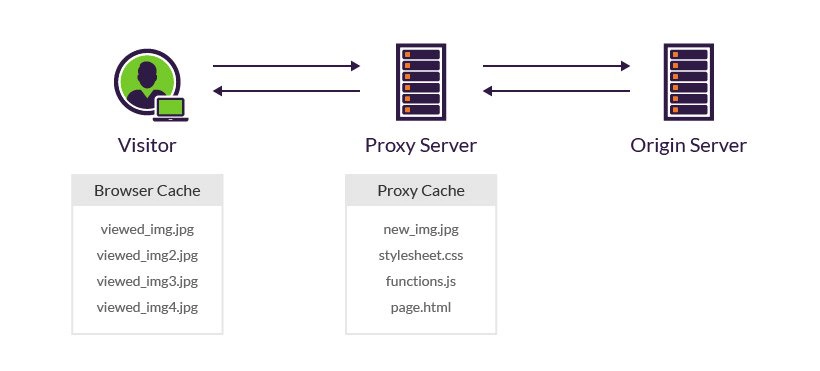
3. Proxy Server Cache — It is an intermediate server between the browser and the server. The browser first initiates a web request to this intermediate server, and after processing (such as permission verification, cache matching, etc.), the request is forwarded to the server. The mechanism of proxy server caching is the same as browser caching on a larger scale.

4. Browser Cache — Every browser implements HTTP caching. The browser stores the recently requested document on the client’s local disk. The HTTP protocol will be used to interact with the server through the browser. The browser performs the caching mechanism according to a set of rules with the server. When the user requests the same page again, the browser can display the document from the local disk.
5. Application Layer Cache — The caching can be implemented at the code level to avoid unnecessary queries on the database. Through coding, the data or resources that have been requested are cached. When the data is requested again, the available cached data is selected through logical processing.

Why do you need browser caching?
After many years of development, browsers have produced many storage mechanisms, some of which have been eliminated, some are being phased out (such as Web SQL DataBase), and some new ones are also emerging (such as the File System API). The currently widely used browser caches are roughly divided into 5 categories.
- HTTP caching
- Web Storage
- App Cache
- IndexedDB
- File System API
1) HTTP Caching
- An HTTP cache is a system for optimizing the World Wide Web. It is implemented both client-side and server-side.
- The browser controls the resource caching mechanism according to the special control field in the HTTP protocol header. According to the different versions of the HTTP protocol, the header fields used to control the cache are mainly divided into the following 2 categories.
HTTP 1.0
Pragma: No-cache header field is an HTTP 1.0 header for use in requests. It tells the browser to send a request to the server for verification before using the cache, and the cache cannot be used directly.Expires: HTTP header contains the date/time relative to the server time after which the response is considered expired. The value is specific data, for example, Fri, 10 June 2022 01:11:11 GMT, telling the browser to use the cache directly until the mentioned expired date. Invalid expiration dates with a value of 0 represent a date in the past and the resources are expired.
Pragma is the product of HTTP 1.0 and has been gradually replaced by HTTP 1.1 with the cache-control:no-cache function. When Pragma and Expires exists at the same time, Expires have no effect. It is because the priority Pragma is higher than the value of Expires.
HTTP 1.1
Cache-Control: More strict control of whether to cache
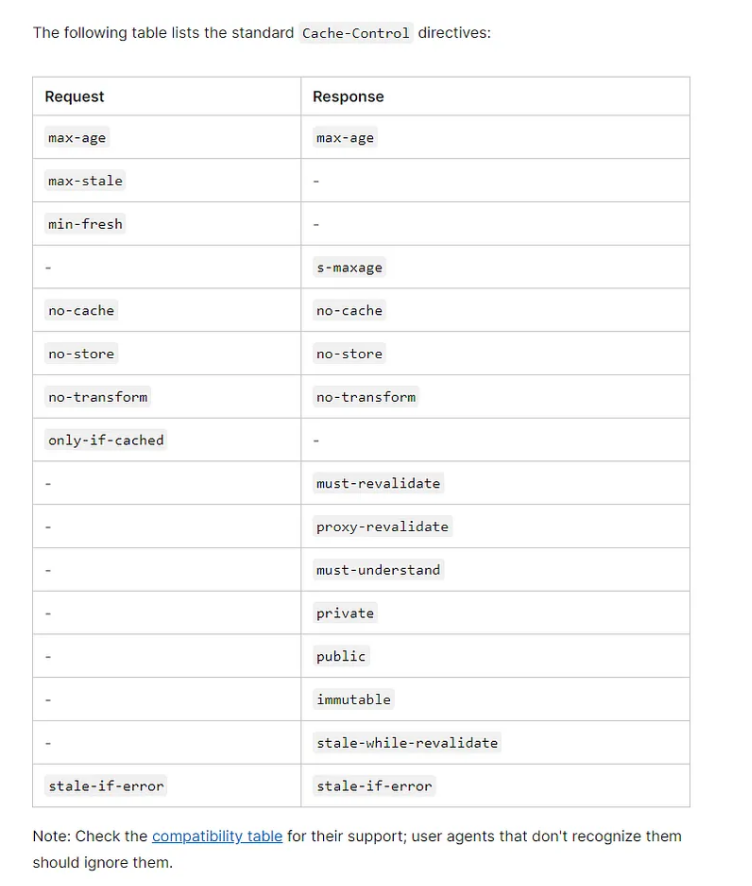
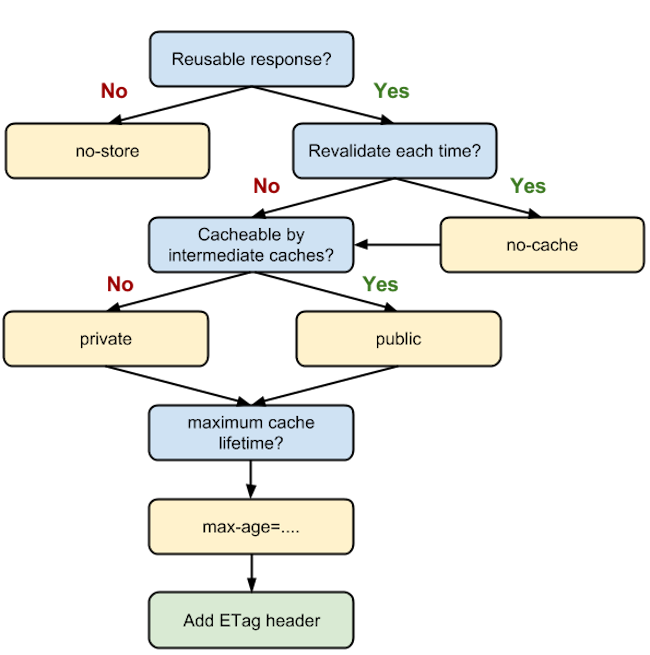
Cache-Control: Multiple values can be set to, and use , to seperate. For example,Cache-Control: no-cache, max-age=31,536,000
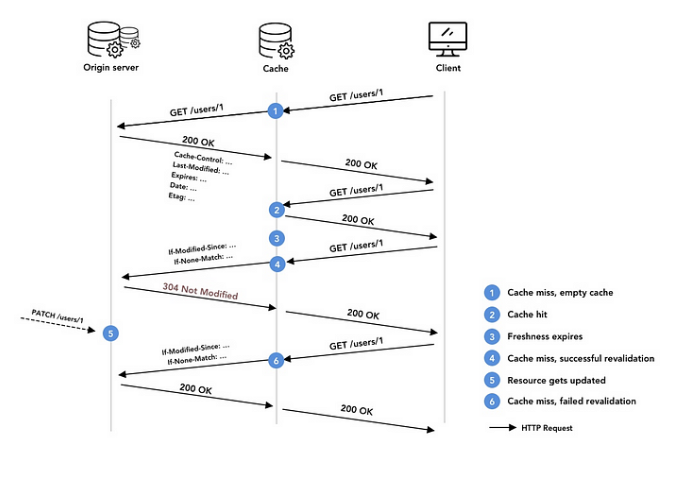
no-store: Force all caches to be prohibited, and resource copies to be prohibited to be saved. All requests for resources must obtain resources from the server in the same way as the first requestno-cache: No matter whether the cache expires or not, it is not allowed to use the cache directly. Every time a resource is requested, a verification request must be sent to the origin server. After that, the server receives the request and judges if the resource has changed. If there is a change, the server will return 200, and new resources can be accessed. If there are no changes, the server will return 304 and the client can use the cached copies.max-age=n: It indicates the valid length that the cache is available, the value is a number in seconds. For example,max-age=31,536,000, it means that the cache is valid within 1 year from the request time.s-maxage=n: The same effect ofmax-age=n, it is for the proxy serverpublic: It indicates that both the proxy server and the client can cache the resourceprivate: It indicates that the resource is private, cached only for a single user, entity, or windowmust-revalidate: Before the cache expires, the cache copy can be used directly, but once the cache expires, a verification request must be sent to the origin servermax-stale=n: The function is similar asmax-age=n, but only is valid in the request header. It indicates that the client is willing to receive an expired version, and the expiration time of the resource cannot exceed the given time n.Last-Modified: The identifier in the response header, the value is a specific GMT time, indicating the last modification time of the resource, which is returned by the server to the client when the resource expires, the client sends a verification request to the origin serverIf-Modified-Since: The identifier in the request header. When the resource expires, the client sends verification requests to the original server. If the expired cached copy is includedLast-Modified, the verification request header will carry theIf-Modified-Sinceidentifier. The value isLast-Modifiedin the cached copy. The server obtains the value and compares it with the current last modification time of the resource. If the last modification time is less than or equal to the requested value, the server returns 304 and updates the relevant cache value. If the last modification time is the latest, it means that the resource has been modified, and the server returns 200 and updates the new resource to the respective disks.Etag: The identifier in the response header, is used to indicate the uniqueness of the resource content. This value is generated by the server, and the generation rules are determined by the server, generally file size (size), modification time (time), Index (index), etc. The client sends an authentication request to the server when the resource expires. The server can carry the Etag value when the server is responding to the client's request.If-None-Match: The identifier in the request header. When the resource expires, the client sends a verification request to the server. If theEtagis included in the expired cached copy, the verification request header will carry theIf-None-Matchidentifier. The value isEtagin the cached copy. The server obtains the value, then compares it with the current hash value of the resource. If it is the same, it will return 304 and update the relevant cache value. If it is not the same, it will return 200 and replace it with the new resource, and update the cache accordingly.
Cache-Controlis used to control the cache and cache time.Last-ModifiedandEtagis used for verification when the cache expires.- With
Last-Modified, why do we stillEtag?
- If the resource changes multiple times within 1 second, the server cannot find out if the file has changed.
- The time is not consistent with the proxy server or client server. Due to the time deviation, it results in cache invalidation.
- The resources will be updated or modified regularly, but their content has not changed, but the value of
Last-Modifiedhas changed, it causes the client cache to be invalidated periodically.
- With
Etag, why do we stillLast-Modified?
- The value of
Etagis a series of hash values calculated by the server. If the calculation process is complicated,Last-Modifiedwill be used. - It is better to use
Last-Modifiedfor some files when the files are not changed frequently.
Etagcompares the characteristic value of the response resource, whileLast-Modifiedcomparing the modification time of the response resource. The server can chooseEtagorLast-Modifiedas the basis for caching judgment according to the needs of its own caching mechanism and finally, decide whether to return 200 or 304 status.
2) Web Storage
- Client browsers store data through cookies. Due to their own characteristics, cookies have their own unique advantages in some aspects, such as configurable expiration time, cross-domain sharing, interaction with the server data, etc.
- When the client sends a request, the cookie will be used as a header to send useless data to the server. After the request is intercepted, the cookie has the security risk of leakage and tampering.
- The size of cookie data is limited to 4K. IE11, Firefox, and Opera have a limit on the number of cookies per domain, the upper limit is 50, and there is no limit on Safari/WebKit.
// Based on the name of get cookie
function getCookie(name) {
  if(document.cookie.length > 0) {
    let c_start = document.cookie.indexOf(name + "=");
    if (c_start != -1) {
      c_start = c_start + name.length + 1;
      let c_end = document.cookie.indexOf(";", c_start);
      if (c_end == -1) c_end = document.cookie.length;
      return unescape(document.cookie.substring(c_start, c_end));
    }
  }
  return ""
}

// Set cookie (name, value,params)
function setCookie(name, value, params = {}) {
  let { expires, ...args } = params;
  if (expires) {
    const date = new Date();
    expires = new Date(date.setDate(date.getDate() + expires)).toGMTString();
  }
  let cookie = `${name}=${escape(value)};expires=${expires}`;
  Object.keys(args).forEach(key => {
    cookie += `;${key}=${args[key]}`;
  });
  document.cookie = cookie;
}
- Therefore, cookies are not suitable for storing a large amount of data.
- However, web storage is more suitable for storing a large amount of data
- Each domain name can provide 5M storage capacity (different browsers may vary, such as IE is 10M storage capacity)
- Strings are stored in the form of key/value pairs to facilitate data access operations
- It is only stored locally on the client and will not be sent to the server with the request
- Web storage is divided into 2 types, namely
sessionStorageandlocalStorage, and the usage methods and APIs of the 2 objects are basically the same.
const storage = sessionStorage || localStorage;
storage.setItem('xxx', 'yyy');
storage.getItem('xxx');
storage.removeItem('xxx');
storage.length;
storage.clear();
sessionStoragemaintains a separate storage area for each given origin that is available during a page session (i.e. as long as the browser is running, including page reloads and restores).localStoragefunction assessionStorage, but the data persists after the browser is closed and then reopened.
3) App Cache
- With the popularity of HTML5 mobile apps, HTML5 provides an application cache mechanism, which enables web-based applications to run offline. Developers should specify the files that must be cached for the browser. When the client is offline or even if the page is refreshed, the resources can be loaded and used.
- The Advantages:
- Offline browsing
- Faster speed
- Reduce the load on the server
- The disadvantages:
- You must refresh the updated resource twice before the resource can be used on the page
- Incremental updates are not supported, and all resources are re-downloaded once when there are some changes
- Lack of sufficient fault tolerance mechanism. When any resource in the manifest is loaded abnormally, the entire manifest will run abnormally
4) IndexedDB
- IndexedDB allows for storing large amounts of data, provides a lookup interface, and can create indexes.
Why is IndexedDB necessary?
- The capacity is too small. Cookies and Web storage can support up to 5M, which can no longer meet the demand
- Both cookies and web storage store data in the form of strings and complex object data must be processed before accessing, which is troublesome.
- Cookies and Web storage can provide search functions and cannot build custom indexes
- IndexedDB has 6 characteristics.
- Key-value pair storage: All types of data can be stored directly. Each data record has a corresponding primary key. The primary key is unique and cannot be replaced.
- Asynchronous
- Support transactions: Support a series of operation steps. As long as one step fails, the entire transaction is canceled, and the database is rolled back to the original state.
- Same-origin restriction: Each database corresponds to the domain name that created it. Web pages can only access databases under their own domain names, but cannot access databases across domains.
- Large Storage Space: The storage is more than 250MB, and there is even no upper limit.
- Support for binary storage: IndexedDB can store not only strings but also binary data (ArrayBuffer objects and Blob objects)
- Web Application has an obvious disadvantage, that is, file operations. However, HTML5 brings a new feature — File System API which can help us access a private local file system (sandbox), where we can read, write files, and create and arrange folders, thus effectively bridging the gap between desktop and web applications.
- Obtain file system access rights
- Create directory
- Traverse files inside a directory
- Delete directory
- Create file
- Write
- Read
- Delete
- Rename
- However, File system API is still a relatively new technology now. There are not many supports for many browser manufacturers.