💎 Step-by-step guide: Telegram Gifts – NFT Rent & Loans
TON Community- How to rent Telegram Gifts
- How to rent out your Telegram Gifts
- How to take Loan on your Gifts
- How to extend the Loan on your NFTs
- How to repay the Loan on your Gifts
Here are the details 🧵✍️

💎 What are Telegram NFT Gifts?
Telegram Gifts are Unique digital collectibles, living on TON Blockchain & integrated directly into the interface of Telegram, with over 2,4M holders.
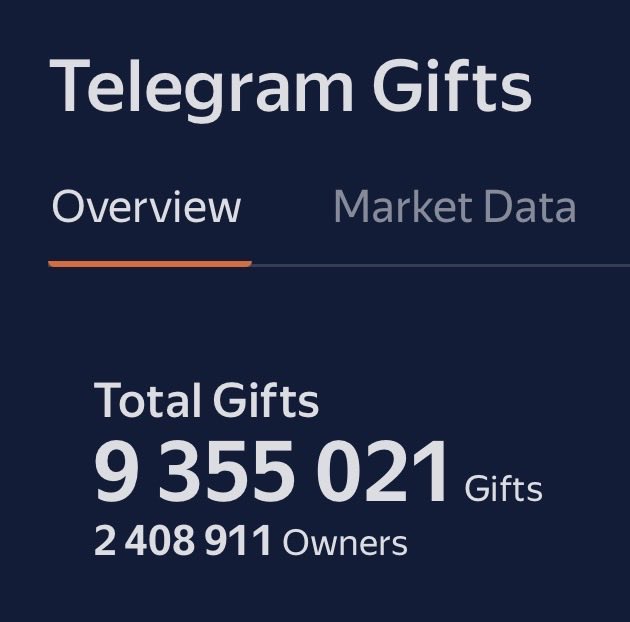
To learn more on how to get started with Telegram Gifts, check out this thread.
💎 What is NFT Rent?
Renting NFTs, similarly to renting an apartment, provide the owner with a small yield on their asset, while the one who rents it gets the asset that he/she can use for an agreed period of time.
Let’s say you have a Plush Pepe NFT:
- you Rent out your NFT
- someone Rents your NFT
- he/she pays you the Fee
- he/she receives NFT that can be used for agreed period of time
You generate yield. The one who rents it – pays it.
P.S. All the logic is executed by the smart contract, ensuring a transparent & safe environment
💎 How does it work & where to go?
In this example we will take a look at Daolama.
To get started you will need:
- Telegram NFT Gift that you hold on-chain
- a little bit of TON to sign the transactions & interact with the smart contract (1 TON is more than enough)
- navigate to Daolama official website
- go to the “Rent” tab
Here you should be able to see something like this 👇 with a small breakdown on how-to-rent, or rent out Telegram Gifts (and other NFTs).

💎 Rent out Your NFT Gift
Once you’re set & ready:
- connect your TON Wallet with the Gift in it
- click “Rent out NFT”
- select the Gift you’d want to rent out (in this case we use Scared Cat #256)

Next you have to set up the desired parameters for whoever will rent it from you:
- Pledge: if the NFT is not returned you will receive this pledge, for example 100 TON
- Floating Pledge: You can additionally specify the floating pledge amount as the percentage that will be added to the floor price of the NFT (for example 50% would mean that the Pledge would be 50% higher than the floor price of the NFT that you are renting out & would adjust automatically as the price goes up & down)
- Rental for each day: TON you will receive for each day that someone is using your NFT (in this example 10 TON
- Connect your Telegram account to receive rent notifications in time.
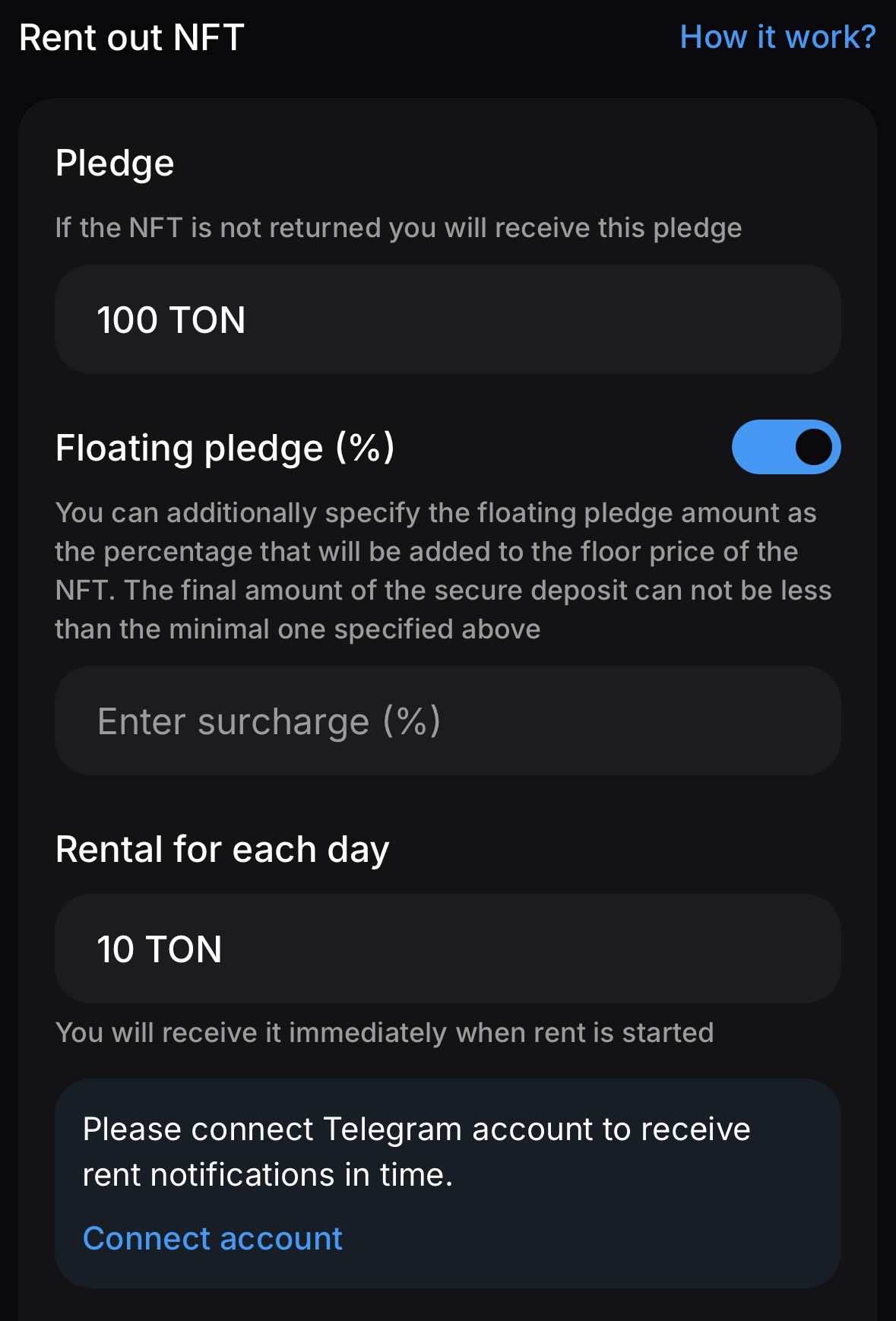
Once you are done, you can go ahead & sign the transaction, and once it’s completed – you will receive a screen notification on Daolama about it with the transaction ID.
As you sign the transaction, your Gift will be sent to the smart contract, and will then further execute the pre-set logic.
💎 Rent a Gift for yourself
Now let’s talk about renting one for yourself, in this instance we’ve chosen Hex Pot #29228
Once you’ve selected a Gift & choose the amount of days you want to rent it for – you will see the display with the details about the deal:
- Price Per Day: 0,2 TON
- Pledge: 5,4 TON (deposit you need to have)
- Service fee: 0,1 TON
- Total: 5,7 TON
P.s. your deposit will be returned once you return the Gift upon agreed period of time. Or in case you don’t – you will lose your deposit & retain a Gift.
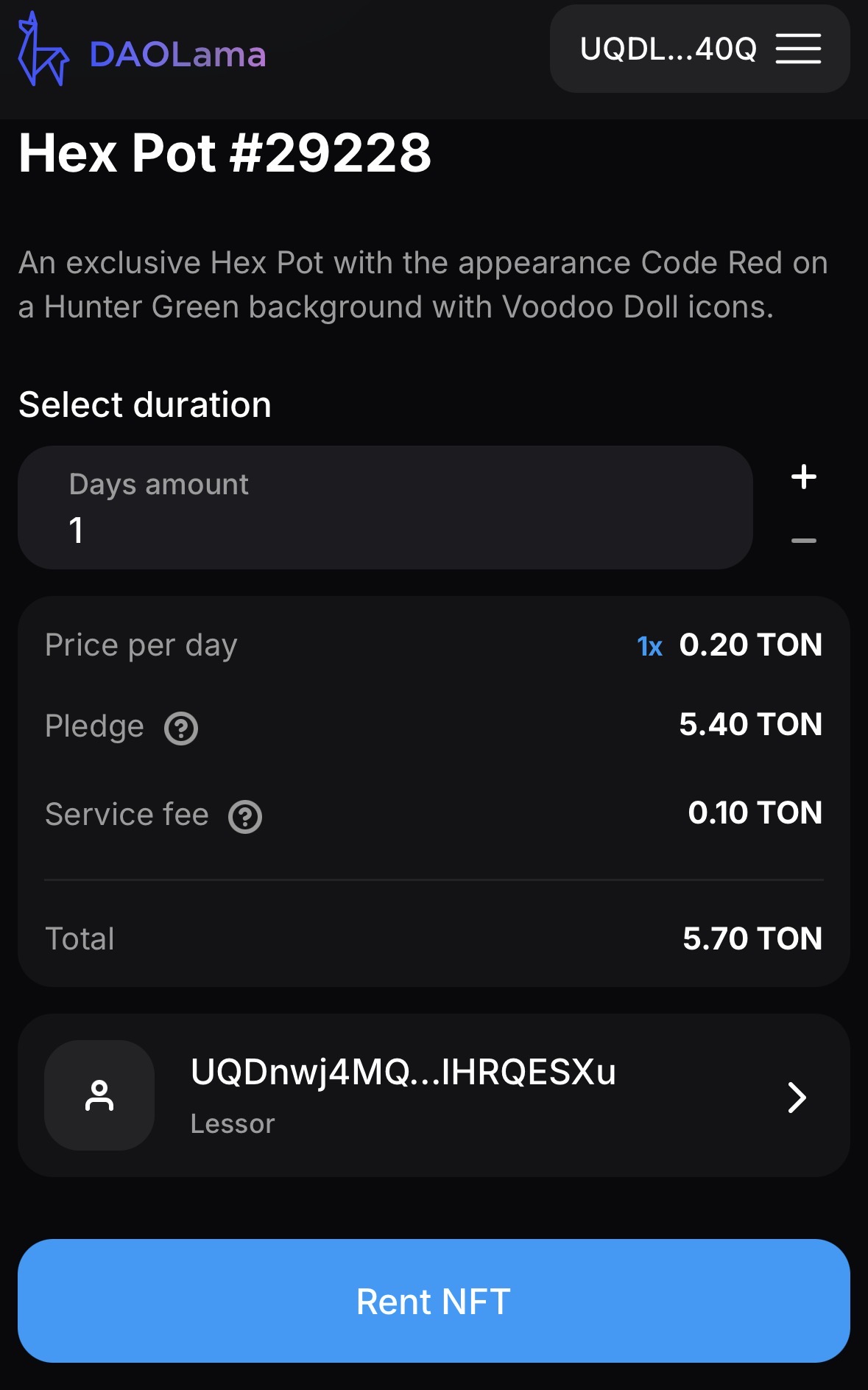
Once you’re done – click “Rent NFT” & it will prompt you to Connect your Telegram profile & show you the following logic that will be executed:
- Smart Contract Deployment
- Transfer TON to the smart contract (the deposit)
- Wait for the NFT transfer
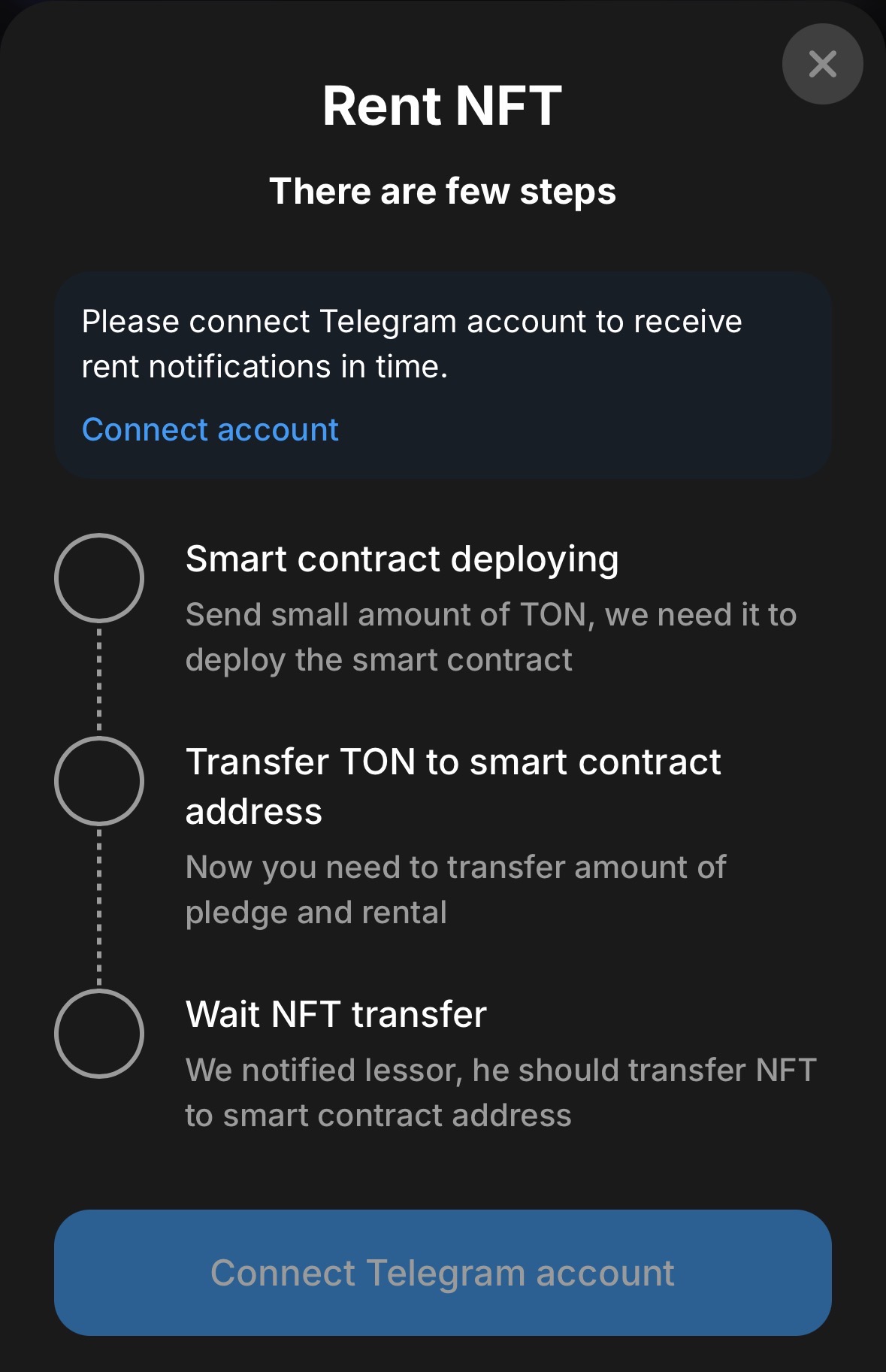
You now can go ahead & execute the transactions.
P.S. Later on don’t forget to return it back, or otherwise you will lose your pledge.
💎 NFT Lending & Borrowing?
Similarly to the traditional finance world - you can Borrow TON against your NFT assets as the collateral. But without the intermediary (aka Bank), as all the logic is executed by the Smart Contract & on-chain.
It is a way to access the liquidity without selling your assets.
However, you need to remember to pay the loan back upon agreed period of time (or extend the loan period further), or otherwise you’ll lose your assets.

💎 How does it work?
TON as NFT collateral – Firstly you select NFT available in your wallet for borrowing against.
Each NFT undergoes an automatic evaluation system. The higher the value of the NFT, the better the loan terms. You can select more than one NFT (up to 20) to obtain a larger loan amount.
The logic is executed by the Smart Contract.

💎 How to borrow TON against your NFT
To get started:
- Head to the Daolama official website
- Click “Borrow TON” at the top of the page
- In “For Pledge” tab you will see your Gifts/NFTs & Loan value you can borrow
- Select Gift you want to borrow against (Scared Cat #256 in this example)
- Click “Borrow TON”

Then it will open a new window, where you can see your NFT that you are borrowing against, as well as the Loan Terms, in this instance:
- Select Terms: 2 Weeks
- Amount to be received: 28 TON
- Amount to be refunded: 28,59 TON

Once you check that everything is alright - you can go ahead & click "Receive 28 TON”. After that it will prompt you to Sign the transaction & you will receive TON, while sending your Gift as a collateral to the Smart Contract.
Once Done, you will see that now your Gift/NFT appears in “Pledged” tab & that TON is now in your wallet.

💎 Extend the Loan on your NFT
While you are at the “Pledged” Tab, you can also see the date of expiry of your Loan in “Buy back until” part, at the bottom of the screen.
In case you’re running out of time to repay the Loan value, you can also extend it by paying interest on it.
In order to do so, simply:
- select your NFT in the “Pledged” tab & click “extend Loan terms”
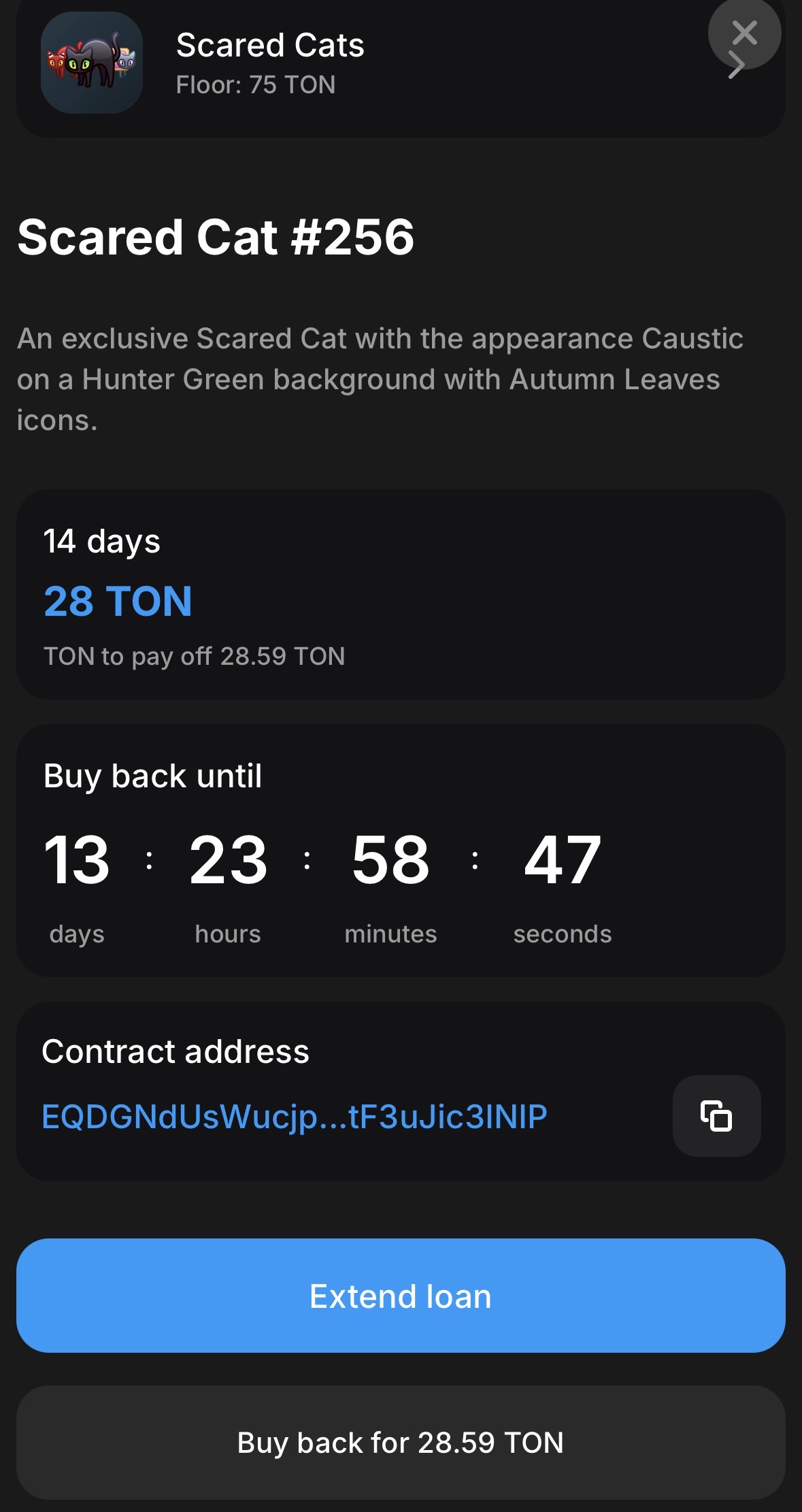
- you will be prompted to another page to extend the loan, while displaying how much it’s going to cost you

- Then you can sign the transaction & pay the fee (0,64 TON in this example)
💎 Return the Loan & get your Collateral back
Now that it’s time to return the Loan back:
- go to the “Pledged” Tab again & select your NFT
Then simply click “Buy back for 28,59 TON” & then “Confirm” in your Wallet
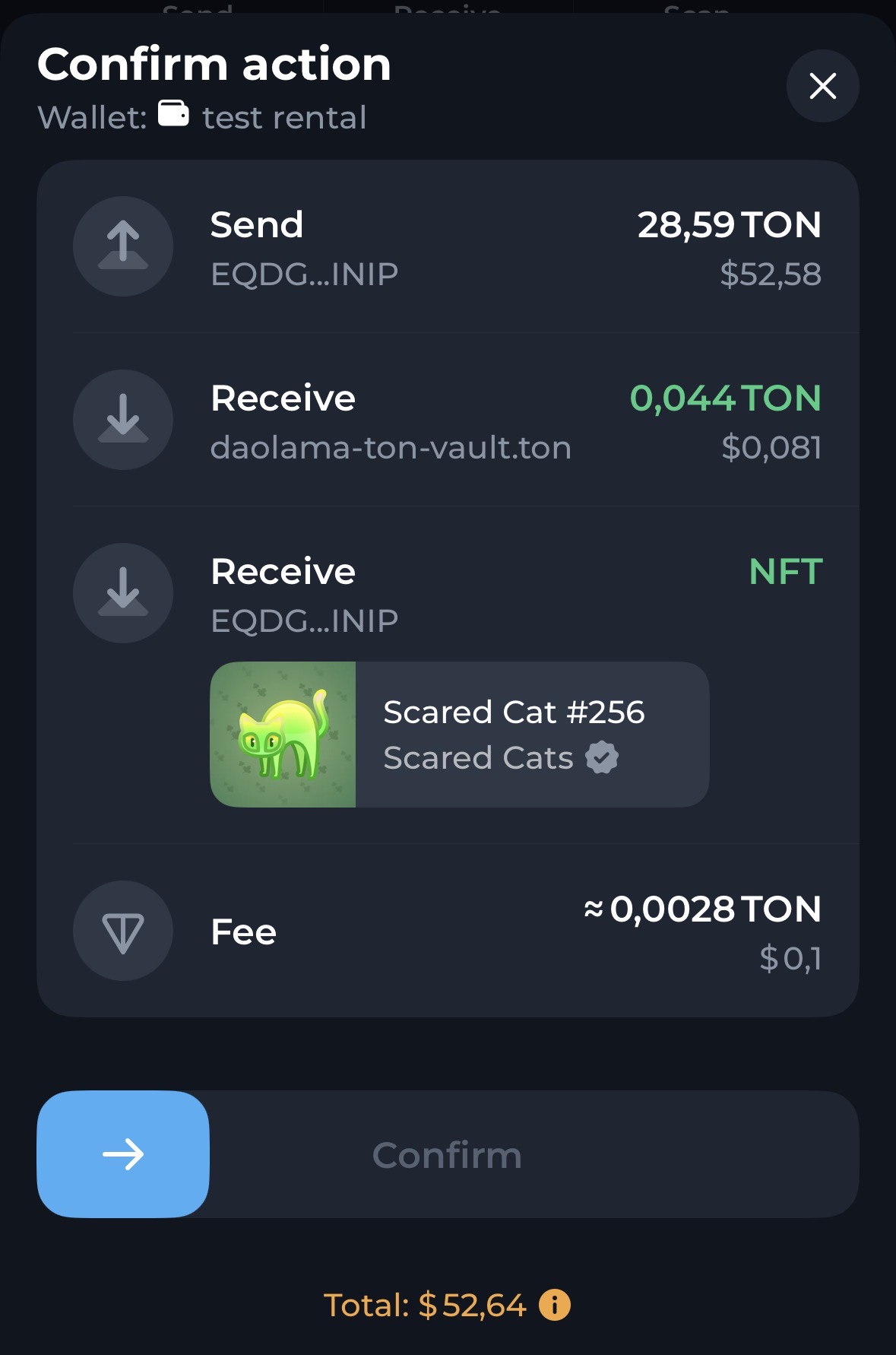
Congratulations, you now have received your NFT back to your wallet.
💎 The End
Thank you for reading. In case you have more questions -> visit the FAQ section on Daolama website & have fun exploring.
In case you would love to learn more about how to start with NFTs on TON, check out this thread.

Disclaimer: This content is for educational purposes only and does not constitute financial, investment, or legal advice nor does it constitute an offer to sell, a solicitation of an offer to buy, or a recommendation of any kind. DeFi protocols involve inherent risks, including smart contract vulnerabilities, impermanent loss, regulatory uncertainty, and potential loss of funds. If you are in any doubt as to any aspect of the content, you should obtain independent professional advice.