Some of the Git Key Concepts
Raymond | Compass
یه چندتا موضوع توی گیت بود برام درست جا نیوفتاده بودن تصمیم گرفتم یه خلاصه ازشون بزارم برای مقایسه با یه لینک برای توضیح کامل تر.
این پست رو به صورت تلگراف نوشتم برای اینکه اگه بعدا بازم به موضوع های مشابه برخوردم ادیتش کنم و خب تکنولوژیه و مرتب در حال تغییر شاید آپدیت لازم باشه.
Fetch vs. Pull
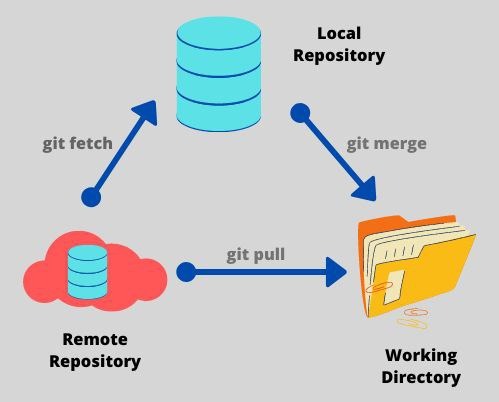
Fetch just downloads the objects and refs from a remote repository and normally updates the remote tracking branches. Git fetch is a safer alternative because it pulls in all the commits from your remote but doesn’t make any changes to your local files.
Pull, however, will not only download the changes, but also merges them - it is the combination of fetch and merge. Git pull is a more advanced action and it’s important to understand that you will be introducing changes and immediately applying them to your currently checked out branch.
pull = fetch + merge
HEAD vs. Master
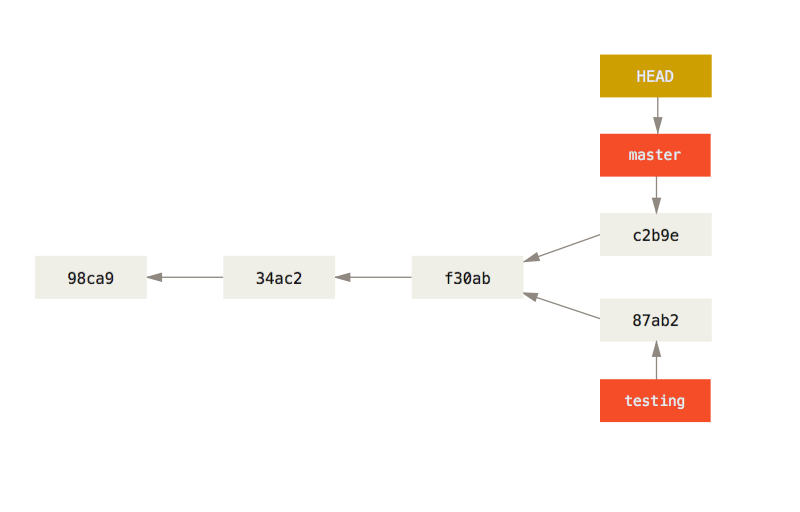
The default branch name in Git is master. As you start making commits, you’re given a master branch that points to the last commit you made. Every time you commit, the master branch pointer moves forward automatically.
How does Git know what branch you’re currently on? It keeps a special pointer called HEAD. The HEAD branch moves forward when a commit is made and also HEAD moves when you checkout.
ویدیو ضمیمه برای فرق HEAD و Detached HEAD (به طور کلی HEAD به یک branch اشاره میکنه و Detached HEAD به یک commit)
Fast forward vs. --no-ff
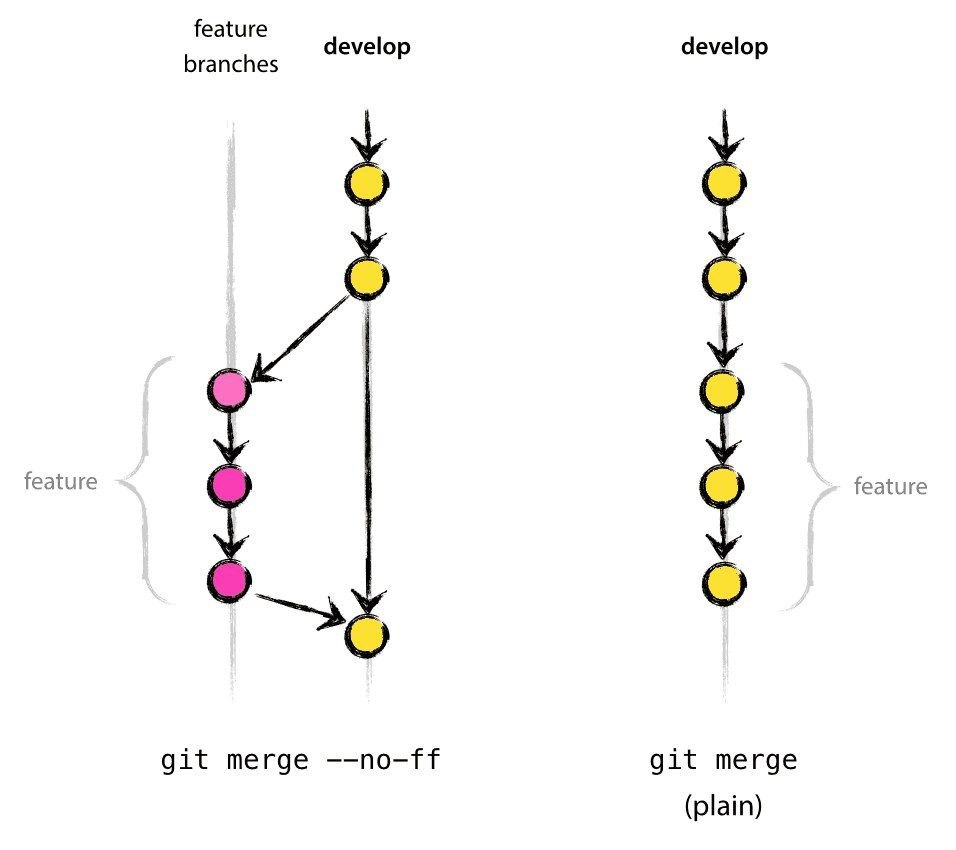
برای این یکی یه مثال جالب پیدا کردم اونو میذارم:
Merge with fast forward:
$ git log --graph --pretty='%Cred%h%Creset -%C(auto)%d%Creset %s %Cgreen(%cr) %C(bold blue)<%an>%Creset' --all

* f7f8e5d - (HEAD -> master, new-feature) commit c (12 minutes ago)
* 52db9e3 - commit b (12 minutes ago)
* c4244c9 - commit a (12 minutes ago)
* 2b19e95 - initial repo (12 minutes ago)
Merge with --no-ff flag (No fast forward):
$ git log --graph --pretty='%Cred%h%Creset -%C(auto)%d%Creset %s %Cgreen(%cr) %C(bold blue)<%an>%Creset' --all

*   0acabeb - (HEAD -> master) new-feature (14 seconds ago)
|\
| * 389934e - (new-feature) commit 3 (20 minutes ago)
| * 3dacbaf - commit 2 (20 minutes ago)
| * 4d403b2 - commit 1 (20 minutes ago)
|/
* a00eb72 - initial repo (20 minutes ago)
The --no-ff option is useful when you want to have a clear notion of your feature branch. So even if in the meantime no commits were made, FF is possible - you still want sometimes to have each commit in the mainline correspond to one feature. So you treat a feature branch with a bunch of commits as a single unit, and merge them as a single unit.
If you do not care about such thing - you could probably get away with FF whenever it is possible. Thus you will have more svn-like feeling of workflow.
The biggest difference between each strategy is the way that you will organize your history. As you can see, --no-ff creates an extra commit with "new-feature". Thus, you can easily check what is going on in your history and remove a new feature.Merge vs. Rebase
Git merge safeguards the histories of both the repositories. You can use the following merge command to merge your branch. Move to your main directory and then write these commands:
git checkout feature
git merge main
Or, you can write:
git merge feature main
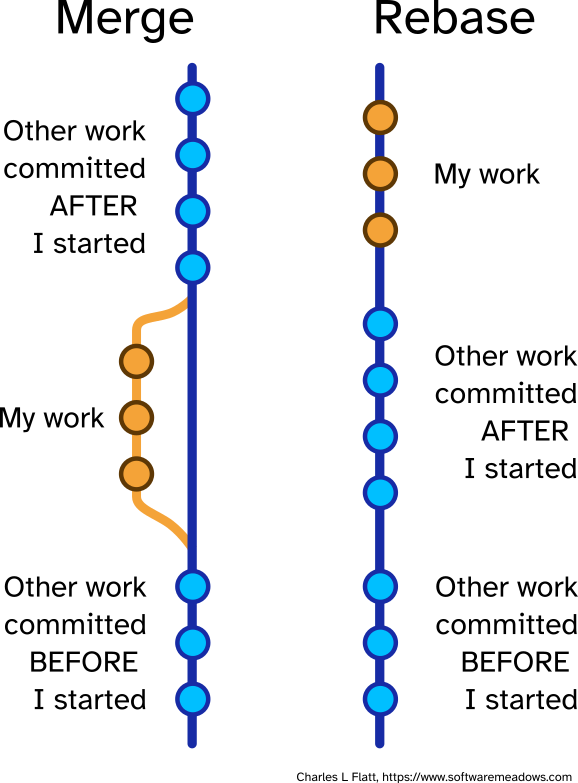
It basically, creates a new “feature commit”, safeguarding the history of both the branches and giving it a structure like this:
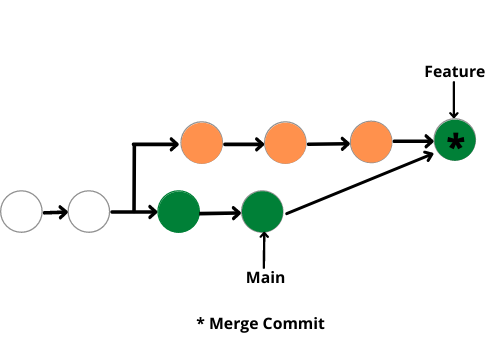
Merge is a non-destructive command. In this command, the existing branches are not changed in any way and thus it covers all the pitfalls or demerits of Git Rebase.
The alternative to git merge is the git rebase option. In this, we rebase the entire feature branch to merge it with the main branch. Follow the following commands to perform merge commit:
git rebase main
Git rebase actually rebases the feature branch and merges it with the main branch. In simple words, it moves the entire feature branch to the tip of the main branch. The pictorial representation looks a bit like this.
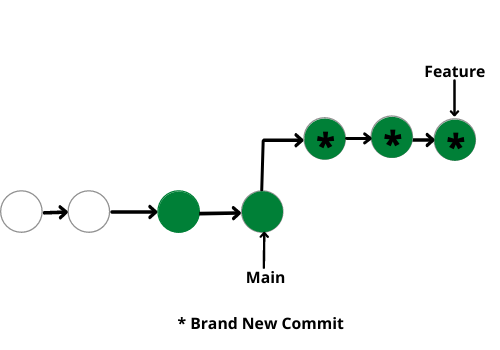
The major benefit of using git rebase is it provides a cleaner merge history. It works linearly, removing the unnecessary merge commits, unlike git merge. It makes it easier to move along the log history and understand the changes.یه
یه ویدیو جالب برای تفاوت merge و rebase با مثال عملی.