Sneaker Proxies: Running a Sneaker Bot on a Private IPv4 Pool
proxy serverSneaker proxies from a private pool give every bot task its own address, and the best http proxy list for a bot is plain IP:PORT lines from thousands of IPv4, refreshed every 15 minutes.
Sneaker proxies are the addresses a sneaker bot sends its traffic through, so that each task reaches the store from its own IP. A task is one attempt to buy one item in one size: the bot watches the product page, adds the item to the cart when stock appears and goes through checkout. A bot with 200 tasks on a home connection sends all of that from one address, and stores limit how many requests they accept from a single IP in a short window.
On a release morning the tasks start in the same second, the monitor polls the product every few seconds, and the shared address reaches the store limit before the drop even opens.
What are sneaker proxies inside a bot
In a bot, proxies live in a proxy list or proxy group: one address per line, loaded before the tasks start. Each task takes a line from the group and keeps that address for its whole session, from the first product request to the payment page. Most bots accept a plain IP:PORT line, and that is the format a WinGate list comes in, because access is tied to the IP of the machine that runs the bot.
The same list can feed two jobs. Checkout tasks hold one address each. Monitors, the part of the bot that refreshes product pages and stock data, take a new line from the rest of the list on every request, so the polling load spreads over many addresses.
Some bots and monitors take SOCKS5 lines instead. If you compare offers the way you would look for the best socks5 proxy provider, check that HTTP and SOCKS5 come on one access: WinGate serves both on the same addresses, so one list fits either setting.
Sneaker bot proxies: one address per task
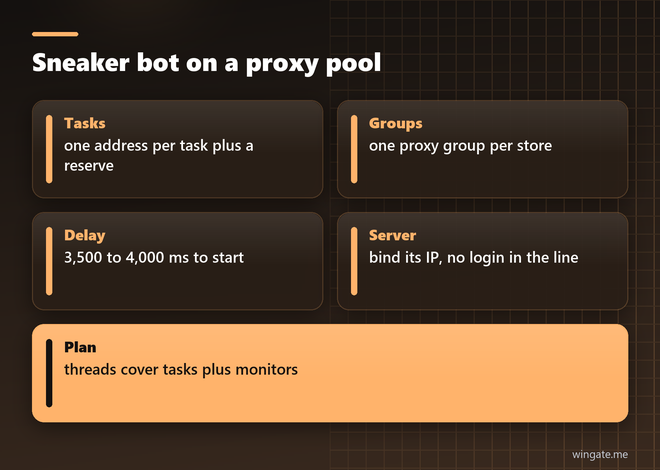
Bot guides start from one proxy per task, and that ratio is the simplest way to size a list. 100 tasks need 100 addresses plus a reserve to replace any line that times out during the release. The WinGate pool keeps 12,000 to 15,000 private IPv4 online during the day, spread over 3,000 to 5,000 networks, so a list of a few hundred lines per release is a small slice, and tasks in one group land on different subnets.
Group tasks by store. Each store gets its own proxy group, and tasks for one store never share an address with tasks for another. When one group starts returning errors, the log shows which store sent them, and you swap only that group.
Bots also set a monitor delay and a retry delay in milliseconds, and bot guides name 3,500 to 4,000 ms as a working start for most bots on a single site. A shorter delay means more requests per minute from each task, so lower it only after you add lines to the group.
Datacenter proxies for sneakers on a server
Many people run sneaker bots on a rented server placed near the store servers, since every millisecond between the click and the checkout request counts. Pool addresses on server networks suit that setup: the bot server reaches the pool over a fast link, and response times stay even through the release.
WinGate access works through IP binding. You add the server IP in the dashboard, and the pool accepts connections from it with no login in the proxy line. A plan can hold two bound IPs with the thread limit split between them, so a main server and a backup machine can both run tasks on one plan.
Threads on the plan equal open connections. A bot with 300 tasks and 20 monitor threads holds about 320 connections at the peak, which fits the 1,000 thread plan with room for retries. Several bots on two servers fit the 3,000 thread plan.
Python sneaker monitor through a proxy pool
A sneaker monitor checks product data on a schedule and reports when something changes. Many Shopify stores answer a request to /products/<handle>.js with JSON that lists the variants, and each variant carries an available flag. The sketch below polls a set of products through random pool addresses and prints the sizes that come back in stock.
import random, time, requests

LIST_URL = "your list link from the dashboard"
pool = requests.get(LIST_URL, timeout=20).text.split()
PRODUCTS = ["https://shop.example.com/products/runner-low-white.js",
            "https://shop.example.com/products/court-high-black.js"]
seen = {}

def get(url):
    for _ in range(3):
        p = "http://" + random.choice(pool)
        try:
            return requests.get(url, proxies={"http": p, "https": p}, timeout=8).json()
        except (requests.RequestException, ValueError):
            continue

while True:
    for url in PRODUCTS:
        data = get(url)
        if not data:
            continue
        for v in data["variants"]:
            if v["available"] and not seen.get(v["id"]):
                print("IN STOCK", data["title"], v["title"])
            seen[v["id"]] = v["available"]
        time.sleep(3.5 / len(PRODUCTS))
The script reads the list link once at start, so in a long run reload it every 15 minutes along with the pool. With 40 products and a 3.5 second cycle it sends about 41,000 requests an hour. Spread over 12,000 addresses, that is three or four requests per address per hour, while a single server IP would carry all 41,000.
To get alerts in a Discord channel, swap the print line for a POST to a Discord webhook URL with a short content field. The webhook call needs no proxy, because it goes to your own channel.
Cheap sneaker proxies: what you pay for
Sneaker proxy offers are often priced per address or per gigabyte, and both bills grow with the number of tasks. A pool priced by threads works another way: WinGate access costs $15 for a day with up to 1,000 threads, $75 for a week and $190 for a month. With 3,000 threads the prices are $30, $180 and $600. Traffic inside the plan is not metered, so monitors that load full product pages with images leave the bill as it was.
For a single release the day plan is enough: buy it on the morning of the drop, bind the server IP and load the list. For a season of releases the month plan comes out cheaper per day, and one account can hold any number of packages if you split stores or bots between plans.
Buy sneaker proxies and test them before a release
Run the free test a day before the release on the same store with the same bot settings. It lasts up to 2 hours on the 1,000 thread plan. Load the list into a proxy group, start monitors at your usual delay on products that are in stock now, and watch two numbers in the bot log: the share of 200 responses and the response time.
If most answers come back with code 200 and the response time holds as you add tasks, keep those settings for release day. Payment is in crypto and the pool opens right after it, so the plan can be bought a few hours before the drop.