Snatcher: Finding and Stealing Someone Else's AirTag With a Plain Android Phone
greyr0ad
The anti-stalker feature that works beautifully for a thief
Picture this. You set your bag down for a second, turn to grab a coffee, and it's gone. There's an AirTag inside, and you know it's chirping away somewhere in the thief's jacket pocket - except the thief has no idea. Now flip that around. The thief can make your AirTag chirp on command, on purpose, to hear exactly where your bag sits among hundreds of others on a crowded subway. And all he needs is a phone in his pocket.
Let's start with what we're even talking about. Apple Find My is a network of roughly a billion Apple devices, launched in 2019, built to help you recover lost things. The mechanism: your lost AirTag quietly screams "I'm here" over Bluetooth, any passing stranger's Apple device catches that signal, encrypts its own location, and uploads a report to iCloud. Only you can decrypt it - proper end-to-end encryption. The location is protected.
But there's a separate feature designed specifically against stalking, for when someone slips an AirTag into your stuff to track you. Apple lets any random bystander connect to a "lost" accessory and make it play a sound, so a victim can find the hidden tracker. A noble idea. And that's precisely what researchers from HKUST turned against the owner - a hidden digital signal becomes an audible, physical homing beacon for whoever wants to steal it.

To me the most valuable thing here isn't the paradox itself, it's that the whole attack runs on a stock Android phone with zero specialized hardware. No SDR (Software Defined Radio - an expensive box for intercepting and generating radio signals), no directional antennas, and, deliciously, no iPhone. That practicality on commodity gear is what makes Snatcher a real threat rather than a theoretical exercise about protocol design. The overall attack model (Figure 1) is laid out as three escalating levels, and I'll take them apart one by one.

One GATT connect, and the AirTag chirps (from any hardware)
Start with the simplest level, what the authors call Level 1. The idea is to force a lost AirTag or AirPods to chirp on command, then walk toward the sound.
To follow the mechanics you need to know what GATT is. Bluetooth Low Energy (BLE - the power-sipping version of Bluetooth for gadgets) organizes communication through GATT (Generic Attribute Profile), a protocol where a device exposes a set of "characteristics" to the outside world - essentially memory cells you can read from and write to. Want the device to do something? Find the right characteristic and write a command into it.
Playing a sound on someone else's AirTag is, technically, a plain GATT flow, nothing exotic. Three steps and you're done:
- Passive BLE scan filtered for Find My packets - hunting the airwaves for lost accessories specifically
- Connect to an accessory in the Separated state (that's the "lost" one)
- Write the command into the right characteristic, and the device chirps
Snatcher ships as a single Android app. The scan is set to SCAN_MODE_LOW_LATENCY via Android's standard Bluetooth API - the most aggressive scanning mode, a battery hog, but it catches advertising packets as fast as possible. The sound trigger itself reuses the anti-stalking API from AirGuard, an open-source app originally built to protect people from being tracked by someone else's tracker. So code written to defend gets repurposed to attack, and it works without a single edit.
The app's logic maps neatly onto pseudocode. Quick disclaimer: this is my illustrative reconstruction of the three steps, not a listing from the paper - the authors never published characteristic and field names, so the labels here are made up:
// discovery: filter BLE for Find My
scanBLE(SCAN_MODE_LOW_LATENCY)
  .filter(pkt -> pkt.companyID == 0x004C   // it's Apple
              && pkt.appleType == 0x12)     // Find My, Separated (Lost)

// sound trigger (simplified)
device = connectGATT(target)
device.discoverServices()
device.writePlaySoundCommand()   // AirTag chirps
The neat part here is that the sound trigger is device-agnostic - the sender's hardware makes no difference whatsoever. The authors ran the command from four different devices, same result every time. Google Pixel 7, OPPO Reno 10, Huawei Nova 12s, and an ESP32-WROVER-E board - all four successfully trigger a sound on both AirTag and AirPods. For the ESP32 the authors even released a dedicated firmware, esp32_sound_maker, that remotely plays sounds on other people's accessories. A plain microcontroller making an AirTag chirp)))

The trick fails on iPhone and Apple Watch, though - you get back a Connection refused, or the command just gets ignored. An iPhone in the lost state doesn't play the sound game.
Now for range. The sound command itself triggers over GATT out to a whopping 80 meters, but that's not much use at that distance: the acoustic signal drops below 40 dB past 30 meters and drowns in background noise. On top of that, beyond 60 meters the connection setup time grows exponentially - up to 7.5 seconds per connect - which makes the "walk-chirp-listen" iterative navigation painfully slow.
Hence the success numbers for acoustic navigation. In a quiet office the system holds steady: around 92% success at 10 meters, roughly 86% at 20, still 85% at 30. In a noisy cafeteria everything collapses with distance - 91% at 10 meters, 80% at 20, and a crash to 20% at 30, because the AirTag chirp simply gets lost in the hum of voices. File this away as the baseline picture: accessories chirp for anyone who asks, with no authentication whatsoever, but the acoustics only work up close.
Three cracks in the Find My foundation
Before climbing the attack levels further, it's worth unpacking why any of this is possible at all. The authors identify three structural vulnerabilities, and all three grow from the same root - the very conflict of goals we'll come back to at the end. Those goals pull the architecture in different directions, and cracks form where they meet. First, the cracks themselves.
To be concrete, look at the BLE frame format that a lost device continuously broadcasts. Inside the advertising packet sits a Manufacturer Specific Data block, and in order:
- Company ID (0x004C) - the manufacturer identifier, literally "this is Apple"
- Find My Type (0x12) - an explicit "I'm a Find My packet" flag; combined with the full public key it means the Separated state
- Status Byte - fine-grained device info, lets you tell an AirTag apart from, say, an iPhone
- Rotating public key - the one the Finder uses to encrypt the location
The first vulnerability is the open discovery beacon. The location in the reports is encrypted, no argument there, but the very fact that a device is lost gets broadcast in the clear. Type 0x12 is static, not obfuscated in any way. And that breaks a basic principle: hide not just the contents, but the existence of a valuable target. The open 0x12 lets a thief instantly filter the interesting target out of thousands of background Bluetooth devices around him - no need to iterate through everything and try connecting, just catch the flag in the advertising packet. The needle lights itself up in the haystack.
The second vulnerability is the unauthenticated sound trigger, that acoustic side channel from the previous section.
The third is MAC rotation that's far too infrequent. The MAC here works as a temporary identifier, and Apple rotates it so nobody can track a device for long. The problem is the intervals. On accessories like AirTag and AirPods Pro the address changes roughly once every 24 hours (the refresh happens at 4 a.m.), on iPhone it's fixed at 15 minutes, on Apple Watch it drifts in a 19-36 minute range. Twenty-four hours is, to put it mildly, a lot. The identifier stays stable across the entire duration of any conceivable theft, giving the thief a calm window to watch the signal gradient and close in without worrying that the target might suddenly "vanish."

Now the numbers on how quickly an item becomes vulnerable. The authors measured two parameters of the transition into the Separated state across four scenarios - office, subway, mall, cafeteria. The BLE connection drops at 11-19 meters, stably across all four settings (60 trials: 4 scenarios × 3 devices × 5 runs). And the timeout before the transition to Separated turned out frighteningly short (30 trials: 3 devices × 10 runs): AirTag - 12.82 minutes (spread ±3.16), AirPods - 8.93 minutes, but with a huge standard deviation of ±6.68, meaning anywhere from a couple of minutes to nearly twenty. Apple Watch is a mere 0.21 minutes (±0.04), about 13 seconds. Step fifteen meters from your table, get distracted for ten minutes, and your bag is already in a vulnerable state, broadcasting to the world that it's been abandoned. A typical theft fits inside those minutes with room to spare.
When the AirTag stays silent: RSSI plus steps in your pocket
Fine, accessories chirp. But what's a thief to do with an iPhone or Apple Watch that answer the sound command with a polite refusal? This is where Level 2 begins - pure passive navigation - and this, to me, is where the engineering gets genuinely beautiful.
Since the device stays silent, one data source remains: the BLE advertisements it keeps broadcasting anyway. More precisely, the RSSI of those packets. RSSI (Received Signal Strength Indicator) is a measure of received signal power - roughly, how loudly the thief's phone hears the target. Closer means louder. The logic is simple: walk toward where RSSI grows. The catch is that RSSI is an extremely noisy quantity, jumping around from reflections, walls, and people, so naively chasing the instantaneous peak means staggering side to side.
The authors' idea is to combine RSSI with the thief's own motion. The phone in his hand has an IMU (Inertial Measurement Unit - a pack of inertial sensors: accelerometer, gyroscope, magnetometer), and through Pedestrian Dead Reckoning (PDR - a method for reconstructing a pedestrian's trajectory from steps and turns, no GPS involved) you can recover where and how the person walked. Now you have a map: where you were and what RSSI you caught there. From that you can build a physical gradient ascent - literally walk toward rising signal.
The key trick is fusing a short-term and a long-term trend via inverse-variance weighting. Sounds scary, the idea is simple. There are two direction estimators: a short one (reacts to the last 3-5 meters, nimble but jittery) and a long one (smooths the whole path, stable but sluggish on turns). Inverse-variance weighting mixes them by confidence: the wider the spread of an estimate, the less you trust it. Early on there's little data, so the short-term trend dominates; once a trajectory accumulates, the system smoothly hands over to the stable long-term one. No manual tuning.
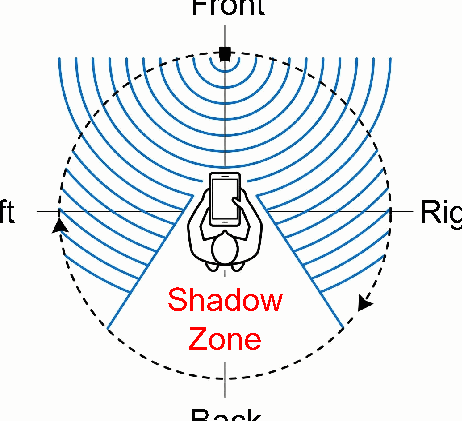
And one more physical hack I particularly love - Scan and Spin. A human torso is wider than the acoustic wavelength from an AirTag, so the body works as a screen, casting a "shadow zone" behind it. By pressing the phone to his chest and turning, the thief turns himself into a directional antenna. As the body shadowing diagram in the paper shows (Figure 3), the effect is quite measurable: outdoors the signal behind drops 20-30 dB relative to the front, indoors 10-15 dB. The thief spins through four orientations (0°, 90°, 180°, 270°), compares the levels, and figures out the bearing to the target.
Now for how well this works against silent devices. The fused gradient holds 100% success out to 20 meters and 90% at 30 meters - against a pitiful 40% for the naive short-term method at the same distance. The gap is enormous: the naive method zigzags the thief around, the fused one holds a course. The price of going passive is the path. Because of the search loops, the thief takes longer distance-wise to close in on iPhone and Apple Watch: from a 30-meter start he covers 77.8 meters on average, with a path efficiency of just 0.44 (the ratio of the straight-line distance to the distance actually walked - closer to 1 is better). In time, though, RSSI navigation is actually faster than the acoustic approach - 150 seconds versus 202 for accessories, because there's no waiting for a chirp each round.

MAC rotation as decoration
Alright, someone will say, what if Apple just rotates the MAC more often - once every ten seconds instead of once a day? Seems like the obvious cure: the thief loses sight of the target, the identifier is always new, nothing left to track. Level 3 shows why that works worse than you'd hope.
Under fast rotation the broadcast channel turns into a mess of short-lived MACs - fragments, each alive for seconds, nothing continuous. But the authors apply spatial-temporal clustering and the whole defense falls apart. The algorithm has two phases.
The first is static profiling. The thief stands still and listens to the airwaves for about sixty seconds. Since he isn't moving, the distance to each device is constant, so each one has its own stable average RSSI - one sits at -60 dBm, another at -80. The authors fit a GMM (Gaussian Mixture Model - a statistical model that decomposes a mix of data into separate "bump" clusters) to the RSSI values and sort packets by device. Within each cluster they watch the moments of MAC change - when an old address "dies" and a new one is born - and compute the rotation period Trot. In effect, they learn the rhythm at which a given device repaints itself.
The second phase is dynamic stitching. The thief walks, the target's MAC changes, and when the old address disappears you have to guess which of the new ones is the same physical device. Policy 1: temporal alignment by Trot - look for the new address that appeared exactly when a rotation was expected. In most cases there's exactly one candidate. Policy 2 kicks in as a tie-breaker when there are several candidates: look at RSSI continuity - the MAC jumps abruptly while the physical signal is smooth, so the correct successor is the one whose RSSI best continues the previous trend.
To test this, the authors emulated an aggressive defense with a modified OpenHaystack firmware on an ESP32 (esp32_airtag_mac_rotation) with a configurable rotation period of 10-60 seconds. The results are painful for the defender: at a 30-second period with two devices, clustering accuracy exceeds 98%, and even at the most aggressive 10 seconds it still holds around 80%. Even when the difficulty rises to three co-located devices, accuracy dips only slightly and stays above 80% for periods from 30 seconds up. So even rotating the MAC six times faster than a traffic light changes, the algorithm still stitches the fragments back into one continuous trajectory. MAC rotation in this setup works more like decoration)))
There's a place to trip, though. Clustering accuracy isn't the same as navigation success. With two devices the success rate of homing in on the target holds 80% at 30 meters, but with three co-located devices it drops to 20% - a ping-pong sets in where one wrong stitch drags the thief toward the wrong target, errors pile up, and he bounces between three signals. The one bit of good news for an honest person: three lost Apple devices in one spot is rare, and BLE doesn't reach far anyway.
What to fix, and why it's awkward
The authors propose three countermeasures to Apple, and the funny part is that each one strikes at the very goal the vulnerability exists to serve.
The first: the device itself decides when to chirp, based on IMU data. The logic: a lost item usually lies still, and if someone's carrying it around, that's possibly stalking, so that's when to chirp. Autonomous sound decision kills the acoustic side channel, but at the same time it partially breaks the original anti-stalking feature, the whole reason the sound was allowed to trigger without authentication in the first place.
The second: faster MAC rotation. It forces the thief to pin an identity from fewer RSSI samples per MAC, which hurts clustering accuracy. But as we already know, even aggressive rotation turned out to be insufficient defense, and rotating even more often runs into power draw and RF load.
The third: unfixed BLE advertising power and interval - floating power and packet cadence. Artificial signal variance makes both the thief's spatial (RSSI) and temporal measurements fundamentally unstable, undermining RSSI-IMU navigation. The three countermeasures are orthogonal and together give decent protection - but each sacrifices something: convenience, anti-stalking, or battery life.
And here's where the thread running through the whole story ties together. Search convenience, anti-stalking protection, and the physical security of the item pull the Find My architecture in three different directions, and any patch on one front opens a gap on another. An anti-tracking feature can't be simultaneously frictionless for the victim and unavailable to the thief - it's the same button.
The main danger, as far as I'm concerned, is still the accessibility of the build I opened with.
To the authors' credit, the public Snatcher repository is deliberately trimmed: it holds only discovery and sound trigger plus the ESP32 firmwares for emulation, while the navigation modules - the sensor fusion and clustering - are cut out, so nobody can assemble a full theft tool out of the box. Discovery they gave away; the path to the target they kept. A reasonable compromise - though, honestly, the most valuable parts of the work are exactly the pieces they cut)))
Research reference: https://arxiv.org/abs/2606.21067