Roam App enables $ROAM Payment Feature
Summary:
Roam App now supports payments using its native token, $ROAM. Users can use $ROAM to purchase eSIM packages, top up balances, or unlock other prepaid services. Payments are facilitated via the Pelago payment gateway. The system automatically converts the required token amount based on real-time exchange rates to ensure a smooth, secure payment experience—and to further enhance $ROAM’s utility within the ecosystem.
Notes:
1. Currently, $ROAM payment is only supported on the BSC (Binance Smart Chain).
2. Any amount of $ROAM exceeding the specified amount cannot be refunded or returned to the account.
How to Use:
1. Initiate Payment Flow
● Within the Roam App, choose to top up your balance or purchase a plan to access the payment page.
2. Select Payment Method
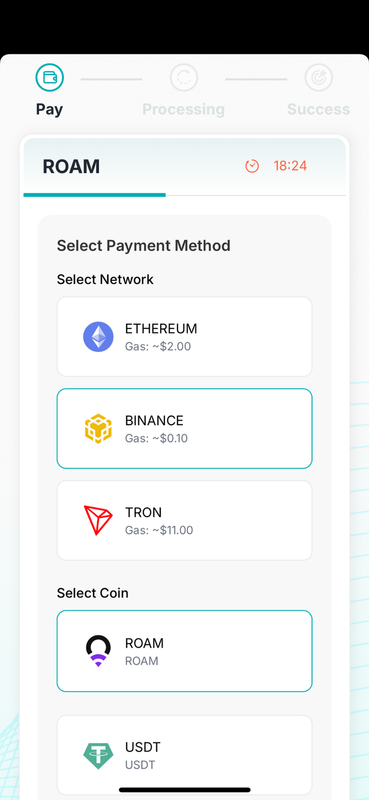
● Choose Pelago as your payment option and click "Check Out" to redirect to Pelago’s payment interface.
● Under the network options, select Binance, then choose $ROAM as the payment token.
3. Real-Time Rate Conversion
● The system calculates how much $ROAM corresponds to the required amount (e.g., in USD) based on up-to-date exchange rates, and presents this to the user for confirmation.
4. Confirm the Payment
● When you click “Continue”, Pelago generates a receiving address.
● You must send exactly the specified amount of $ROAM to that address within the prescribed time frame. (Again, any excess $ROAM will not be refunded or credited back.)
5. On-Chain Transaction Confirmation
● After the transaction completes, you’ll be automatically directed to a payment success page.
● If the transaction fails, an error message will appear, and you may try again.
6. View Payment History
● Users can review payment details—including transaction content, hash, timestamp, and status—in the transaction history section of the Roam App.