Resource Management
https://medium.com/aws-in-plain-english/chapter-3-resource-management-568af7ef673a
Resource Management Introduction
In kubernetes, all content is abstracted as resources, and users need to manage kubernetes by operating resources.
Kubernetes is a cluster system. Users can deploy various services in the cluster. The so-called deployment service runs a container in the Kubernetes cluster and runs the specified program.
The minimum management unit of Kubernetes is a pod, not a container, so containers can only be placed in Pod. Kubernetes generally does not directly manage Pod but manages Pod through the Pod controller.
After the Pod can provide services, you need to consider how to access the services in the Pod. Kubernetes provides the Service resource to implement this function.
Of course, if the data of the program in the Pod needs to be persisted, Kubernetes also provides various storage systems.
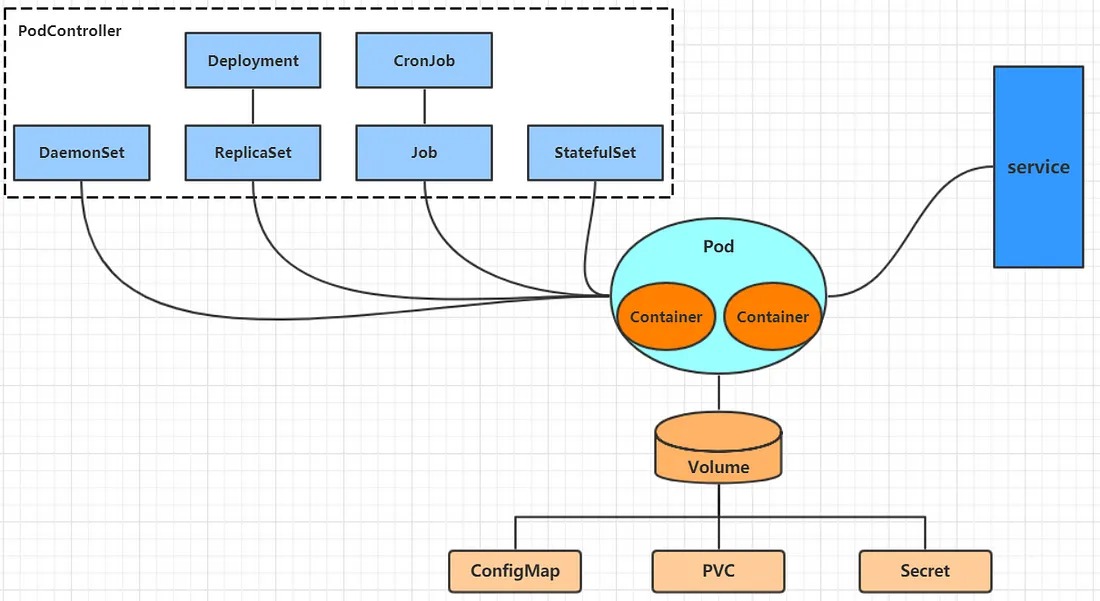
The core of learning Kubernetes is to learn how to operate various resources such as Pod, Pod controller, Service, and Storage on the cluster.
YAML Language Introduction
YAML is a markup language similar to XML and JSON. It emphasizes data as the center, not the identification language. Therefore, the definition of YAML itself is relatively simple, and it is called “a humanized data format language”.
<heima>
 <age>15</age>
 <address>Beijing</address>
</heima>
heima:
  age: 15
  address: Beijing
YAML syntax is relatively simple, mainly the following:
- Case sensitive
- Use indentation to represent hierarchical relationships
- Indentation is not allowed to use tabs, only spaces are allowed (limited to low versions)
- The number of spaces indented is not important, as long as the elements of the same level are left-aligned
- ‘#’ indicates a comment
YAML supports the following data types:
- Scalar: a single, indivisible value
- Object: a collection of key-value pairs, also known as mapping/hash/dictionary
- Array: a group of values arranged in order, also known as a sequence/list
# Scalar, refers to a simple value, string, boolean, integer, floating point number, Null, time, date
# 1 Boolean type
c1: true (or True)
# 2 Integer type
c2: 234
# 3 Floating point type
c3: 3.14
# 4 null type
c4: ~  # Use ~ to represent null
# 5 Date type
c5: 2018-02-17    # The date must use the ISO 8601 format, that is, yyyy-MM-dd
# 6 Time type
c6: 2018-02-17T15:02:31+08:00  # The time uses the ISO 8601 format, the time and date are connected by T, and finally + is used to represent the time zone
# 7 String type
c7: heima     # Simple writing, write directly. If there are special characters in the string, you must use double quotes or single quotes to wrap
c8: line1
    line2     # If the string is too long, it can be divided into multiple lines, and each line will be converted into a space
# Object
# Form 1 (recommended):
heima:
  age: 15
  address: Beijing
# Form 2 (understand):
heima: {age: 15,address: Beijing}
# Array
# Form 1 (recommended):
address:
  - Shunyi
  - Changping
# Form 2 (understand):
address: [Shunyi, Changping]
Resource management method
- Imperative object management: directly use commands to operate Kubernetes resources
kubectl run nginx-pod --image=nginx:1.17.1 --port=80
- Imperative object configuration: operate Kubernetes resources through command configuration and configuration files
kubectl create/patch -f nginx-pod.yaml
- Declarative object configuration: operate Kubernetes resources through apply command and configuration files
kubectl apply -f nginx-pod.yaml

Imperative object management
kubectl command
kubectl is the command-line tool for the Kubernetes cluster, which can manage the cluster itself and install and deploy containerized applications on the cluster. The syntax of the kubectl command is as follows:
kubectl [command] [type] [name] [flags]
comand: specifies the operation to be performed on the resource, such as create, get, delete
type: specifies the resource type, such as deployment, pod, service
name: specifies the name of the resource, and the name is case-sensitive
flags: specifies additional optional parameters
# View all pods
kubectl get pod

# View a pod
kubectl get pod pod_name

# View a pod, display the result in yaml format
kubectl get pod pod_name -o yaml
Resource Type
All content in Kubernetes is abstracted as a resource, which can be viewed through the following command:
kubectl api-resources
The frequently used resources are as follows:
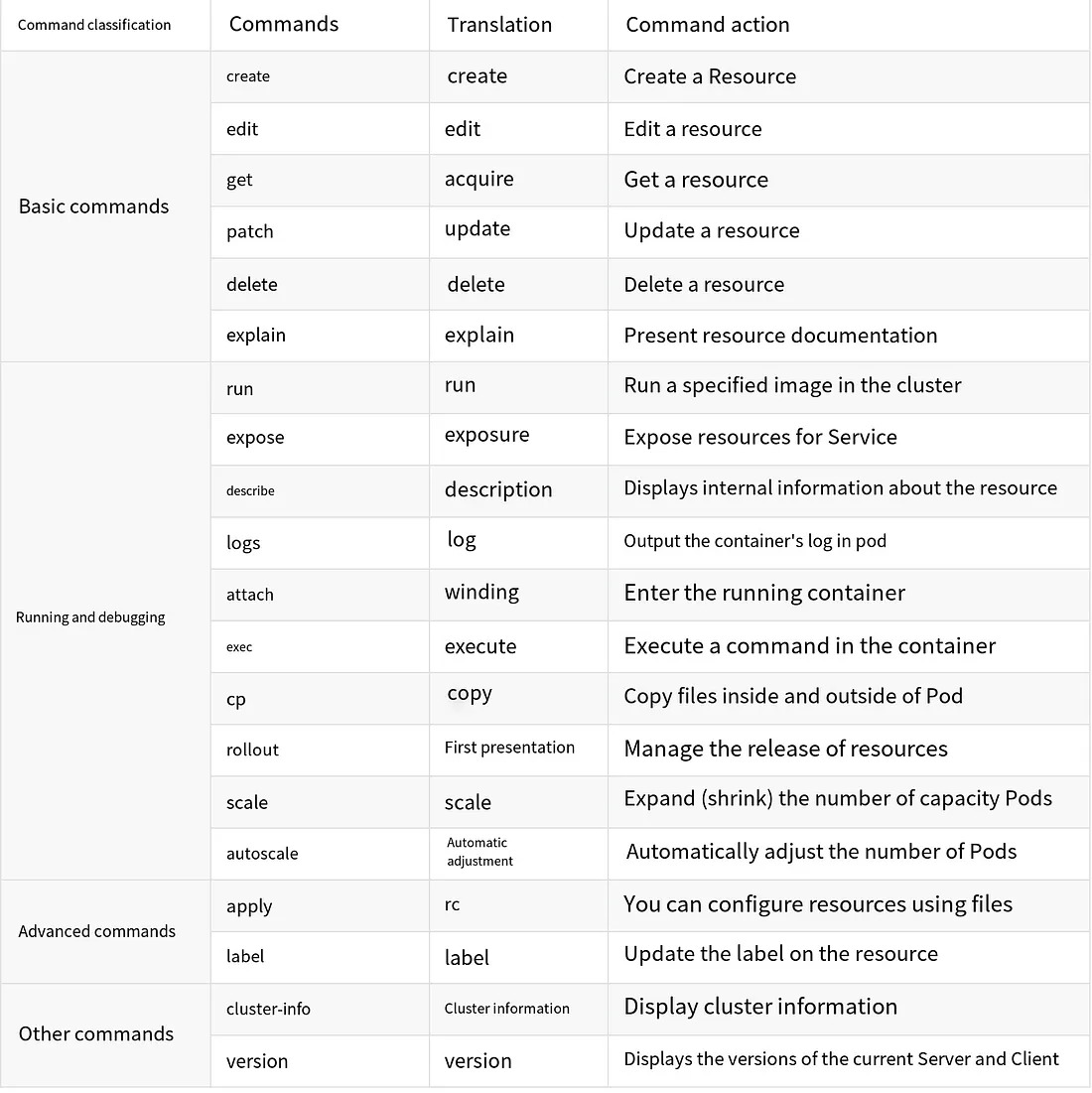
Here’s a simple demonstration of how to create and delete a namespace and a pod using commands:
# Create a namespace
[root@master ~]# kubectl create namespace dev
namespace/dev created

# Get the namespace
[root@master ~]# kubectl get ns
NAME              STATUS   AGE
default           Active   21h
dev               Active   21s
kube-node-lease   Active   21h
kube-public       Active   21h
kube-system       Active   21h

# Create and run an nginx pod in the namespace
[root@master ~]# kubectl run pod --image=nginx -n dev
kubectl run --generator=deployment/apps.v1 is DEPRECATED and will be removed in a future version. Use kubectl run --generator=run-pod/v1 or kubectl create instead.
deployment.apps/pod created

# View the newly created pod
[root@master ~]# kubectl get pod -n dev
NAME                   READY   STATUS    RESTARTS   AGE
pod-864f9875b9-pcw7x   1/1     Running   0          21s

# Delete the specified pod
[root@master ~]# kubectl delete pod pod-864f9875b9-pcw7x
pod "pod-864f9875b9-pcw7x" deleted

# Delete the specified namespace
[root@master ~]# kubectl delete ns dev
namespace "dev" deleted
Imperative Object Configuration
Imperative object configuration is the process of using commands in combination with configuration files to manipulate Kubernetes resources.
1.Create an nginxpod.yaml file with the following content:
apiVersion: v1
kind: Namespace
metadata:
  name: dev

---

apiVersion: v1
kind: Pod
metadata:
  name: nginxpod
  namespace: dev
spec:
  containers:
  - name: nginx-containers
    image: nginx:1.17.1
2. Execute the create command to create the resources:
[root@master ~]# kubectl create -f nginxpod.yaml
namespace/dev created
pod/nginxpod created
At this point, two resource objects have been created, a namespace and a pod.
3. Execute the get command to view the resources:
[root@master ~]#  kubectl get -f nginxpod.yaml
NAME            STATUS   AGE
namespace/dev   Active   18s

NAME            READY   STATUS    RESTARTS   AGE
pod/nginxpod    1/1     Running   0          17s
This displays information about the two resource objects.
4. Execute the delete command to remove the resources:
[root@master ~]# kubectl delete -f nginxpod.yaml
namespace "dev" deleted
pod "nginxpod" deleted
Now, both resource objects have been deleted.
Conclusion:
Imperative object configuration can be simply considered as a combination of commands and YAML configuration files (which contain various parameters required by the commands).
Declarative Object Configuration
Declarative object configuration is quite similar to imperative object configuration, but it only has one command: apply.
# First, execute `kubectl apply -f yaml` file, and the resources are created
[root@master ~]#  kubectl apply -f nginxpod.yaml
namespace/dev created
pod/nginxpod created

# Execute `kubectl apply -f yaml` file again, and the resources remain unchanged
[root@master ~]#  kubectl apply -f nginxpod.yaml
namespace/dev unchanged
pod/nginxpod unchanged
Conclusion:
In essence, declarative object configuration uses apply to describe the final state of a resource (defined in the YAML file). When using apply to operate resources:
- If the resource does not exist, it will be created, similar to
kubectl create. - If the resource already exists, it will be updated, similar to
kubectl patch.
Extension: Can kubectl be run on a node?kubectl needs to be configured to run, and its configuration file is located in $HOME/.kube. To run the command on a node, you need to copy the .kube file from the master to the node. To do this, execute the following command on the master node:
scp -r HOME/.kube node1: HOME/
Recommended usage: How should the three methods be used?
Create/Update resources: Use declarative object configuration: kubectl apply -f XXX.yaml.
Delete resources: Use imperative object configuration: kubectl delete -f XXX.yaml.
Query resources: Use imperative object management: kubectl get(describe) resource_name.