Quick guide Telegram payments through Redsys
RedsysThis quick guide will teach you how to claim a token to process payments in Telegram with Redsys as processor.
This guide understand you own a Telegram bot and previous knowledge of how to operate with it as a business. Otherwise, check the Telegram documentation on it (https://core.telegram.org/bots/payments/).
Our steps to follow:
Get a Virtual POS with Redsys:
If you already have a Virtual POS, you can skip to the next step (Configure Telegram in the admin portal).
To begin with, you have to contact your bank and ask them to create a Virtual POS, since the creation of every single Redsys virtual POS depends on them.
Any commissions applied your Virtual POS will depend on your bank.
Your bank will give you a merchant number (fuc) and a terminal number for this merchant, as well as some credentials to enter the admin portal. A merchant can have more than one terminal.
Set Telegram up in the admin portal:
The Redsys admin portal is Canales (https://canales.redsys.es/portal/), where, in addition to Telegram, you can configure other payment methods.
Once you have obtained the Virtual POS (or if you already had one), go to the configuration section of your business and select the button to edit its payment methods.
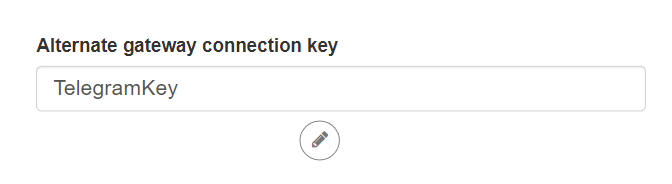
Within this section, you will find an area to fill your alternative gateway connection password, this password will not be exclusive to Telegram. Make sure it's safe. This key will be required later.
Once finished, we will press the Save changes button.

Request payment provider token in Telegram:
From the BotFather bot (https://telegram.me/BotFather/), you have to access your bot settings, choose the Payments section, and search for Redsys within the list of providers.

Once selected, the payment bot will ask for our merchant number, our terminal number, and the password we previously setted up.
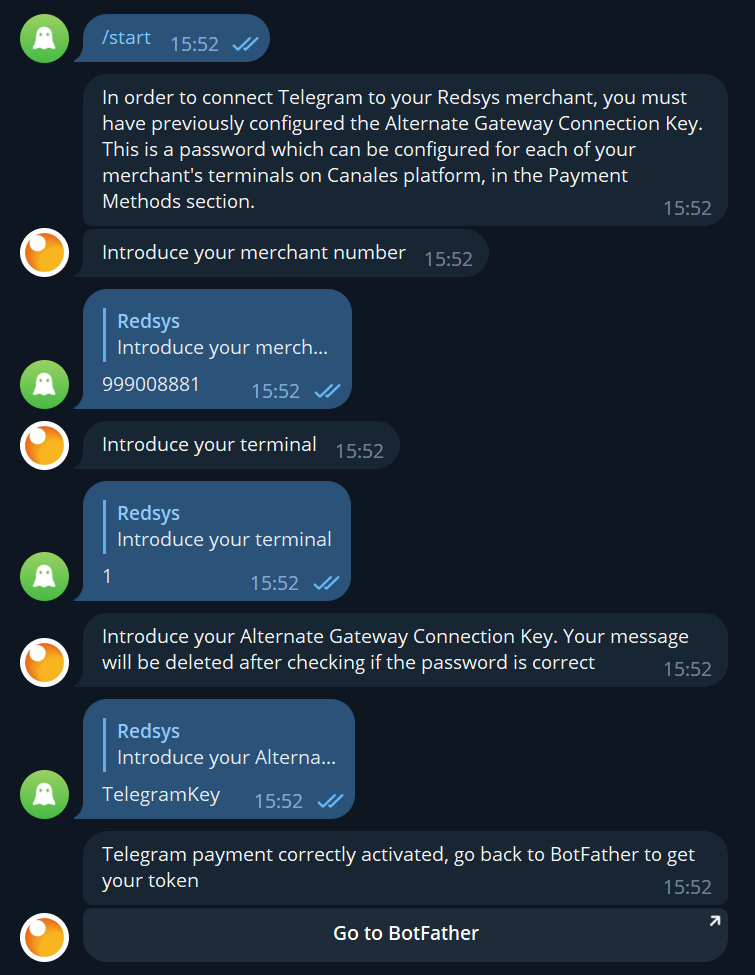
The message in which we write our alternative gateway connection password will be deleted within a few seconds.
If we receive the success message, we will already have our token in the payment configuration of our bot in BotFather.
