QuboScanner Documentation 23/09/2019
@fregno & zreplyBasics
QuboScanner is a minecraft server scanner usable from the command line. It is completely written in java and implements various functions and fixes that other free software does not have.
How to run
As you know to run a java executable you have to give the command: java -jar nameOfTheJar.jar
QuboScanner is based on the initial arguments, so before sending it is necessary to enter the following information: initial ip (such as 164.132.200.0), final ip (such as 164.132.200.255), the port range (such as 25565-25577), the number of threads and the ping timeout.
Though it may seem long, you get used to it. Giving the command such as
java -jar quboScanner.jar 164.132.200.0 164.132.200.255 25565-25577 1500 500
the program will start searching for minecraft servers in the inserted range, for example from 164.132.200.0, 164.132.200.1 up to 164.132.200.255. For each ip is scanned every port within the required range (in our example 25565-25577 will be 25565,25566,25567 etc. .. until you get to 25577).
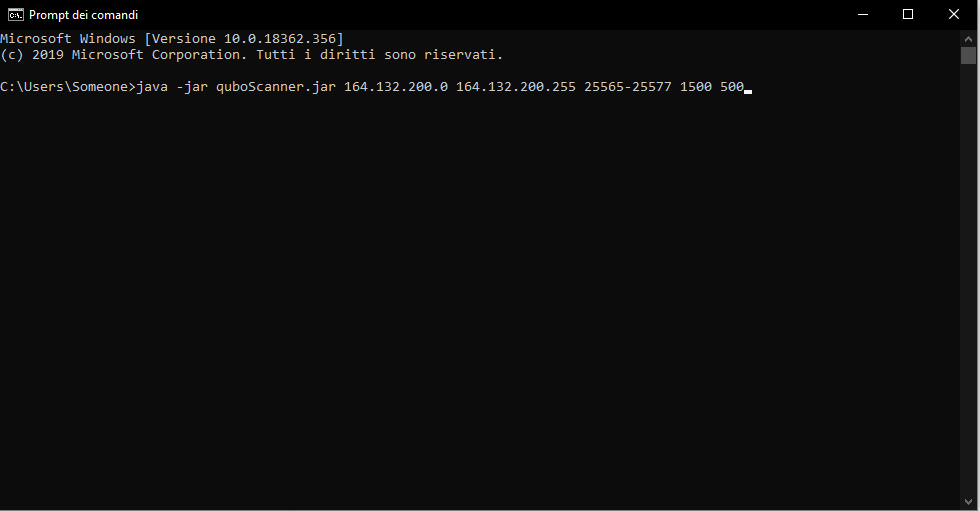
After doing this, make yourself comfortable with a nice bottle of beer and wait for the program to do its job.
Thread Option
It is good to explain the operation of the threads. In the above command "1500" is the maximum number of threads that the program can create. Every single thread deals with an ip:port, so it is easy to guess that by entering a larger number of threads the program will go faster. Well it's not that simple.
It's true that the more threads you work at the same time, the faster the program goes, but this also results in a higher consumption of CPU and internet bandwidth.
Moreover, the more threads you work at the same time, the greater the risk of skipping servers. This happens for various reasons, for example the internet bandwidth, now saturated, fails to ping within the timeout the server, so although the server exists is not displayed because it has not responded within the timeout
You will have to do some tests and determine the number of threads suitable for your connection and your CPU.
For the timeout instead usually just enter "500", value in milliseconds.
Arguments
The software implements some optional topics to vary its functionality.
The arguments must be typed after the timeout and are as follows:
-noping to skip the initial ping
-nooutput to prevent the scanner from writing the output text file
-all to scan even common ports (useful only for debugging purposes)

Commands
The program supports various commands that can be executed while the software is running. Among the most useful ones is "status" which shows how far the scanner has come, or "exit" to exit.
For the list of commands type "help" and press enter.
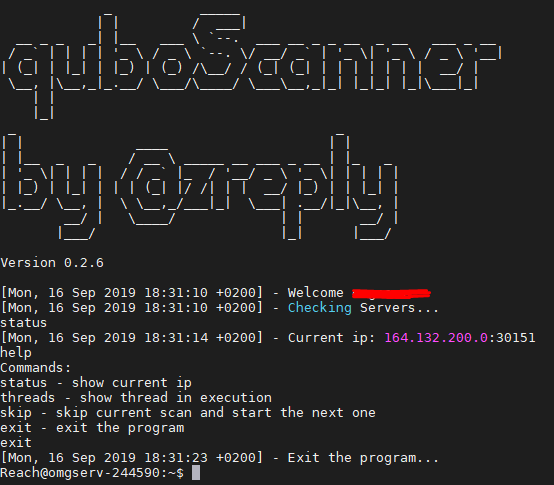
Ranges.txt
You can create a file called "ranges.txt" to put multiple commands at once.
The syntax of the file must be similar to the following one:
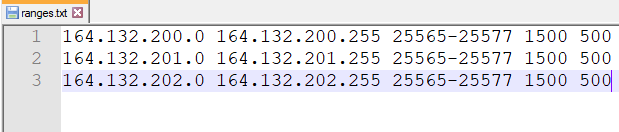
You can create a file called "ranges.txt" to put multiple commands at once.
The syntax of the file must be similar to the following one:
After doing this place the text file in the same folder as the executable quboscanner and start the program with:
java -jar quboscanner.jar -txt
If you want to skip the current operation just run the skip command
GUI implementation
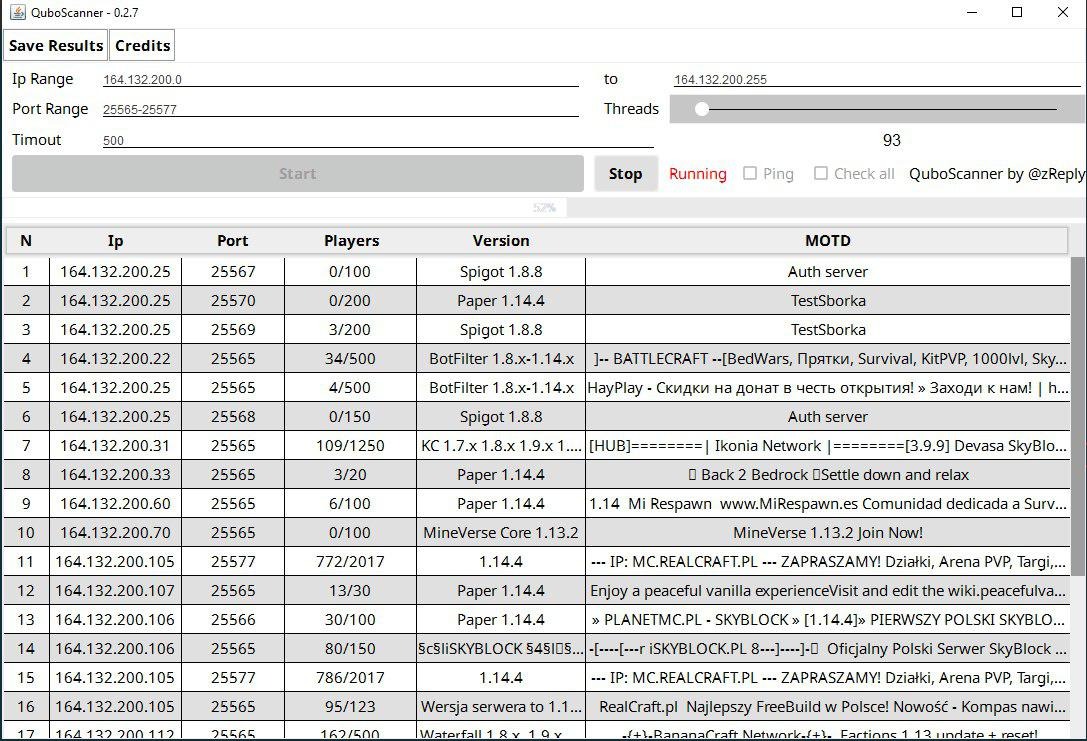
QuboScanner has implemented the GUI! Now windows users may use QuboScanner without any type of problem!
Contacts
Thanks again for buying my work, I appreciate it.