Push Button Security for Your GitHub Actions - HashiCorp Solutions Engineering Blog - Medium
HashiCorp Solutions Engineering Blog - MediumSecure your GitHub Action workflows with a push of a button in HCPVault
When building CI/CD pipelines, they usually require one or more credentials to access other systems. This leads to credentials being spread across multiple environments or repos, to be used by GitHub Actions. This could become a concern as the number of repos increases.
As your use of GitHub Actions scales, you’ll find it increasingly difficult to:
- Keep credentials up todate
- Manage secret rotation and versioning
- Ensure that the principle of least privilege is inplace
- Work around GitHublimits.
This is where HashiCorp Vault helps. HashiCorp Vault becomes the identity broker and solves this challenge.
However, if I don’t want to build and manage my own Vault platform, what could I do that’s quick, easy and secure? The answer is I could use HashiCorp Cloud Platform (HCP) Vault. HCP provides Vault-as-a-service allowing me to quickly get up and running, so I can focus only on the adoption of secure credential management.
HCP Vault can be deployed with the “push of a button” or using Terraform. Let’s explore the workflow between Vault and GitHubActions.
GitHub ActionsWorkflow
This chart gives a short overview of the interaction between GitHub andVault.
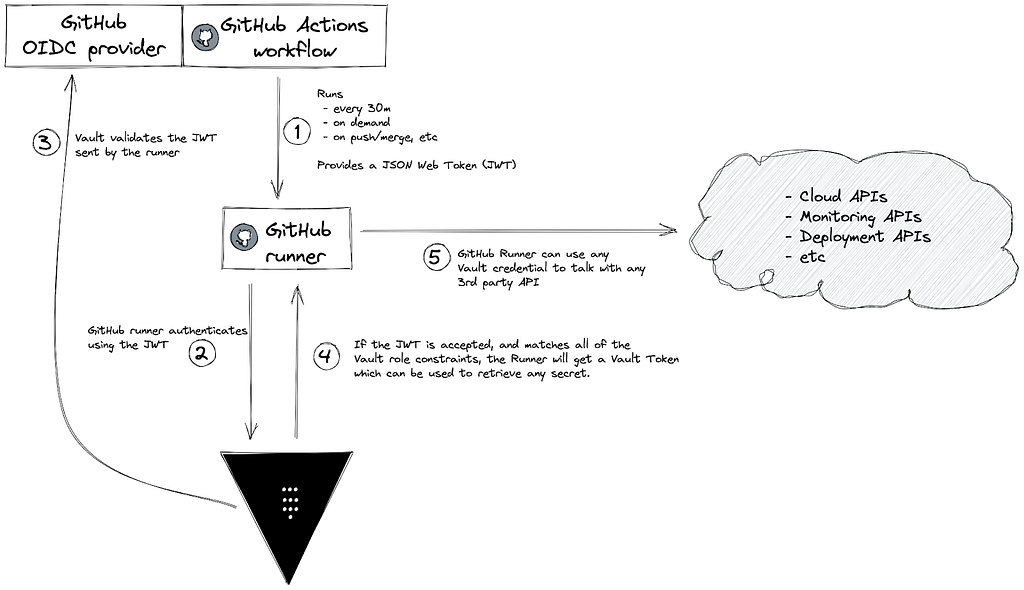
Luckily, steps 1–4 are already taken care of by the Vault GitHub Action, making the integration very clean andsimple.
Here’s an example of the GitHub ActionYAML:
In this GitHub Action, I’m using a self-hosted runner to access the private endpoint of HCP Vault. There are some Terraform modules in the Terraform Registry that may help you with the deployment.
Next we need to enable and set up the JWT authentication in Vault, but for that we need to first have a look at an example JWT sent by GitHub to understand what will go into our configuration.
Looking at the example JWT, we will use these fields to define 3 main parameters in HashiCorp Vault for the JWT authentication role:
- bound_subject: is what is set in the sub field of the JWT. You can use wildcards in case you want to only allow pull requests or development branches to use this role. From the GitHub documentation, the subject field is determined by the GitHub organization, repository, branch, or the associated job environment.
- bound_audiences: is what you have under the aud field of theJWT.
- user_claim: is related to how you want Vault to identify this client. Vault will create an Entity and a respective Entity Alias using this field from the JWT. You can also use groups_claim if you want to group entities and/or use grouppolicies
Here’s an example on how to setup Vault using theCLI:
At the FinishLine
After going through these steps, your GitHub Action will be able to access HashiCorp Vault without having to store any shared credentials inGitHub.
Get started with this use case by creating an HCP account today, and have a look at my other blog post where I explore a few use cases for HashiCorp Vault dynamicsecrets.
Push Button Security for Your GitHub Actions was originally published in HashiCorp Solutions Engineering Blog on Medium, where people are continuing the conversation by highlighting and responding to this story.
本文章由 flowerss 抓取自RSS,版权归源站点所有。
查看原文:Push Button Security for Your GitHub Actions - HashiCorp Solutions Engineering Blog - Medium