Proxy vs VPN: What Is the Difference and Which One to Use
buy private proxies
Proxy vs VPN for scrapers, bots and antidetect browsers: the WinGate private IPv4 pool gives you http proxy and SOCKS5 access in one plan.
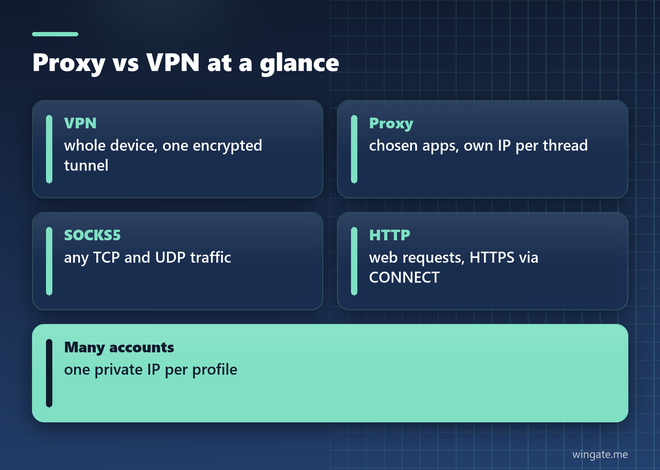
What is a proxy vs VPN in plain terms? Both hide your real IP address from the sites you visit, and they work at different levels. A VPN wraps all traffic from your device in an encrypted tunnel. A proxy carries traffic only for the programs you point at it, and each program can use its own address.
The difference matters most when you run software: scrapers, antidetect browsers, bots, SEO tools, account managers. There the choice depends on how many IP addresses you need at once, how they rotate and how much traffic goes through them. For software, those three numbers usually settle the choice before price even comes up.
What is a proxy vs VPN: how each one works
A proxy is a server that forwards requests on behalf of a program. The browser or script sends its request to the proxy, the proxy opens a connection to the site, and the site sees the proxy address. Each application decides on its own whether to use a proxy, so a scraper can work through a thousand addresses while your mail client goes direct.
A VPN builds an encrypted tunnel between your device and a VPN server, and the operating system routes everything into it: browser tabs, messengers, updates, background services. All of them reach the internet from the same server address. Your internet provider and anyone else on the local network see only encrypted data going to that server.
Scope is the main difference. A VPN changes the network for the whole device at once. A proxy changes it for one program, or even for one request inside that program, and automation needs that level of control.
Proxy vs VPN speed comparison
A VPN encrypts every packet on your side and decrypts it on the server, so each request carries some extra processing and a few more bytes. A typical HTTP or SOCKS5 proxy adds no encryption layer of its own. HTTPS pages stay encrypted anyway, because the browser and the site agree on TLS through the proxy and the proxy only passes the bytes along.
Distance often matters more than protocol. Every request travels from your machine to the server, then to the site and back. For a scraper that makes fifty thousand requests a day, an extra 80 milliseconds per request turns into more than an hour of waiting, so server load and route weigh more than the logo on the plan.
Parallel work is where the gap gets large. A VPN gives you one outgoing IP address at a time, and every thread in your software shares it, along with one rate limit on the target site. A proxy pool lets each thread take its own address, so a thousand threads do not queue behind a single IP and stop at the first 429 error.
To compare fairly, measure on your own job. Run the same 500 URLs once through the VPN and once through the proxy pool with the same thread count, then compare the total time and the number of failed requests. Vendor speed tests rarely match what your software sees on your channel.
SOCKS5 proxy vs VPN
A socks5 proxy passes any TCP traffic and also UDP, so it works with messengers, game clients, mail programs and custom software that does not speak HTTP. In that sense it covers part of what people buy a VPN for, with one practical difference: you choose which programs use it, and everything else on the machine keeps its normal connection.
Setup is short. SOCKS5 accepts a login and password or an IP whitelist, and most automation software has a field for the format IP:PORT:LOGIN:PASS or a box to load the whole list from a link. A VPN needs its own client or a system profile, and switching to another server reconnects the entire device.
One detail to set right: domain name lookups. Some programs resolve the site name on your own computer and send only the IP address through SOCKS5. In curl and Python this is the difference between socks5 and socks5h in the proxy address. With socks5h the proxy resolves the name itself, and your local DNS stays out of the picture.
curl -x socks5h://LOGIN:PASS@IP:PORT https://api.ipify.org

pip install "requests[socks]"

import requests
proxy = "socks5h://LOGIN:PASS@IP:PORT"
r = requests.get("https://api.ipify.org", proxies={"http": proxy, "https": proxy}, timeout=15)
print(r.text)
SOCKS5 vs HTTP proxy
An http proxy handles web requests only, which is exactly what browsers, scrapers and antidetect profiles send. Secure pages go through it with the CONNECT method, and the content stays encrypted between the browser and the site, so the proxy sees only the host name and port. Many SEO tools and checkers use HTTP by default, while bots and desktop programs more often ask for SOCKS5.
Proxy vs VPN for anonymity: which is better
For hiding your address from the sites you visit, both tools do the job: the site sees the server IP in place of yours. The difference is in what else stays visible. A VPN also hides your traffic from the local network and the internet provider, which helps on public Wi-Fi. A proxy leaves that part to HTTPS, which already encrypts the content of almost every site today.
With accounts, anonymity means something more specific. Each account should come from its own address and keep that address for the whole session. Through one VPN server, ten accounts share one IP, and platforms group accounts by address before anything else. With a proxy pool, every antidetect profile gets its own IP, written once into the profile settings.
Public proxy lists are the weak spot here. Hundreds of people use each address at the same time, its owner can see where and when you connect, and sites block such IPs fast. Free VPN services have a similar catch, since someone pays for the servers. Logins, payments and work accounts should go through neither.
VPN vs proxy: which is safer
Safety depends on the threat. On an open network in a cafe or hotel, a VPN protects every app at once, including the ones that still send data without encryption. For software that talks to sites over HTTPS, a private proxy keeps the content just as protected in transit, and what remains is a question of who else uses the same IP and what that address did before you got it.
That is why the source of the addresses matters more than the protocol. Shared and public addresses carry the history of other people's tasks: spam, bans and captchas. Addresses from a private pool go to a limited number of clients and stay out of public lists, so sites meet them with fewer checks and your accounts are less likely to inherit someone else's record.
Proxy vs VPN: which is better for your task
In practice the choice comes down to the job in front of you.
- personal browsing on public Wi-Fi from one laptop: a VPN, since one switch covers every app
- scraping and price monitoring: a rotating proxy pool, where every request gets a fresh address and threads run side by side
- antidetect browsers and many accounts: private proxies, one IP per profile, kept for the whole session
- bots, Telegram clients and custom desktop software: a SOCKS5 proxy, since it carries any TCP traffic
- SEO tools, rank trackers and checkers: an HTTP proxy pool with enough threads for the settings in the software
Plenty of people use both: a VPN on the laptop for personal traffic and a proxy pool inside the work software. They live together without trouble as long as the software connects to the proxy directly. When the software runs on a server, the VPN usually is not needed there at all.
Private proxies for software: what to check
If you compare private proxies from different sellers, ask three questions before paying: how many clients share the same addresses, how many threads the plan allows and whether traffic has a cap. The answers predict how a pool behaves under real load far better than the price per IP on the landing page.
Check the access method as well. Login and password suit software that starts on several machines or in the cloud, where the outgoing address changes. An IP whitelist suits one fixed server: you add its address in the dashboard once, and the proxy lines need no credentials at all.
WinGate sells access to a private IPv4 pool built for this kind of work. A small circle of clients shares it, and its addresses are not posted in public lists. One access works over HTTP, HTTPS and SOCKS5, traffic is unlimited, and plans differ by thread count: 1000, 3000 or 5000. Addresses come from networks all over the world, and the current list sits behind a link in the dashboard, so software that loads proxies by URL picks it up on its own.
Run the pool through your own software before you scale. WinGate gives a free test for up to 2 hours, which is enough to load the list into a scraper or an antidetect browser, start the real number of threads and watch how many captchas and 403 or 429 errors come back.
If the error rate stays flat for an hour of real work, the setup is ready for production. If it climbs, lower the number of threads per target site or rotate addresses more often, and check that the software does not reuse one connection for hundreds of requests.