Prop Copytrading Guide

Instructions for linking to our DAX only account system
( minimum invest 100$ )
1. open link : Click Here
VERY IMPORTANT :
A pop up window may appear asking if you want to register with RoboForex or RoboMarkets.
BE SURE TO CLICK ON ROBOFOREX ! You cannot link up with RoboMarkets
2. click on "Open account" (green button)
- Email address
- First name
- Last name
- Phone number
- Click on register (blue button)
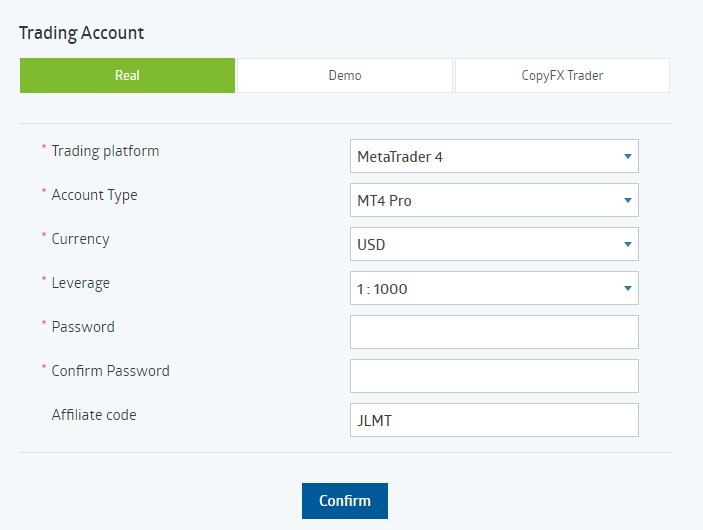
3. open a trading account :
Go to "Accounts" in the menu items
- Click on the sub-item "Trading account
- Live
- Metatrader 4
- MT4 Pro
- EUR or USD (better Euro if you have the Euro as currency)
- 1:1000
- Set password (this is only the password for the trading account and not for the RoboForex account)
- Your city
- Your address
- ZIP CODE
- Click on "confirm" (blue button)
4. capitalize account (minimum 100$):
Go to "Payment transactions" in the menu items
- Click on the "Deposit funds" sub-item
- Select payment method
- "Simple deposit" (DO NOT ACCEPT BONUS)
- Enter the amount - select EUR or USD
- Deposit funds - Deposit funds
- Complete all further steps
5. link account :
- Open link : click here
- "Subscribe to Trader" (blue button)
Leave all settings as they are:
Proportional
Ratio 1.00

6. download Roboforex Mobile Trader and log in to follow everything live (you will receive the data by e-mail)
You can also join the Telegram group : click here
Prop Trading Team ❤️