Private Proxies: What They Are and How to Get Them Running
best private proxiesPrivate proxies for scraping, SEO software and multi-account work: see how a pool of private proxies for data scraping runs with unlimited traffic.
Private proxies are addresses a provider gives to you or to a small closed group of clients, and they never show up in public lists. Requests from your software go out through them, sites see the proxy IP, and only a handful of users shape the history of each address.
People usually start looking for them when free lists stop working: logins fail, captchas appear on the first page and half the addresses time out. A private plan solves the supply side. Formats, authorization and thread counts are still yours to set, and each of them can break a working list.
What are private proxies
The word private describes who else uses the address. A public proxy is open to anyone who finds it. A shared plan from a seller gives one address to several paying clients. A private address or pool belongs to you or to a limited group, and access is closed by a login and password or by a whitelist of your server IPs.
Protocol is a separate question. Private proxies can speak HTTP, HTTPS or SOCKS5, and a datacenter pool can be private as easily as any other kind. For software with many threads the usual form is a private pool: thousands of addresses behind one access, which your tools rotate through.
They earn their price in jobs that hit the same sites hard. Price monitoring and search result scraping send thousands of requests an hour to a few domains. Antidetect browsers and account managers keep each profile on its own address for days. SEO tools check positions in bulk overnight. All of these suffer when the addresses come from a public list that someone else has already worn out.
How to get private proxies
Getting from purchase to a working setup takes four steps, and the first one sets the price. Count how many connections your software opens at peak, add any second tool you plan to run alongside it, and pick a plan by that number of threads.
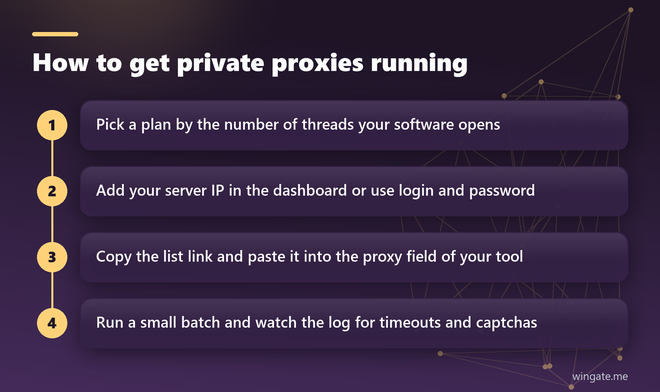
Next comes authorization. Credentials in the proxy line suit laptops and office connections where your own IP changes. A whitelist suits servers: you add the server IP in the dashboard once and connect without a password, which also keeps passwords out of scripts and config files.
Then paste the list link into the proxy field of your tool and run a short batch before the full job. A few hundred requests are enough to surface timeouts, captchas and authentication errors while fixing them is still cheap.
Private proxies list
Larger plans arrive as a list with one address per line, refreshed by the provider. Tools differ in which line format they expect, and a mismatch is the most common reason a fresh list looks dead. Common formats are IP:PORT for whitelisted access, IP:PORT:LOGIN:PASS for credentials, and a URL form with the scheme in front, such as http:// or socks5://. Some tools also want the protocol chosen in a separate field. Test one line by hand before loading the whole file:
curl -x http://LOGIN:PASS@IP:PORT https://api.ipify.org
curl -x socks5h://LOGIN:PASS@IP:PORT https://api.ipify.org
while read p; do curl -s -m 10 -x "http://$p" https://api.ipify.org; echo "  $p"; done < list.txt
If the command prints the proxy IP, the line works and the problem sits in the tool settings. If it hangs, check the port and whether your current IP is on the whitelist. The third line walks through a saved list and prints the answer next to each address, which takes a minute for a few hundred lines.
For jobs that need thousands of lines at once, bulk private proxies come as a link that tools reload on a schedule, so nobody has to update files by hand. Point the software at the link and set the reload interval to match the refresh on the provider side.
Shared private proxies and a private pool
Sellers use the phrase shared private proxies for addresses split between a few clients. The price per address is lower, and the addresses still stay out of public lists. A private pool works on a different scale: you get access to thousands of addresses at once and spread threads across them, so each IP carries a small part of your load.
For scraping and SEO tools the pool format pays off on volume. A plan of 1,000 threads over a pool of 12,000 addresses means no single IP has to take hundreds of requests a minute, and per-address limits on a site matter much less.
Private proxies free trial
Free private proxies cannot exist in a strict sense: once an address is posted for free, it becomes public, and everyone who finds the list uses it at the same time. The owner of such a relay also sees which sites you open. What sellers offer is a trial on the paid product.
WinGate gives a free test of up to 2 hours with HTTP, HTTPS and SOCKS5 on the same access and no traffic limit. That window is enough to run your real software at a reduced thread count and compare the error rate with your current setup. Run it on the same sites you plan to work with, since a test against an easy target says little about a hard one.
Best private proxies: how to compare sellers
Compare offers by what your software will feel: addresses online at once, how many networks they come from, the thread limit, the traffic limit and the way the list reaches your tools. Price per thread only makes sense once those numbers are known.
WinGate keeps 12,000 to 15,000 private IPv4 addresses online during the day across 3,000 to 5,000 networks and refreshes the list every 15 minutes. Plans are counted in threads, at 1,000, 3,000 or 5,000, traffic is unlimited, authorization works by login and password or by up to two whitelisted IPs, and you can pay in crypto.