@PokeRaiderBot
PokeRaider bot for Telegram: @PokeRaiderBot helps to organize meetings of Pokémon Go gamers to battle "raid bosses".
⊳ See this help in other languages ⊲
To initiate a new raid send /newraid command to the bot privately or /newraid@PokeRaiderBot in a group chat, example:
/newraid@PokeRaiderBot 12:00 50.464663,30.644601 Entei on Lisova metro station
If there are no other bots which react to /newraid command in a chat then no need to append @PokeRaiderBot to it.
Parameters: 12:00 is the time of battle beginning, 50.464663,30.644601 are coordinates (latitude and longitude) separated by comma (or full copy-pasted link of a place on any map — Google, Gymhuntr, Yandex etc. containing these coordinates in the URL, example: http://www.google.com/maps?q=50.464663,30.644601), then the title of a meeting. The order is no matter (time, coordinates, title in any order are allowed). Only title is required but time (in hh:mm format) and coordinates/URL are recommended.
The bot will send a meeting info with a numeric ID, voting buttons and a map.
Additionally, the optional parameter -s<digit> for team emoji setting is available for the /newraid command, see more in the /gamer command description.
Additionally, the optional parameter -i is available that adds the "Invite me" button. The list of users clicked this button is being displayed as well as Going, Not going and Maybe lists. The initiator of a raid will receive a notification.
To publish the raid voting into other group chat, type: /raid@PokeRaiderBot 12345 (12345 is the raid ID).
Voting results in all group chats will be synchronized on each vote.
To test the raid information will be printed correctly, type commands /newraid or /raid privately to the bot.
To display you Pokemon Go level and team in meetings use /gamer command, ex.:
/gamer m 30 or /gamer 25 Valor or /gamer Yellow 33 or /gamer 20 i (team color or name or first letter of color or name with level number, in any order), recommended to send this command not to a group chat but to the bot directly.
For clearing level and team (for example if team/level are added to the user display name manually) type: /gamer clear or /gamer clean.
By default, the emoji set displaying the gamer team changes randomly on each voting update (vegetables, hearts, nature elements). The optional -s<digit> parameter of the /newraid command forces team emoji to be constant. The parameter placing is no matter as well as other data in the command. 1 - vegatables, 2 - hearts, 3 - nature elements, 4 - letters. E.g. /newraid -s 1 Gym Name, /newraid 12:00 Gym Name -s2.
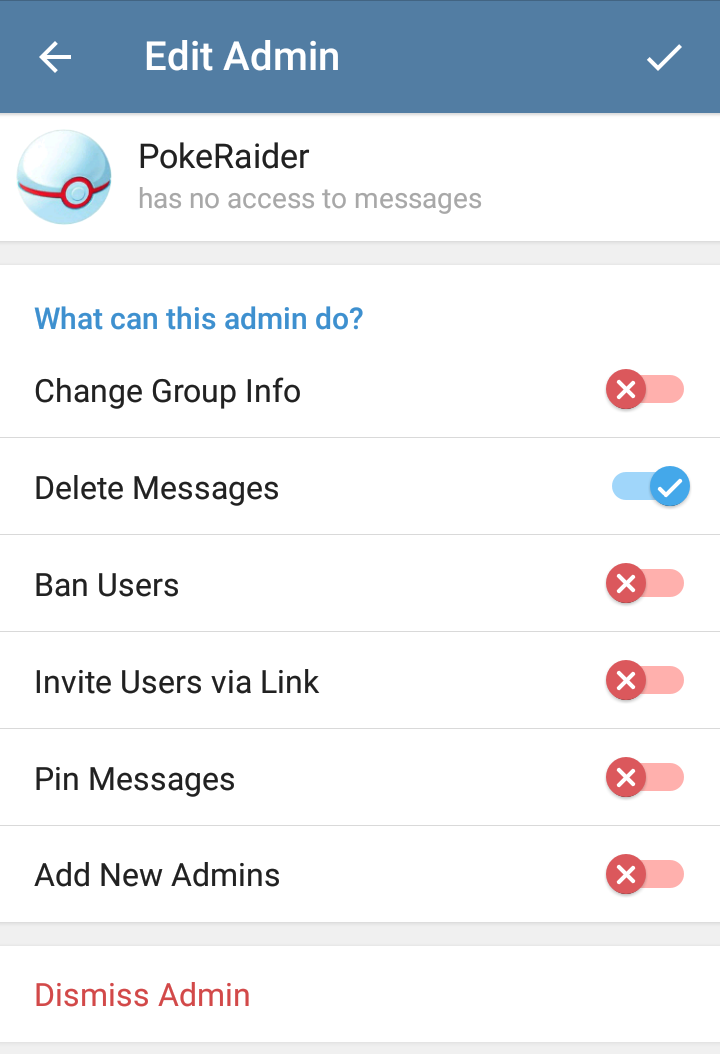
Recommended access settings for the bot
If the bot has access for deleting messages (in a supergroup) it will clean /raid and /newraid commands sent by users (see the screenshot).
How does "+1" button act
To display a gamer is coming to the raid with some other people who are not in your Telegram group chat, press [+1] button one or more times. To avoing misunderstanding the button acts only if a chat user will take part in a raid, i. e. he has pressed Yes button before. Also, after pressing No or Meybe buttons those add-on persons will be nulled.
Optional commands
/comment 123 We will catch you — add your comment to the raid #123. Only for users who voted in this raid.
Also simplified commenting is available, it works as usual "Reply-to" action: select a message "raid 12345: ...." created by the bot, click the "Relpy" button and type your text. It will be added as a comment created via the '/comment' command. Messages replying to a raid and containing the @ character won't be added as comments (as such messages with @UserName are not comments but notifications of users). Additionally, if the text is ended with the slash / - then the bot will delete your message. Another "Reply-to" application: if you reply to the raid message with a location (click the "Attachment" icon, select "Location" and "Send location") then a comment with a location link will be added. Both these actions are available for users which have marked theirselves in the raid (i.e. clicked Yes, No or Maybe).
/cancel 123 — remove voting buttons from #123 raid and add Canceled on the end of a message. Only for the initiator of a given raid.
/result 123 7 — add Caught: 7 on the end of a message and remove voting buttons. Only for the initiator of a raid.
/language uk — set user language, then votings you create are in this language. Languages supported currently: uk (Ukrainian), en (English), ru (Russian), fr (French), pt-br (Portuguese Brazil), es (Spanish), de (German), fi (Finnish), pt (Portuguese of Portugal), en2 (English Altered) - see Update Oct 19, 2020, fi2 (Finnish Altered), it (Italian), tr (Turkish).
/unlock 123 — unlocks the voting auto-finalized previousely after 36 hours (or closed by /cancel, /result commands) and sets auto-finalize interval to 15 days. Only for the initiator of a raid.
/editraid 123 -t 12:00 — change battle start time, also the comment about this change will be added. Only for the raid initiator.
/nickname Abc Xyz — change the user display name for the bot. For example, you can set your display name to "real_name [PoGo_nickname]". The /nickname call without parameters resets the display name to "first_name last_name" given in Telegram settings.
Commands may be sent either to a group chat or to the bot privately.
Update Jun 21, 2021:
Turkish (tr) language added.
Update Feb 3, 2021:
Italian (it) language added.
Update Oct 19, 2020:
Added: modified English translation (en2) with renamed buttons and participant list titles: "Yes" --> "Local", "Maybe" --> "Remote". So if you ask the bot /language en2 then buttons of your next raid will be: Local, No, Remote.
Update Aug 9, 2020:
"Invite me" button added.
Update Feb 23, 2020:
Portuguese of Portugal (pt) language added.
Update Aug 3, 2018:
Now the /gamer command doesn't reset nicknames.
Update July 27, 2018:
- To prevent voting from flood, comment count per user is limited to 10, next comment of this user will remove the first one.
- Functionality for private raids added (the command /raid doesn't work for such raids so persons which are not members of your char won't view your raids).
Update July 6, 2018:
The /nickname command added.
Update May 30, 2018:
The /editraid command fot changing start time of the battle is available; a bug in the /newraid fixed (all instances of battle start time were being removed but only the first should be).
Update May 5, 2018:
Messages replying to a raid and containing @ won't be added as comments.
Update May 1, 2018:
Setting of team emoji for the /newraid command.
Update Apr 24, 2018:
Simplified commenting works now (select a voting and click "Reply" botton).
Update Apr 4, 2018:
- The bot can speak Finnish.
- Partially fixed a bug of broken votings when a user blocked the bot after submitting in a voting. Telegram does not allow mentioning such users by the bot and return error. For such cases, the voting list won't link users at all.
- /unlock command added (extend voting auto-finalize interval to 15 days after creation).
Update Mar 22, 2018:
- The bot can speak German.
- Command option for clearing team/level: /gamer clear (or clean).
Update Feb 22, 2018:
The bot can speak Spanish.
Update Jan 19, 2018:
The bot can speak Portuguese Brazil.
Update Nov 26, 2017:
The bot can speak French.
Update Oct 28, 2017:
Command added: language.
Update Sep 25, 2017:
Commands added: comment, cancel, result.
Update Sep 24, 2017:
Posting raid votings to channels
Now the bot supports posting /raid command to channels. Note that /newraid command will not be supported for channels because Telegram channel posts don't include the author (raid initiator) data. So, you can post /newraid command first to the bot directly or to a group chat and then send /raid command to the channel.
--------------------------------
More bot options might be implemented later.
If you have something to say, found bugs, want to translate the bot to other language, or the bot don't work as expected, you may contact the developer.
--------------------------------
Private raids
Private raid means it can not be sent to another chat using the '/raid' command. Syntax: /newraid -x <usual raid parameters>
This option is paid. The functionality could be enabled for a group chat or for user.
If it's enabled for user then this user can create private raids in any chat (if the user is allowed to post messages and PokeRaiderBot is present).
If it's enabled for chat then any user of this chat can create private raids (who can post messages).
To request private raids functionality send the command /needprivate chat (request for the current chat) or /needprivate user (request for the command poster). Then the bot admin will contact you for confirmation and payment details.
Demo chat where private raids are enabled: @demo_private_raids, you can try to create a private raid here and test whether it could be reposted via /raid anywhere else.