Playing video in rust (the hard way)
DCNick3 🦀One day I needed to play an mp4 file (H.264 video + AAC audio) in a game engine. Shouldn't be hard, right? use video::Video; let video = Video::new(); video.play(), right?..
Sadly, there is no single library that can do this in rust.
A bit disappointed, I embarked on a journey to search for a combination of crates that will allow me to play the video in my custom engine with the least amount of pain possible.
What do we actually need to play the video? Well, mostly three things:
- Demux the container format (mp4 in this case): extract the encoded audio and video streams
- Decode the audio and video streams into raw video frames and digital audio samples
- Present the video frames and audio samples at the right time
The most common way for handling the first two is "just" to use ffmpeg: a multimedia framework, written in C.
It supports a tremendous amount of formats and codecs, so handling this quite conventional combination of H.264 and AAC should be no problem for it.
A "fun" fact is that while ffmpeg is open-source (licensed under LGPL), the H.264 codec itself is covered by a patent, so no end-user-facing encoder/decoder implementation can't be distributed without a patent license. You can find more information on the issue here.
This put browser vendors seeking to standardize the <video> tag in 2010 in a precarious position and motivated the creation of royalty-free video codecs like VP8, VP9 and AV1.
AAC also was patented, but the patents for the AAC-LC profile used in most videos have expired in 2017, so it can be used freely now.
So, ffmpeg should work, right?
ffmpeg being the dominant library used for everything multimedia, I, obviously, started looking at ways to use it in my project.
As a first ominous sign, there was an ffmpeg crate by meh providing ffmpeg bindings. Apparently, it was abandoned and later forked by zmwangx and published under the ffmpeg-next name.
Looking at the fork closer though, it seems that it wasn't getting much love recently too: there are quite a few PRs stalled for a bit more than half a year (August of 2022).
Apart from lack of maintenance there are some actual problems, which do not allow me to use it in my engine though:
First and foremost, this crate only supports reading video files from the filesystem. While this might be fine for some use-cases, my engine uses a custom archive format to store assets, so to play videos it would need to extract them to a temporary directory, which brings requires bookkeeping to delete the files afterwards and is overall more slow and hacky.
This problem, along with some trivial memory leaks I found while thinking of implementing the custom reader support, nudged me to move away from ffmpeg in search of other solutions.
Brief mentions of other projects considered:
- rust-av project, which aims to provide a full multimedia stack to rust. Unfortunately, it does not support H.264 decoding
- libmpv-rs, rust bindings to libmpv, a full video playback library based on ffmpeg. Unfortunately it does not allow me to integrate with the game engine well & the renderer API bindings are incomplete
Take #1: mp4 + openh264
After discarding those options, I decided to try my lack gluing a pure-rust mp4 demuxer crate and openh264 - rust bindings to an H.264 encoder and decoder library by Cisco.
It was released around 2015, with the goal of providing low-latency for video calls. AFAIK, it's what all browsers use for H.264 in WebRTC.
Unlike ffmpeg, which is licensed under LGPL, openh264 is available under BSD license, which is much easier to comply with. It also has less code, resulting in smaller executables!
Though, to use a H.264 another not yet mentioned hurdle has to be overcame. The codec uses technique called chroma subsampling and so the frames decoded by openh264 are represented in Y'PbCr colorspace instead of the usual RGB expected by most graphics APIs.
Chroma Subsampling
Your (hopefully human) eyes have more trouble noticing changes in color than changes in brightness. Video codecs exploit this by separating the brightness and color information and storing less of the color components (subsampling them!).
To do this, they first transform the video signal into Y'PbCr colorspace, where the Y' component stores the brightness and Pb & Cr components store the color information. Notice, that ffmpeg refers to this colorspace as YUV. AFAIK, this is not technically correct, but who can stop them?
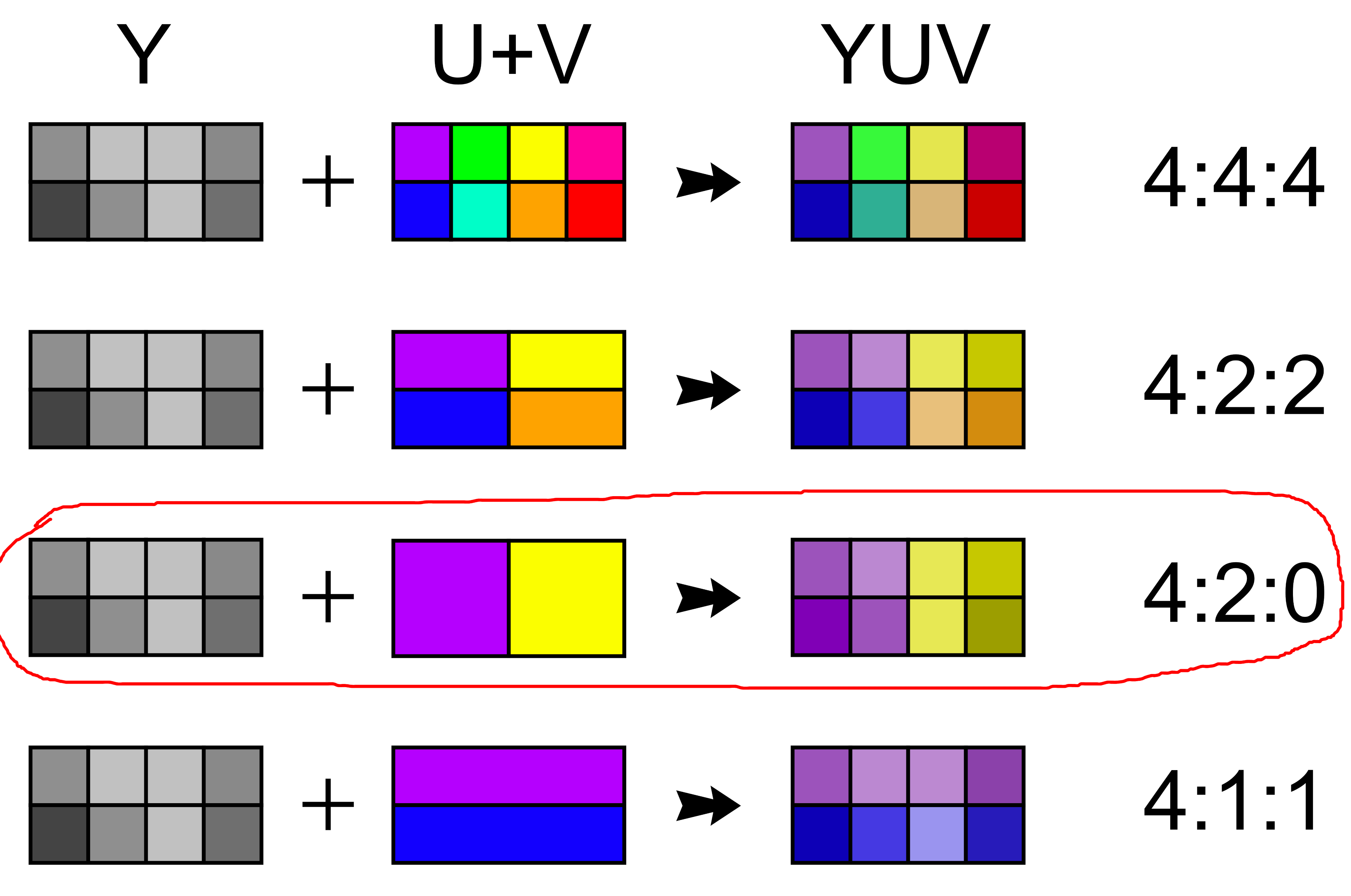
After the colorspace conversion the codec does this "store less color" thing: the most common way to achieve this is to store only one color value (a pair of Pb and Cr values) for 2x2 pixel block, while still having 4 brightness values. This subsampling scheme is called 4:2:0 (yuv420 in ffmpeg).
Here's an illustration of various subsampling schemes:
Color Conversion
Okay, so we need to somehow convert these subsampled Y'PbCr frames to RGB, surely there are crates for this...
There definitely are, even the openh264 bindings crate include such a utility. Although, there's a reason openh264 (and other libraries) spit out Y'PbCr frames instead of RGB: you can be more efficient with it.
Instead of converting the subsampled frames to larger RGB and sending it to GPU to render, we can do the conversion on the GPU, saving memory bandwidth. Also, the GPUs are heavily optimized for such a workload (the conversion is just a matrix by vector multiplication) & even allow you to resize the video to the render resolution in one pass!
BTW, here lies another rabbithole that I will not dive too deep into, but it's still worth mentioning. Actually, Y'PbCr is a family of colorspaces, and the precise formula for converting it to RGB will vary. I just assumed BT.709 color and converted it to sRGB, praying it was correct.
Why is my video all stuttery??
So, I made a quick prototype & run a simple test video. It... worked, but it looked like very stuttery
After trying to find issues with GPU memory synchronization or data races I came to a conclusion that there are no data races in rust 😉. Instead, it's the openh264 that was giving me frames out of order.
With the benefit of hindsight, I now know that this reordering is due to feature of modern video codecs called B-frames: https://ottverse.com/i-p-b-frames-idr-keyframes-differences-usecases/
TL;DR: B-frames use information about future frames for decoding. This requires decoding some future frames before the B-frames. MP4 chooses to store the frames in the order of decoding, but this requires reordering of frames for playback.
And, apparently openh264 does not do the playback frame reordering for me. It (presumably) can't, as the information that is needed to implement this reordering is actually stored at MP4 level (in form of ctts box), not at the codec level.
At the time, though, I thought that openh264, being optimized for WebRTC use-case, was not implementing some parts of H.264, so I scratched the prototype and decided to look for another way.
Take #2: The ffmpeg way
Now I returned to ffmpeg. Though, instead of using rust bindings (which, as we have learned, have some deal-breaking shortcomings), I decided to go with a bit more... exotic approach.
ffmpeg can be used not only as a library, but also as a standalone program, which convert a variety of multimedia formats.
Same as with openh264, I handled the MP4 with the mp4 crate, sending the raw H.264 stream (or, in more technical terms, Annex B formatted stream) to ffmpeg and reading back yuv4mpeg2 - a raw file format, containing the frames in Y'PbCr colorspace, along with some minimal metadata about the resolution.
I used pipes to put input into and get output from ffmpeg, so no extra temporary files are created & input can come from any reader, including the custom asset format used by my engine.
Frame reordering, which I struggled with when using openh264, surprisingly, was not a problem here. Even though, as far as I can tell, you have to use metadata from mp4 ctts box to do the reordering, ffmpeg somehow handles this for me automagically. I even tried stripping some extra metadata from the H.264 stream and it still spit out the frames in-order. I don't know why it works, but... If it works it works, right?
After decoding the frames I've just written some simple timer code that waits for frame presentation time to arrive before displaying it. For audio I used the symphonia, which already has a pure-rust AAC decoder.
Most of the code written was just a glue between all the components: ffmpeg pipes, the engine audio output, wgpu rendering, mp4 demuxing, symphonia AAC decoding and asset loading. The result it this:
In the end, I quite like the solution: it keeps the big scary monster of ffmpeg outside of my address space (less potential segfaults) and executable file (less build system pain from integrating C with Rust). As a bonus, it also keeps me free from H.264 patent issues, albeit with a cost of user having to provide an ffmpeg binary themselves.
The current implementation lives in the shin repository: https://github.com/DCNick3/shin/tree/master/shin-video. The code has a certain amount of coupling to the rendering & audio output framework, but otherwise is pretty independent.
The end?
After celebrating for some time, I thought "hmm, the decoding uses a noticeable percentage of CPU... I wonder if I can use hardware acceleration for the decoding..."
But that's a story for another time... (please no)