PixelPlusUI OTA Flashing Guide
Saurav (ugly_kid_af)
Requirements for OTA Updates :
- Encryption is recommended for OTA. Decryption isn't recommended
- No Magisk Support (If you have installed magisk and after flashing via ota if somethings gets fucked up don't blame us)
- User Must use SHRP Recovery or any recovery which Supports Proper encryption and FCRYPT v3
- Don't Change kernel or use any Unwanted MODs it may break OTA
- Never ever disable prevent auto reboot after ota in shrp settings while u are DECRPYTED
- SHRP Recovery LINK HERE
- OTA is useful only when you don't change ROM every day/week/month. So stop being retard
OTA Steps for Encrypted Users:
- Flash SHRP Recovery and uncheck "prevent auto reboot after ota" in shrp settings

- Get OTA update when we push in OTA updater
- Click on Download & then install it
- Go take a break & in the meantime Recovery does all the job
- And It will BOOT when done
OTA Steps for Decrypted Users:
- Flash SHRP Recovery and check "prevent auto reboot after ota" in shrp settings
- Get OTA update when we push in OTA updater
- Click on Download & then install it
- Go take a break & in the meantime Recovery does all the job
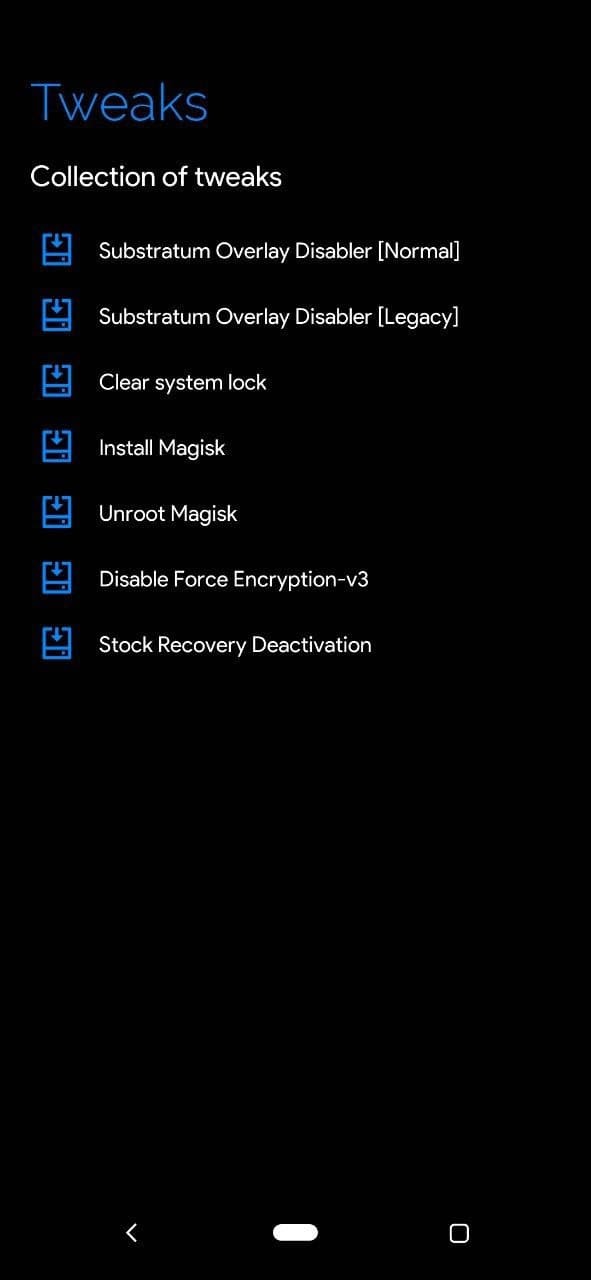
- Important :- After ota process done, Go to tweaks on Home screen >>> Select Disable force encryption-v3 >>> Disable
- Reboot to system
- As you know build is free but building ROM needs server its not like PORTs. And Maintaining source and device stuff needs server and its pretty expensive for a student. It will be really helpful and appreciated if you donate or contribute us. TIME = Money
PAYTM UPI ID : dwarmachine24@paytm
GPAY UPI ID: dwarmachine24@oksbi
PAYPAL: https://www.paypal.me/uglykid24