Personal Archlinux Installation Guide with btrfs and snapshots
dakatacaContent
1 Errors in archiso
∟ 1.1 SCHED ERROR
∟ ∟ 1.1.1 Solution
2 Keyboard and font terminal
3 Wifi
∟ 3.1 Iwd
∟ ∟ 3.1.1 Adapters and devices
∟ ∟ 3.1.2 Station mode
∟ ∟ ∟ 3.1.2.1 Visible networks
∟ ∟ ∟ 3.1.2.2 Hidden networks
∟ 3.2 Check internet connection
4 UEFI or legacy bios
∟ 4.1 UEFI bios
∟ 4.2 Legacy bios
5 Update system clock
6 Storage devices
∟ 6.1 List storage devices
∟ 6.2 Verify storage device partition scheme
∟ 6.3 Partitions
∟ ∟ 6.3.1 Create partitions
∟ ∟ 6.3.2 Listing created partitions
∟ ∟ 6.3.3 Partitions formating
7 Subvolumes
∟ 7.1 System mounting options
8 Pacman configuration
∟ 8.1 Reflector mirrorlist
∟ ∟ 8.1.1 America
∟ ∟ 8.1.2 Europe
9 Install essential packages
∟ 9.1 Install packages for UEFI system
∟ 9.2 Install packages for legacy system
10 Configure the system
∟ 10.1 Chroot
∟ 10.2 Time zone
∟ 10.3 Localization
∟ 10.4 Network
∟ 10.5 Initramfs
∟ ∟ 10.5.1 Add modules
∟ ∟ 10.5.2 Recreate the initramfs image
∟ 10.6 Boot loader
∟ ∟ 10.6.1 Grub
∟ ∟ ∟ 10.6.1.1 Install grub
∟ ∟ ∟ 10.6.1.2 Config grub
∟ ∟ ∟ 10.6.1.3 Generate grub.cfg
∟ 10.7 Users and groups
∟ 10.8 Pacman configuration
∟ 10.9 Microcode
∟ 10.10 Aditional packages
∟ 10.11 Network manager
∟ ∟ 10.11.1 Iwd
∟ ∟ 10.11.2 Systemd-networkd
∟ 10.12 zswap or zram
∟ ∟ 10.12.1 Enabling zram
∟ 10.13 Fstab
11 Unmount partitions and restart system
12 Openresolv
13 Wifi
∟ 13.1 Iwd
∟ ∟ 13.1.1 Station mode
∟ ∟ 13.1.2 Visible networks
∟ ∟ 13.1.3 Hidden networks
∟ ∟ 13.1.4 Check internet connection
14 Snapper
∟ 14.1 Create configuration
∟ 14.2 Snapshots configuration
∟ 14.3 Automatically update grub upon snapshot
15 Reflector mirrorlist
∟ 15.1 America
∟ 15.2 Europe
16 User configurations
1 Errors in archiso
1.1 SCHED ERROR
Ante un error de éste tipo durante el inicio de archiso:
[171.533340] nouveau 0000.03.00.0: fifo: SCHED_ERROR 06 []
[171.533539] nouveau 0000.03.00.0: fifo: SCHED_ERROR 06 []
[171.534340] nouveau 0000.03.00.0: fifo: SCHED_ERROR 06 []
...
1.1.1 Solution
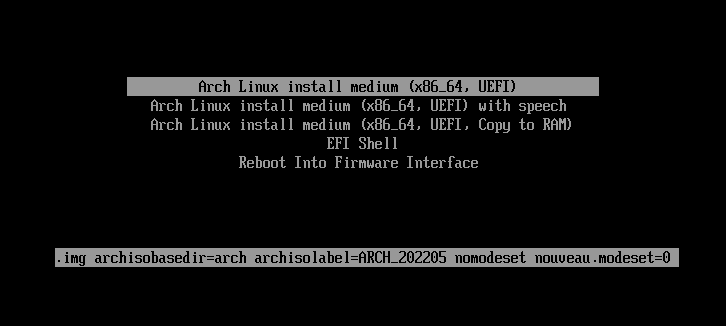
Press e when the menu appeart and in the line initramfs-linux.img add the following kernel parameters to disable modesetting:
nomodeset nouveau.modeset=0
2 Keyboard and font terminal
Set the latin keyboard layout/font (us: default):
# loadkeys la-latin1
# setfont Lat2-Terminus16
3 Wifi
Connect internet using wifi.
3.1 Iwd
3.1.1 Adapters and devices
List Wi-Fi adapters and devices:
root@archiso~# iwctl
NetworkConfigurationEnabled: enabled
StateDirectory: /var/lib/iwd
Version: 1.27
[iwd]# adapter list
                             Adapters
-----------------------------------------------------------------------
 Name         Powered   Vendor              Model
-----------------------------------------------------------------------
 phy0         on        Qualcomm AtherosQCA9565 / AR9565 Wir

[iwd]# device list
-----------------------------------------------------------------------
                             Devices
-----------------------------------------------------------------------
 Name         Address             Powered  Adapter  Mode
-----------------------------------------------------------------------
 wlan0        80:a5:89:d7:6c:3d   on       phy0     station
[iwd]#
If the adapter and device are turned on, continue the guide, if not:
Check the driver status:
# lspci -kv | grep -A7 Network
If all goes well continue with the guide, if not:
3.1.2 Station mode
List wifi devices on station mode:
root@archiso~# iwctl
NetworkConfigurationEnabled: enabled
StateDirectory: /var/lib/iwd
Version: 1.27
[iwd]# station list
                    Devices in Station Mode       *
-----------------------------------------------------------------------
  Name                State           Scanning
-----------------------------------------------------------------------
  wlan0               disconnect
3.1.2.1 Visible networks
List networks and connect to a:
[iwd]# station wlan0 scan
[iwd]# station wlan0 get-networks
                    Available networks            *
-----------------------------------------------------------------------
  Network name                Security           Signal
-----------------------------------------------------------------------
  PETRO PRESIDENTE            psk                ****

[iwd]# station wlan0 connect 'PETRO PRESIDENTE '
Passphrase:******
3.1.2.2 Hidden networks
Connect hidden networks:
[iwd]# station wlan0 connect-hidden 'PETRO PRESIDENTE '
password:******
3.2 Check internet connection:
# ping -c2 archlinux.org
PING archlinux.org (95.217.163.246) 56(84) bytes of data.
64 bytes from archlinux.org (95.217.163.246): icmp_seq=1 ttl=50 time=202 ms
64 bytes from archlinux.org (95.217.163.246): icmp_seq=2 ttl=50 time=222 ms
--- archlinux.org ping statistics ---
3 packets transmitted, 3 received, 0% packet loss, time 2000ms
rtt min/avg/max/mdev = 201.582/210.083/222.138/8.760 ms
4 UEFI or legacy bios
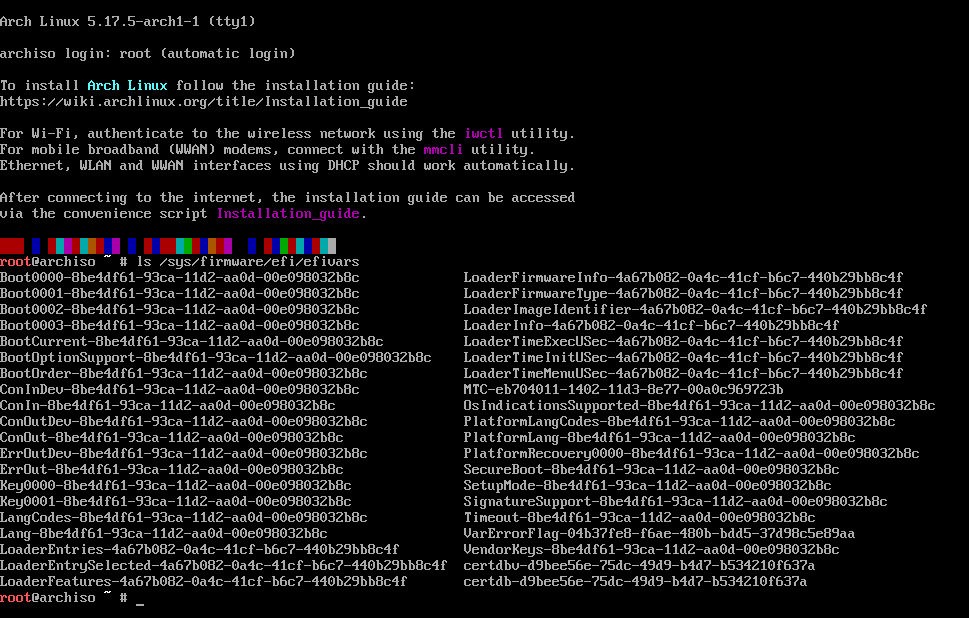
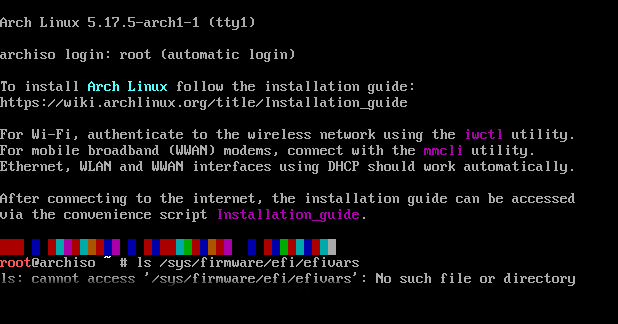
Check boot type, UEFI or BIOS/Legacy:
# ls /sys/firmware/efi/efivars
4.1 UEFI bios
4.2 Legacy bios
5 Update system clock:
# timedatectl set-ntp true
6 Storage devices
6.1 List storage devices:
# lsblk -dp
6.2 Verify storage device partition scheme:
# parted /dev/sda print | grep -E "Model|msdos|gpt"
6.3 Partitions
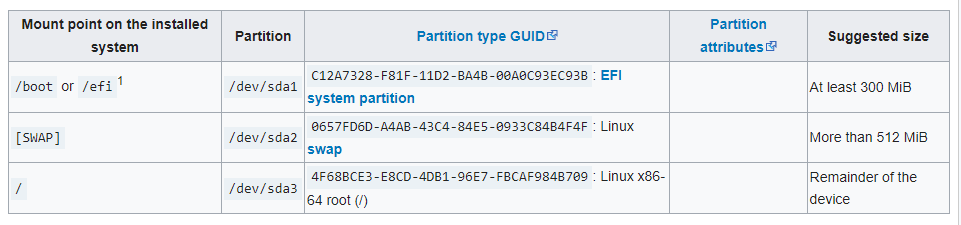
6.3.1 Create partitions:
# fdisk /dev/sda
6.3.2 Listing created partitions:
# lsblk -p /dev/sda
6.3.3 Partitions formating
UEFI boot:
# mkfs.fat -F32 -n "UEFI" /dev/sda1
Legacy boot:
# mkfs.ext4 -F -L "legacy" /dev/sda1
Swap partition:
# mkswap -L "swap" /dev/sda2
# swapon /dev/sda2
Root partition:
# mkfs.btrfs -f -L "root" -R free-space-tree -n 32k /dev/sda3
List partitions:
# lsblk -po NAME,FSTYPE,LABEL,MOUNTPOINT,SIZE /dev/sda
7 Subvolumes
Mount root partition:
# mount /dev/sda3 /mnt
Create subvolumes:
# btrfs subvolume create /mnt/@
# btrfs subvolume create /mnt/@home
# btrfs subvolume create /mnt/@var_log
# btrfs subvolume create /mnt/@var_tmp
# btrfs subvolume create /mnt/@snapshots
List subvolumes:
# btrfs subvolume list -p /mnt
Umount partition root:
# umount /mnt
7.1 System mounting options
Mount root partition with options:
# mount -o noatime,compress=zstd,subvol=@ /dev/sda3 /mnt
Mount subvolumes with options:
# mount --mkdir -o noatime,compress=zstd,subvol=@home /dev/sda3 /mnt/home
# mount --mkdir -o noatime,compress=zstd,subvol=@var_log /dev/sda3 /mnt/var/log
# mount --mkdir -o noatime,compress=zstd,subvol=@var_tmp /dev/sda3 /mnt/var/tmp
# mount --mkdir -o noatime,compress=zstd,subvol=@snapshots /dev/sda3 /mnt/.snapshots
Mount boot partition:
# mount /dev/sda1 /mnt/boot
List partitions:
# lsblk -p /dev/sda
8 Pacman configuration
Enable/uncomment parallel downloads, comic pacman and color on "# misc options" section:
# vim /etc/pacman.conf
-----------------------------------------------------------------------
# Misc options
Color
ParallelDownloads = 5
ILoveCandy
8.1 Reflector mirrorlist
Get in detail the 20 download mirrors synchronized in the last 12 hours, with a response time of no more than 35 seconds, classify them by speed and overwrite the file /etc/pacman.d/mirrorlist, from the countries:
8.1.1 America
Canada 🇨🇦, Chile 🇨🇱, Brazil 🇧🇷, Ecuador 🇪🇨, United States 🇺🇸 and Colombia 🇨🇴:
# curl -s ix.io/3V9q | bash
8.1.2 Europe
France 🇫🇷, Germany 🇩🇪, Spain 🇪🇸, United Kingdom 🇬🇧, Italy 🇮🇹, Switzerland 🇨🇭 and Hungary 🇭🇺:
# curl -s ix.io/3YXN | bash
9 Install essential packages
Use the pacstrap(8) script to install essentials packages.
9.1 Install packages for UEFI system:
# pacstrap /mnt base{,-devel} linux{,-{headers,firmware}} grub ntfs-3g gvfs-{mtp,afc,gphoto2} neovim git os-prober arch-install-scripts zram-generator efibootmgr
9.2 Install packages for legacy system:
# pacstrap /mnt base{,-devel} linux{,-{headers,firmware}} grub ntfs-3g gvfs-{mtp,afc,gphoto2} neovim git os-prober arch-install-script zram-generator
10 Configure the system
10.1 Chroot
Change root into the new system:
# arch-chroot /mnt
10.2 Time zone
Set the time zone for Colombia:
# ln -sf /usr/share/zoneinfo/America/Bogota /etc/localtime
Run hwclock(8) to generate /etc/adjtime:
# hwclock --systohc
Set system clock to start in UTC mode (optional):
# timedatectl set-local-rtc 0
10.3 Localization
Edit /etc/locale.gen and uncomment es_CO.UTF-8 UTF-8 for Spanish Colombia:
# nvim /etc/locale.gen
-----------------------------------------------------------------------
es_CO.UTF-8 UTF-8
Generate the locales by running:
# locale-gen
Create the locale.conf(5) file, and set the LANG variable accordingly:
# nvim /etc/locale.conf
-----------------------------------------------------------------------
LANG=es_CO.UTF-8
Set the keyboard layout and console font in vconsole.conf(5):
# nvim /etc/vconsole.conf
-----------------------------------------------------------------------
KEYMAP=la-latin1
FONT=Lat2-Terminus16
10.4 Network
# echo arch > /etc/hostname
Set system with a fully qualified domain name:
# nvim /etc/hosts
127.0.0.1                      localhost
::1                            localhost
127.0.1.1   arch.localdomain   arch
10.5 Initramfs
Modify mkinitcpio.conf(5) and add necessary modules.
10.5.1 Add modules
Add btrfs and zram modules, and delete hook fsck:
# nvim /etc/mkinitcpio.conf
-----------------------------------------------------------------------
MODULES=(btrfs zram)
...
HOOKS=(base udev autodetect modconf block filesystems keyboard consolefont)
...
10.5.2 Recreate the initramfs image
# mkinitcpio -P
10.6 Boot loader
Choose and install a Linux-capable bootloader.
10.6.1 Grub
10.6.1.1 Install grub
Install grub on a GPT partition with UEFI bootloader :
# grub-install --target=x86_64-efi --efi-directory=/boot --bootloader-id=Archlinux
Install grub on a MBR partition with Legacy bootloader :
# grub-install --target=i386-pc /dev/sda
10.6.1.2 Config grub
Detecting other operating systems
Remove "quiet" option and uncomment os-prober option:
# nvim /etc/default/grub
-----------------------------------------------------------------------
GRUB_CMDLINE_LINUX_DEFAULT="loglevel=3"
GRUB_DISABLE_OS_PROBER=false
10.6.1.3 Generate grub.cfg
# grub-mkconfig -o /boot/grub/grub.cfg
10.7 Users and groups
Set the root password:
# passwd
Add user with system groups, user groups and pre-systemd groups:
# useradd -mG power,wheel,storage,input,video,audio -s /bin/bash dakataca
Set dakataca user password:
# passwd dakataca
To allow members of group wheel sudo access uncomment:
# EDITOR=nvim visudo
-----------------------------------------------------------------------
%wheel      ALL=(ALL:ALL) ALL
10.8 Pacman configuration
Enable/uncomment multilib repository, parallel downloads, comic pacman, VerbosePkgLists and color on "# misc options" section:
# nvim /etc/pacman.conf
-----------------------------------------------------------------------
# Misc options
Color
VerbosePkgLists
ParallelDownloads = 3
ILoveCandy

[multilib]
Include = /etc/pacman.d/mirrorlist
10.9 Microcode
Enable microcode updates.
Install AMD microcode package:
# pacman -Sy amd-ucode --noconfirm
Install Intel microcode package:
# pacman -Sy intel-ucode --noconfirm
10.10 Aditional packages
Aditionals Packages required for btrfs, wifi and fonts:
# pacman -S linux-lts iwd grub-btrfs snapper reflector rsync ttf-{inconsolata,dejavu,hack,roboto,liberation} usbutils openresolv --needed --noconfirm
10.11 Network manager
10.11.1 Iwd
Useful for managing wireless networks and wireless adapters.
Create configuration directory:
# mkdir -p /etc/iwd/
Select DNS manager resolv.conf and configure routes using the built-in DHCP client:
# nvim /etc/iwd/main.conf
-----------------------------------------------------------------------
[Network]
NameResolvingService=resolvconf

[General]
EnableNetworkConfiguration=true
Enable unit iwd.service
# systemctl enable iwd.service
10.11.2 Systemd networkd
Wired configuration with static ip:
# nvim /etc/systemd/network/20-wired.network
.......................................................................
[Match]
Name=enp*

[Network]
DHCP=no
Address=192.168.1.2/24
Gateway=192.168.1.1
Wireless configuration with dinamyc ip:
# nvim /etc/systemd/network/25-wireless.network
.......................................................................
[Match]
Name=wl*

[Network]
DHCP=yes
IgnoreCarrierLoss=3s
Enable the service:
# systemctl enable systemd-networkd.service
10.12 zswap or zram
zswap comes enabled in the official linux kernel by default.
10.12.1 Enabling zram
Disable zswap, enable TCP Fast Open and decreasing the virtual file system (VFS)cache parameter:
# nvim /etc/sysctl.d/99-sysctl.conf
.......................................................................
zswap.enabled=0
net.ipv4.tcp_fastopen=3
vm.vfs_cache_pressure=50
Create file config:
# curl ix.io/48cE -so /etc/systemd/zram-generator.conf
10.13 Fstab
Generate an fstab file defined for UUID with genfstab:
# genfstab -U / >> /etc/fstab
11 Unmount partitions and restart system
Exit chroot environment:
# exit
Poweroff swap:
# swapoff -a
Disassemble all mounting points and reboot:
# umount -R /mnt
# reboot
12 Openresolv
Cloudflare and Google DNS servers with /etc/resolv.conf:
# nvim /etc/resolv.conf
-----------------------------------------------------------------------
# Resolver configuration file.
# See resolv.conf(5) for details.
nameserver 1.1.1.1
nameserver 8.8.8.8
nameserver 8.8.4.4
nameserver 1.0.0.1
Overwriting of /etc/resolv.conf:
# chattr +i /etc/resolv.conf
13 Wifi
13.1 Iwd
Wireless Adapter Manager.
13.1.1 Station mode
List wifi devices on station mode:
root@arch~# iwctl
NetworkConfigurationEnabled: enabled
StateDirectory: /var/lib/iwd
Version: 1.27
[iwd]# station list
                    Devices in Station Mode       *
-----------------------------------------------------------------------
  Name                State           Scanning
-----------------------------------------------------------------------
  wlan0               disconnect
13.1.2 Visible networks
List networks and connect to a:
[iwd]# station wlan0 scan
[iwd]# station wlan0 get-networks
                    Available networks            *
-----------------------------------------------------------------------
  Network name                Security           Signal
-----------------------------------------------------------------------
  PETRO PRESIDENTE            psk                ****

[iwd]# station wlan0 connect 'PETRO PRESIDENTE '
password:******
13.1.3 Hidden networks
Connect hidden networks:
[iwd]# station wlan0 connect-hidden 'PETRO PRESIDENTE '
password:******
13.1.4 Check internet connection:
# ping -c3 archlinux.org
14 Snapper
Managing snapshots of Btrfs subvolumes.
14.1 Create configuration
Configuration snapper and mount point:
# umount /.snapshots
# rm -r /.snapshots
Create a configuration file for the subvolumes mounted at /:
# snapper -c config create-config /
14.2 Snapshots configuration
Snapshot timeline can be created with a configurable number of hourly, daily, weekly, monthly, and yearly snapshots kept.
Set onfiguration named config with only 5 hourly snapshots, 7 daily ones, no monthly and no yearly ones:
nvim /etc/snapper/configs/config
-----------------------------------------------------------------------
TIMELINE_MIN_AGE="1800"
TIMELINE_LIMIT_HOURLY="5"
TIMELINE_LIMIT_DAILY="7"
TIMELINE_LIMIT_WEEKLY="0"
TIMELINE_LIMIT_MONTHLY="0"
TIMELINE_LIMIT_YEARLY="0"
14.3 Automatically update grub upon snapshot:
Automatically regenerate grub-btrfs.cfg when a modification appears in the /.snapshots mount point:
# systemctl enable --now grub-btrfs.path
# systemctl enable snapper-{timeline,cleanup}.timer
15 Reflector mirrorlist:
15.1 America
Canada 🇨🇦, Chile 🇨🇱, Brazil 🇧🇷, Ecuador 🇪🇨, United States 🇺🇸 and Colombia 🇨🇴.
# curl -s ix.io/3V9q | bash
15.2 Europe
France 🇫🇷, Germany 🇩🇪, Spain 🇪🇸, United Kingdom 🇬🇧, Italy 🇮🇹, Switzerland 🇨🇭 and Hungary 🇭🇺.
# curl -s ix.io/3YXN | bash
16 User configurations
Login with your user.
Manage "well known" user directories like the desktop folder and the music folder.
Install xdg-user-dirs:
$ sudo pacman -S xdg-user-dirs
Generate default directories in the English language (recomended):
$ LC_ALL=C xdg-user-dirs-update --force
Generar directorios predeterminados en el idioma establecido en el sistema (es_CO.UTF-8):
$ xdg-user-dirs-update