🔐 Part 9: Hardcoded API Keys in Flutter — How Secrets Leak Through APK Decompilation
FlutterPulseThis article was translated specially for the channel FlutterPulseYou'll find lots of interesting things related to Flutter on this channel. Don't hesitate to subscribe!🚀

Your app connects to Firebase, Stripe, OpenAI, or a custom backend — so you add an API key into your code and ship it.
🔙 Check Previous Part [How Frida Hooks Can Modify Your App on the Fly]
Seems simple, right?
But hardcoding secrets into a Flutter app — even in production builds — exposes them to easy extraction via APK decompilation. In just minutes, attackers can reverse your Flutter app and steal tokens, secrets, or endpoints — with devastating consequences.
Let's dive into how it happens, how attackers do it, and how to fix it.
🔍 What's the Problem?
In Flutter apps, developers often write things like:
const String openAIKey = "sk-rG09b...SECRET";
Or worse:
final firebaseUrl = "https://your-app.firebaseio.com";
final firebaseApiKey = "AIzaSyB9...EXPOSED";
Even if you obfuscate Dart, build with --release, or minify assets — these values remain stored in the binary and can be recovered using:
apktooljadxstringsFrida- Static analysis tools like
MobSF
🕵️♂️ Real-World Exploit Scenarios
💣 Exploit 1: Reverse via APKTool + Strings
apktool d myflutterapp.apk
strings myflutterapp.apk | grep -i 'AIza' # Google API key
Results:
AIzaSyB9...EXPOSED
sk-rG09b...SECRET
💣 Exploit 2: Decompile Dart Code with JADX
- Extract
.apk - Open it in JADX GUI
- Navigate to
libapp.so, extract and find:
const-string v1, "sk-abcdef1234567890"
You now have full access to:
- Firebase DB
- Stripe payments
- OpenAI API (costing you real $)
- Your own backend with auth bypass
💣 Exploit 3: GitHub Secret Leak (Bonus)
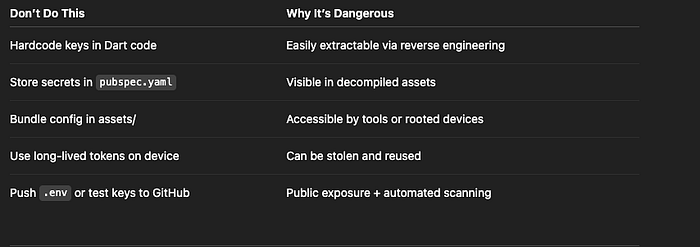
Sometimes devs accidentally push .env, config.dart, or test keys to public repos — exposing secrets globally. GitHub search engines and tools like truffleHog can find them within seconds.
📉 Real-World Impact
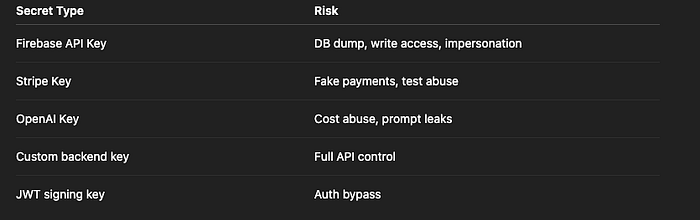
Risk Level: CRITICAL
🛡️ How to Fix It
✅ Fix 1: Never Hardcode Secrets in the Flutter App
Avoid putting secrets in:
- Dart files (
constorfinal) pubspec.yaml- Static assets
- Build config files (
AndroidManifest.xml,Info.plist)
✅ Fix 2: Move Secrets Server-Side
Shift sensitive keys to backend services and expose only scoped, short-lived tokens to the app.
Bad:
const openAIKey = "sk-..."; // In Flutter
Better:
// App calls your backend
POST /get-openai-token
→ returns: temporary scoped token with TTL
✅ Fix 3: Use API Gateways or Proxies
Instead of exposing backend keys:
- Route all requests through a gateway
- Validate user sessions on the server
- Inject keys into requests server-side
Flutter → Your Backend → Adds key → Proxies to real API
✅ Fix 4: Use flutter_dotenv Securely (Only for Non-Sensitive Config)
The flutter_dotenv package is not secure for secrets.
Only use it for:
ENVIRONMENT=prod
API_BASE=https://api.example.com
Never for API keys or secrets.
✅ Fix 5: Use Firebase App Check
For Firebase services:
- Enable App Check
- Bind access to a device attestation (SafetyNet, Play Integrity)
- Prevent requests from fake or reverse-engineered apps
❌ Anti-Patterns to Avoid
✅ Developer Checklist
- Never hardcode sensitive keys or tokens
- Use secure backend to proxy secret-related API calls
- Obfuscate release builds with
--split-debug-info - Use Firebase App Check to validate real devices
- Scan repos for leaked secrets (
truffleHog,gitleaks) - Rotate API keys if any leak is detected
- Monitor usage of 3rd-party services for abuse
👀 Up Next
🔍R Part 10: Flutter SharedPreferences Credential Dump — How Rooted Devices Expose User Tokens & PII
Thank you for reading this article
If I missed something or made an error, please let me know in the comments. I'm always eager to learn and improve.
Give a clap 👏 if you found this article helpful.