🧪 Part 5: JavaScript Injection in Flutter WebViews — How Untrusted Web Content Can Exploit Your…
FlutterPulseThis article was translated specially for the channel FlutterPulseYou'll find lots of interesting things related to Flutter on this channel. Don't hesitate to subscribe!🚀

WebViews are one of the most powerful tools in Flutter — they allow you to embed entire web pages, show dynamic content, or even bridge…
🔙 Check Previous Part [How JWTs Leak from Flutter Apps]
WebViews are one of the most powerful tools in Flutter — they allow you to embed entire web pages, show dynamic content, or even bridge between native and web.
But if you don't handle them securely, WebViews can become open gateways to JavaScript injection, Dart code execution, and credential theft — especially when dealing with untrusted or external web content.
In this article, we dive into how attackers exploit Flutter WebViews and how to lock them down properly.
🚨 What's the Problem?
When using InAppWebView or WebView in Flutter, developers often:
- Load external or user-controlled URLs
- Enable unrestricted JavaScript execution
- Expose Dart-native bridges (
JavaScriptHandler,evaluateJavascript) - Don't sanitize or validate loaded content
This opens the door for:
- JavaScript injection (via URL params, untrusted HTML)
- Remote code execution (via JS → Dart handlers)
- Credential theft and session hijacking
- Data exfiltration from WebView to attacker
🕵️♂️ Real-World Exploit Scenario
Goal: Execute malicious JavaScript inside the WebView and potentially invoke Dart functions or steal data.
🔥 Exploit #1: XSS via URL Query Injection
Suppose you're loading content like this:
final url = 'https://example.com/profile?user=${widget.username}';
webViewController.loadUrl(url);
If username = "<script>alert('hacked')</script>", and the backend reflects it — XSS occurs.
🔥 Exploit #2: Dart Code Execution via JS Bridge
Flutter WebViews often use JS bridges like:
webViewController.addJavaScriptHandler(
  handlerName: 'sendToFlutter',
  callback: (args) {
    doSomethingSecure(args[0]); // <-- Dangerous!
  },
);
Attackers can now inject:
window.flutter_inappwebview.callHandler('sendToFlutter', 'malicious_payload');If doSomethingSecure() changes app state, performs navigation, or leaks data — it becomes a critical exploit.
📉 Real-World Impact
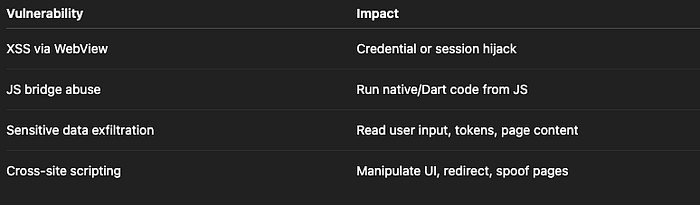
Risk Level: HIGH
🛡️ How to Fix It
✅ Fix 1: Never Trust Dynamic Web Content
Only load WebView content from trusted, controlled sources.
if (Uri.parse(url).host == 'example.com') {
  webViewController.loadUrl(url);
} else {
  // Block or sanitize
}
✅ Fix 2: Disable JavaScript if Not Needed
initialOptions: InAppWebViewGroupOptions(
  crossPlatform: InAppWebViewOptions(
    javaScriptEnabled: false,
  ),
)
Only enable JS if absolutely necessary.
✅ Fix 3: Validate Input and Escape Strings
If you must pass data from Flutter → WebView, sanitize it first:
final safeUsername = Uri.encodeComponent(username);
webViewController.loadUrl('https://example.com?user=$safeUsername');
On the backend, escape HTML and strip scripts before rendering dynamic values.
✅ Fix 4: Restrict JavaScript Handlers
Use named handlers only for well-defined interactions, and always validate args:
webViewController.addJavaScriptHandler(
  handlerName: 'submitForm',
  callback: (args) {
    if (args.isNotEmpty && args[0] is String && args[0].length < 100) {
      saveToBackend(args[0]);
    } else {
      throw Exception('Invalid input');
    }
  },
);
✅ Fix 5: Use CSP & HTTP Headers on Hosted Pages
If you control the server:
- Use Content-Security-Policy headers
- Prevent inline JS and untrusted scripts
- Sanitize and encode all dynamic content
- Add X-Frame-Options, Referrer-Policy, and others
✅ Secure WebView Configuration Example
InAppWebView(
  initialUrlRequest: URLRequest(url: Uri.parse("https://yourdomain.com")),
  initialOptions: InAppWebViewGroupOptions(
    crossPlatform: InAppWebViewOptions(
      javaScriptEnabled: true,
      useShouldOverrideUrlLoading: true,
      clearCache: true,
    ),
  ),
  onWebViewCreated: (controller) {
    controller.addJavaScriptHandler(
      handlerName: "safeHandler",
      callback: (args) {
        if (args.isNotEmpty && args[0] == "valid") {
          // Safe action
        }
      },
    );
  },
)
❌ Anti-Patterns to Avoid
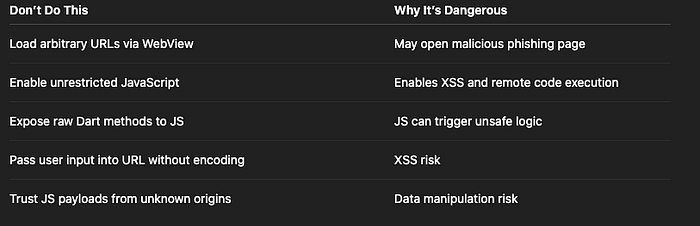
✅ Developer Checklist
- Load WebViews only from trusted URLs
- Disable JavaScript unless absolutely needed
- Validate all JS→Dart bridge arguments
- Sanitize user inputs and escaped URLs
- Use CSP and security headers for hosted content
- Avoid exposing privileged Dart logic to JS
👀 Up Next
🔓R Part 6: Firebase Misconfigurations in Flutter — How Open Rules Leak All Your App's Data
Thank you for reading this article
If I missed something or made an error, please let me know in the comments. I'm always eager to learn and improve.
Give a clap 👏 if you found this article helpful.