🔐 Part 4: Token Theft via SharedPreferences — How JWTs Leak from Flutter Apps
FlutterPulseThis article was translated specially for the channel FlutterPulseYou'll find lots of interesting things related to Flutter on this channel. Don't hesitate to subscribe!🚀
Welcome back to the Flutter App Hacking & Security series.
In this part, we explore a highly common yet overlooked vulnerability —…
🔙 Check Previous Part [How Dev Builds Can Open the Door to Attackers]
Welcome back to the Flutter App Hacking & Security series.
In this part, we explore a highly common yet overlooked vulnerability — storing sensitive tokens like JWTs or OAuth credentials in SharedPreferences.
These tokens are meant to represent authenticated sessions — but when you store them insecurely, attackers can extract them, reuse them, or even impersonate users without ever cracking a password.
Let's break it down.
🚨 What's the Problem?
Many Flutter apps store sensitive tokens like this:
final prefs = await SharedPreferences.getInstance();
prefs.setString('auth_token', jwt);
But SharedPreferences is just a plain XML file stored on internal device storage. On rooted devices, emulators, or with physical access — it's easy to read, modify, or exfiltrate.
🕵️♂️ Real-World Attack Scenario
Goal:
Extract an active JWT token and reuse it in an API call — gaining unauthorized access.
Tools Needed:
- Rooted Android device or emulator
adb(Android Debug Bridge)curlor Postman
🛠️ Step-by-Step Exploit
- Install and open the target Flutter app. Login once.
This writes the token into FlutterSharedPreferences.xml.
- Access device storage via
adb:
adb shell
run-as com.example.app
cd shared_prefs
cat FlutterSharedPreferences.xml
- Extract the token:
<string name="flutter.auth_token">eyJhbGciOiJIUzI1NiIsInR5cCI6...</string>
- Replay the token in an API call:
curl -H "Authorization: Bearer eyJ..." https://api.example.com/user/profile
You now have full access — no MFA, no password, just the raw token.
📉 Real-World Impact
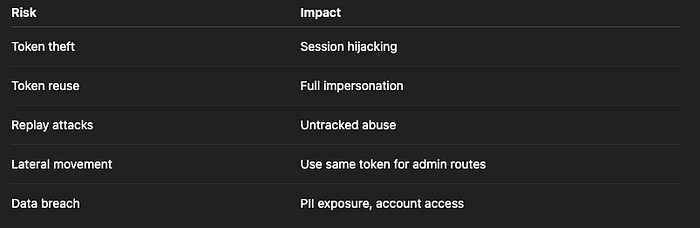
Risk Level: CRITICAL
🛡️ How to Fix It
✅ Fix 1: Use Encrypted Storage
Replace SharedPreferences with flutter_secure_storage:
import 'package:flutter_secure_storage/flutter_secure_storage.dart';

final storage = FlutterSecureStorage();
await storage.write(key: 'auth_token', value: jwt);
This encrypts data using Android Keystore or iOS Keychain.
✅ Fix 2: Set Expiry & Refresh Strategy
Never keep tokens "forever" on the device. Instead:
- Store short-lived access tokens (e.g., 15 mins)
- Refresh tokens via a secure endpoint
- Invalidate server-side tokens when app uninstalls/logs out
✅ Fix 3: Implement Backend Token Revocation & Rotation
Even if a token is stolen, backend should detect unusual behavior:
- Device mismatch?
- IP address change?
- Expired or inactive token?
Force logout and rotate tokens accordingly.
✅ Fix 4: Harden the Device Environment
At minimum:
- Detect root or emulator using packages like
device_info_plus - Limit token exposure in logs, stack traces, or debug tools
- Clear secure storage on logout, uninstall, or suspicious behavior
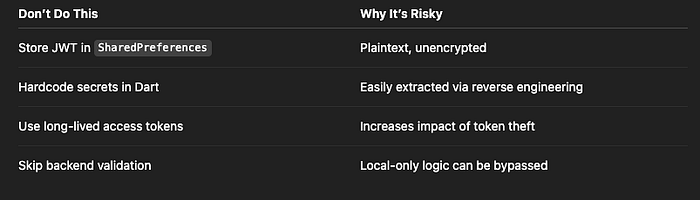
❌ Anti-Patterns to Avoid
✅ Developer Checklist
- Never store tokens in
SharedPreferences - Use encrypted storage like
flutter_secure_storage - Store only short-lived access tokens
- Refresh and revoke tokens securely
- Detect and handle device manipulation (root, emulator)
- Monitor backend for suspicious session reuse
🔐 Bonus: Detect If App Is Running on Rooted Device
import 'package:root_check/root_check.dart';

bool isRooted = await RootCheck.isDeviceRooted;
if (isRooted) {
  // Block access or restrict features
}
👀 Up Next
🚨 Part 5: JavaScript Injection in Flutter WebViews — How Untrusted Web Content Can Run Dart Code
Thank you for reading this article
If I missed something or made an error, please let me know in the comments. I'm always eager to learn and improve.
Give a clap 👏 if you found this article helpful.