🧠 Part 3: Debug Mode Abuse in Flutter — How Dev Builds Can Open the Door to Attackers
FlutterPulseThis article was translated specially for the channel FlutterPulseYou'll find lots of interesting things related to Flutter on this channel. Don't hesitate to subscribe!🚀

Shipping your Flutter app with debug mode enabled in production?
Or leaving debug flags in your code like showDevMenu = true?
🔙 Check Previous Part [How Frida Can Fool Your Fingerprint Checks]
Then congratulations — you've just handed attackers superpowers.
In this part of the series, we'll uncover how debuggable apps and leftover dev features can be used to reverse engineer, hook, and manipulate your Flutter app — often without root access.
🚨 What's the Problem?
Flutter's debug mode is great during development — but it must never make it to production.
Why? Because it:
- Disables code optimizations
- Allows runtime inspection & instrumentation
- Includes verbose logs, stack traces, and internal flags
- Makes
assert()statements behave differently - May include hidden debug menus or backdoors
🕵️♂️ Exploitation Scenario
Goal: Attach Frida or other tools to a production Flutter app and override internal flags or expose hidden screens.
Common Attack Paths:
- Hooking Dart or native methods at runtime
- Using
adb shellto inspect app logs - Using Flutter DevTools on a running production build
- Accessing debug-only routes (
/debug/settings, etc.)
🔍 Step-by-Step Attack: Check for Debug Mode
- Download the APK:
adb shell pm path com.example.app
adb pull /data/app/com.example.app-1/base.apk
- Check for
android:debuggablein the manifest:
unzip base.apk -d temp/
cat temp/AndroidManifest.xml | grep debuggable
If it says android:debuggable="true" — big problem.
🧬 Sample Frida Hook for Dev Flag
Suppose your Flutter code has this:
bool showDevTools = kDebugMode;
An attacker could override this via Frida:
Java.perform(function () {
  var Boolean = Java.use('java.lang.Boolean');
  Boolean.valueOf.overload('boolean').implementation = function (val) {
    console.log('[+] Overriding debug flag to TRUE');
    return Boolean.TRUE;
  };
});
📉 Real-World Impact
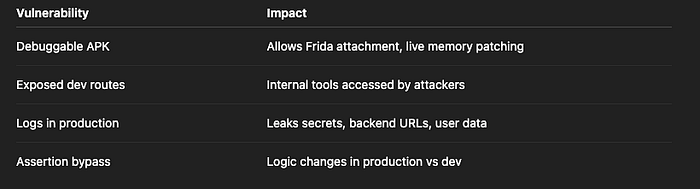
Risk Level: HIGH
🛡️ How to Fix It
✅ Fix 1: Disable Debuggable Flag
In your android/app/build.gradle, make sure:
buildTypes {
    release {
        debuggable false
        minifyEnabled true
        shrinkResources true
        signingConfig signingConfigs.release
    }
}
This ensures production builds cannot be hooked easily.
✅ Fix 2: Use kReleaseMode or bool.fromEnvironment()
Avoid hardcoding debug logic like:
bool showDevMenu = true;
Instead, wrap dev features with proper guards:
import 'package:flutter/foundation.dart';

if (!kReleaseMode) {
  showDevMenu();
}
You can also use:
const bool enableExperimental = bool.fromEnvironment('EXPERIMENTAL_FLAG');Then pass flags only in development builds.
✅ Fix 3: Strip Logs & Debug Tools
Use a logging package like logger and disable logs in release:
Logger.level = kReleaseMode ? Level.nothing : Level.debug;
Also, remove:
- Console prints
- Stack traces
- Exception details
FlutterError.onErrordev overrides
✅ Fix 4: Obfuscate Dart Code
Use Flutter's --obfuscate flag:
flutter build apk --release --obfuscate --split-debug-info=build/debug_info/
This makes it harder to reverse engineer Dart symbols from the release APK.
🧠 Secure Engineering Patterns
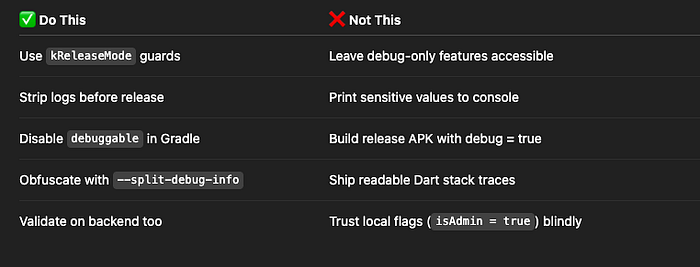
✅ Developer Checklist
- Verify
debuggable=falsein manifest - Wrap dev tools & test features with
kDebugModeorkReleaseMode - Disable all
print()orlogger.debug()logs in release - Use obfuscation for Dart code
- Review builds before publishing to store
👀 Up Next
💣 Part 4: Token Theft via SharedPreferences — How Attackers Extract JWTs from Plaintext Storage
Thank you for reading this article
If I missed something or made an error, please let me know in the comments. I'm always eager to learn and improve.
Give a clap 👏 if you found this article helpful.