🧠 Part 27: Miscellaneous & Advanced Flutter Exploits — From Stack Trace Leaks to Input Hijacking
FlutterPulseThis article was translated specially for the channel FlutterPulseYou'll find lots of interesting things related to Flutter on this channel. Don't hesitate to subscribe!🚀

Beyond traditional exploits like token theft or WebView injection, there are less obvious, but equally dangerous threats lurking in the…
🔙 Check Previous Part [Runtime Modifications and Dynamic Asset Swaps]
Beyond traditional exploits like token theft or WebView injection, there are less obvious, but equally dangerous threats lurking in the corners of Flutter apps. These include stack trace leaks, verbose logging, keyboard input abuse, accessibility service hijacking, and more.
These attacks often go unnoticed because they exploit default behaviors, debugging leftovers, or platform-native features Flutter interacts with.
In this final part, we'll unpack these edge-case but powerful exploits.
🕵️♂️ Real-World Advanced Exploits
💣 Exploit 1: Verbose Error Messages & Stack Trace Exposure
During crashes or errors, many Flutter apps log full stack traces:
flutter: [ERROR:flutter/runtime/dart_vm_initializer.cc] Unhandled Exception: FormatException
#0      SomeClass.fromJson
#1      LoginBloc.onEvent.<anonymous closure>
...
Attackers can:
- Infer internal class structures
- Map obfuscated symbol behavior
- Spot logic bugs and entry points
- Confirm backend endpoints and flows
🔥 Outcome: Recon data for deeper exploits.
💣 Exploit 2: Flutter Keyboard Input Logging via Accessibility or Native Hook
On Android, apps with Accessibility permissions (like screen readers or automation tools) can capture text input events — including passwords typed in secure fields.
Even without Accessibility, native input methods (IMEs) or keyloggers can:
- Hook FlutterTextInputPlugin
- Log each character in real-time
🔥 Outcome: Credential theft without modifying app code.
💣 Exploit 3: Flutter Accessibility Hijacking
Flutter exposes semantics and widget trees to the platform's Accessibility system. Malicious services can:
- Monitor focus changes
- Read screen contents
- Detect sensitive UI (e.g., "Enter OTP", "PIN")
🔥 Outcome: App state monitoring and potential PIN/OAuth intercept.
💣 Exploit 4: Leaking Sensitive Data to System Logs
Using print(), debugPrint(), or uncaught exceptions can leak:
- User PII
- Tokens
- API responses
- Internal app state
Example:
print("Auth token: $token");Even in release builds, logs may be captured via logcat or 3rd-party system apps.
🔥 Outcome: Passive token/PII leakage without any injection.
💣 Exploit 5: System-Wide Clipboard Hijack
Apps that store sensitive data (like OTPs or tokens) into clipboard:
Clipboard.setData(ClipboardData(text: token));
…can have it read by any app with clipboard permissions. No root or special privileges needed.
🔥 Outcome: Token or password stolen instantly.
📉 Real-World Impact
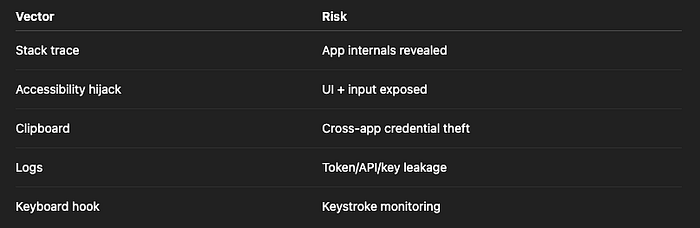
Risk Level: MEDIUM to HIGH depending on exploit chain
🛡️ How to Fix It
✅ Fix 1: Strip Stack Traces & Disable Verbose Logs in Release
Use conditional logging:
if (kDebugMode) {
  print("Debug data");
}
Use crash reporters (Sentry, Firebase Crashlytics) to log obfuscated stack traces securely.
✅ Fix 2: Don't Log Tokens, Passwords, or User Data
Sanitize logs:
- Remove sensitive fields
- Mask payloads in debug prints
- Avoid logging full HTTP responses
✅ Fix 3: Disable Clipboard for Sensitive Data
Avoid using the clipboard for:
- Tokens
- OTPs
- Passwords
If necessary, clear clipboard immediately after paste:
Clipboard.setData(ClipboardData(text: ""));
✅ Fix 4: Detect & Block Accessibility/Screen Readers (if needed)
For high-security apps:
- Detect active accessibility services
- Show warning or restrict app
Use plugins like device_info_plus, flutter_accessibility_service_checker (custom)
✅ Fix 5: Avoid Flutter Print in Production
Override or disable debugPrint globally:
void main() {
  debugPrint = (String? message, {int? wrapWidth}) {};
  runApp(MyApp());
}
❌ Anti-Patterns to Avoid
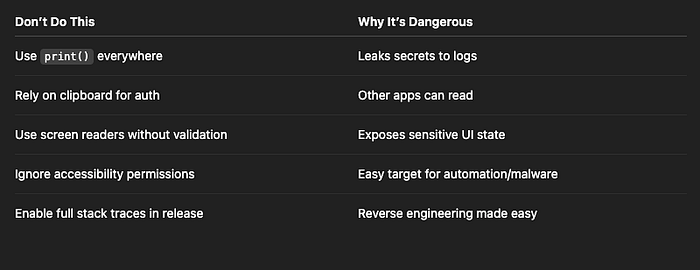
✅ Developer Checklist
- Disable verbose logs in production builds
- Never log tokens or user data
- Avoid clipboard for secure content
- Monitor and restrict accessibility if required
- Strip stack traces from UI errors
- Sanitize error and exception messages
✅ Series Recap
You've now completed all 27 parts of the Flutter App Hacking & Security Vulnerabilities series:
```
| Category             | Highlights                                      |
|----------------------|-------------------------------------------------|
| Auth & Login         | Offline bypass, token hijack, biometric abuse   |
| Token Theft          | SharedPreferences dump, HTTP interception       |
| Storage Abuse        | Local DB leaks, clipboard hijack                |
| WebView Attacks      | XSS, JS bridge injection                        |
| Firebase Exploits    | Misconfig, UID collision                        |
| Deep Links & Intents | URI hijacking, spoofing                         |
| Runtime & Code       | Frida hooks, dynamic execution                  |
| Assets & Binaries    | Reverse engineering libapp.so, asset injection  |
| Misc                 | Logging abuse, accessibility threats            |
```
Thank you for reading this article
If I missed something or made an error, please let me know in the comments. I'm always eager to learn and improve.
Give a clap 👏 if you found this article helpful.