🗂️ Part 25: Asset Repack Attacks — How Attackers Modify Your Flutter App's Assets to Inject…
FlutterPulseThis article was translated specially for the channel FlutterPulseYou'll find lots of interesting things related to Flutter on this channel. Don't hesitate to subscribe!🚀

Many Flutter apps use assets — images, JSON configs, HTML files, and scripts — to drive parts of their UI or logic. These assets are…
🔙 Check Previous Part [Why Obfuscation Isn't Enough to Protect Your App Logic]
Many Flutter apps use assets — images, JSON configs, HTML files, and scripts — to drive parts of their UI or logic. These assets are bundled into the APK, typically under the /assets folder.
What many developers don't realize is: assets are easy to extract, replace, and repackage. If an attacker modifies these assets and distributes a tampered APK, your app can become a vessel for phishing, ads, credential theft, or bypassed logic — without touching your code.
📦 What Are Asset Repack Attacks?
Asset repack attacks involve:
- Extracting the APK
- Replacing or modifying files under
/assets/ - Repacking the APK
- Distributing the modified APK for side-loading
These assets may include:
- HTML/JS files for WebViews
- Local JSON configs
- UI images/icons
- Secret flags or values
🕵️♂️ Real-World Exploit Scenarios
💣 Exploit 1: HTML Injection for WebView Phishing
If you load a local HTML file like:
webView.loadUrl("file:///android_asset/www/login.html");An attacker can:
- Modify
login.htmlto inject JavaScript that captures input - Replace form action to send data to malicious server
- Add scripts to silently capture cookies or tokens
🔥 Outcome: Local WebView becomes a phishing page.
💣 Exploit 2: Config JSON Swap
Apps often load configs like:
final data = await rootBundle.loadString('assets/config.json');Attacker modifies config.json to:
- Enable debug flags
- Unlock premium features
- Change API endpoints
- Disable security checks
🔥 Outcome: Security and feature logic bypassed via asset edit.
💣 Exploit 3: Icon & Branding Swap (Spoofing)
Attacker swaps:
- App icons (
assets/icon.png) - Splash screen images
- Fonts, strings, etc.
The app is repacked to mimic another legitimate app. This spoofed APK is used for:
- Credential theft
- Payment redirection
- Brand impersonation
🔥 Outcome: App is unrecognizable from original — major trust loss.
💣 Exploit 4: Hardcoded Secret Leaks via Assets
Developers sometimes store keys or tokens in asset files:
{
  "api_key": "sk_test_123abc",
  "mode": "production"
}
These are exposed through simple APK unzip or static analysis:
unzip app.apk -d out/
cat out/assets/config.json
🔥 Outcome: Attacker gets tokens without even launching the app.
📉 Real-World Impact
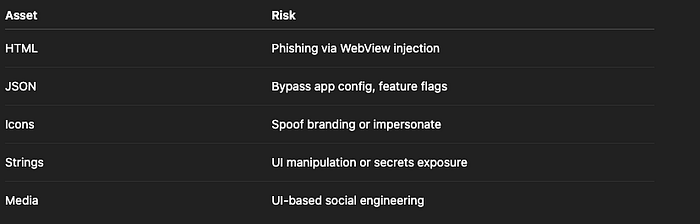
Risk Level: HIGH
🛡️ How to Fix It
✅ Fix 1: Don't Load Sensitive Logic or Flags from Assets
Move such logic to backend APIs. Instead of:
final config = await rootBundle.loadString('assets/config.json');Use:
final config = await http.get('/secure-config');…and cache securely.
✅ Fix 2: Hash & Verify Critical Assets at Runtime
Store expected hashes of critical files and verify:
final bytes = await rootBundle.load('assets/config.json');
final digest = sha256.convert(bytes.buffer.asUint8List());

if (digest.toString() != expectedHash) {
  throw Exception("Asset tampering detected");
}
🔥 Reject execution if hash mismatch is found.
✅ Fix 3: Encrypt Local Assets
Use encrypted JSON or HTML and decrypt in memory using FlutterSecureStorage or native code:
final encrypted = await rootBundle.load('assets/data.enc');
// decrypt before parsing
🔥 Prevents direct modification by repackers.
✅ Fix 4: Apply App Signature & Integrity Checks
In native Android:
- Verify signature matches expected hash
- Terminate app if mismatched
Signature[] sigs = ...;
String hash = getSignatureHash(sigs);
if (!hash.equals(EXPECTED_HASH)) {
   System.exit(0);
}
✅ Fix 5: Never Trust WebView with Local Files
Avoid loading file:// URLs directly in production. Instead:
- Load HTML from a secure HTTPS source
- Disable JS unless needed
- Sanitize input/output carefully
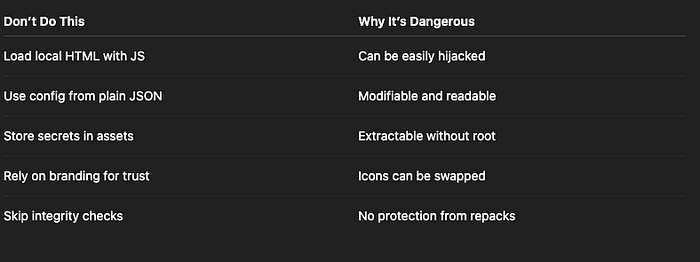
❌ Anti-Patterns to Avoid
✅ Developer Checklist
- Do not load critical logic/configs from assets
- Hash and verify any required asset at runtime
- Encrypt sensitive local data if unavoidable
- Avoid WebView use of local HTML/JS
- Use app signature check for tamper detection
- Educate users about risks of side-loading
👀 Up Next
🔐 Part 26: Asset Tampering in Flutter — Runtime Modifications and Dynamic Asset Swaps
Thank you for reading this article
If I missed something or made an error, please let me know in the comments. I'm always eager to learn and improve.
Give a clap 👏 if you found this article helpful.