📦 Part 22: Flutter App Integrity Bypass via Repack & Side-Loading — The Hidden Danger of Modified…
FlutterPulseThis article was translated specially for the channel FlutterPulseYou'll find lots of interesting things related to Flutter on this channel. Don't hesitate to subscribe!🚀
Even a secure Flutter app can be completely hijacked if attackers modify the APK, inject malicious logic or assets, repack the app, and…
🔙 Check Previous Part [How Hackers Extract Secrets from libapp.so and Beyond]
Even a secure Flutter app can be completely hijacked if attackers modify the APK, inject malicious logic or assets, repack the app, and trick users into installing it through side-loading (installing outside official app stores).
Once your app is repackaged, all client-side logic — including licensing, authentication, feature flags, or UI trust — can be bypassed or replaced entirely.
This article shows how easy it is for attackers to tamper with Flutter APKs, what happens under the hood, and how to protect your app's integrity against such attacks.
📦 What's APK Repacking?
Repacking is the process of:
- Decompiling your APK
- Modifying its contents (code, resources, assets)
- Rebuilding and re-signing the APK
- Distributing it outside Google Play
Attackers can use tools like:
apktooljadxsmali/baksmalizipalign,apksigner- Custom Python scripts
Once repackaged, your Flutter app may behave entirely differently — while looking identical to the end user.
🕵️♂️ Real-World Exploit Scenarios
💣 Exploit 1: Inject Malicious Code
Using apktool, attacker modifies smali code or adds a malicious Flutter plugin:
apktool d app.apk -o unpacked/
# Inject new logic in MainActivity.smali
apktool b unpacked -o hacked.apk
apksigner sign --ks mykey.keystore hacked.apk
🔥 Outcome: Modified APK now sends logs, credentials, or session data to attacker server.
💣 Exploit 2: Bypass Licensing or Feature Locks
Attacker decompiles libapp.so, patches licensing check to always return true, then rebuilds APK.
🔥 Outcome: App behaves as if user has premium access — no server auth needed.
💣 Exploit 3: Replace Assets & UI
Attacker replaces:
- App icons (to impersonate another app)
- Images, HTML, JavaScript, JSON in assets
- Labels or UI flows
# Inject phishing form in assets/login.html
🔥 Outcome: App UI now captures credentials or mimics a different app — indistinguishable to user.
💣 Exploit 4: Add Frida Detection Bypass
App originally includes:
if (isFridaDetected()) {
   System.exit(0);
}
Attacker comments out or inverts that condition in smali and rebuilds the APK.
🔥 Outcome: Anti-debugging is neutralized.
📉 Real-World Impact
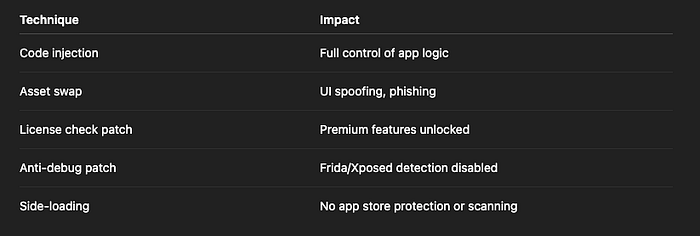
Risk Level: CRITICAL
🛡️ How to Fix It
✅ Fix 1: Enforce Signature Verification on Startup
On app launch, verify the app's signature hash matches the original (can be done via Java or native code):
Signature[] sigs = getPackageManager()
   .getPackageInfo(getPackageName(), PackageManager.GET_SIGNATURES)
   .signatures;
String current = sigs[0].toCharsString();

if (!current.equals(EXPECTED_SIGNATURE)) {
   // App was repackaged or tampered with
   System.exit(0);
}
✅ Fix 2: Use Play Integrity API / SafetyNet
Google Play Integrity API (or older SafetyNet API) validates that:
- App is unmodified
- Installed from Play Store
- Device is not rooted/emulated
Call server-side and validate the attestation result before allowing sensitive operations.
✅ Fix 3: Implement Anti-Tamper Logic
Use third-party SDKs or native code to:
- Check hash of
.so, assets, or classes.dex - Detect added classes, plugins, or UI modifications
- Alert backend or lock app features
✅ Fix 4: Encrypt Critical Assets
If your app loads sensitive config, HTML, or JSON via rootBundle, encrypt it before packaging and decrypt at runtime.
Uint8List encrypted = await rootBundle.load('assets/data.enc');
// decrypt before use
Prevents attackers from easily replacing or reading contents.
✅ Fix 5: Avoid Client-Side Feature Control
Don't do:
if (isPremiumUser) {
  showPremiumFeatures();
}
Do this instead:
bool isPremium = await backend.checkPremium(token);
Server-side check = no impact from repacked APK.
❌ Anti-Patterns to Avoid

✅ Developer Checklist
- Enable Play Integrity API or SafetyNet
- Validate app signature at runtime
- Add anti-tamper logic to critical files
- Don't store secrets or feature flags locally
- Move licensing/role/auth checks to backend
- Obfuscate Java/Kotlin and Dart logic
- Educate users to avoid side-loading
👀 Up Next
🔐 Part 23: Reverse Engineering libapp.so — Extracting Hidden Secrets From Compiled Flutter Code
Thank you for reading this article
If I missed something or made an error, please let me know in the comments. I'm always eager to learn and improve.
Give a clap 👏 if you found this article helpful.