🧠 Part 17: Runtime Memory Token Extraction in Flutter — How Attackers Sniff Sensitive Data from…
FlutterPulseThis article was translated specially for the channel FlutterPulseYou'll find lots of interesting things related to Flutter on this channel. Don't hesitate to subscribe!🚀

Even if your app encrypts tokens, stores them in secure storage, or transmits them over HTTPS, there's one place all secrets must pass…
🔙 Check Previous Part [How Attackers Inject and Run Arbitrary Dart at Runtime]
Even if your app encrypts tokens, stores them in secure storage, or transmits them over HTTPS, there's one place all secrets must pass through — device memory.
Attackers with root access or Frida can dump live memory from a running Flutter app and extract sensitive information like JWT tokens, API keys, user IDs, or session flags.
This article walks through how tokens are exposed in memory, how they're extracted using common tools, and how to minimize exposure.
🔍 What's the Problem?
Sensitive data is always decrypted and stored temporarily in RAM when used — even if encrypted at rest or in transit.
In Flutter:
- Any
String,Map, or object in use is in memory - Any token read from
SharedPreferences,FlutterSecureStorage, or from an API call is loaded into memory - Dart's memory model does not automatically zero or garbage-collect sensitive strings after use
🕵️♂️ Real-World Exploit Scenarios
💣 Exploit 1: Memory Dump Using Frida or Ghidra
Attacker hooks into a running Flutter app and uses Frida to dump memory:
Interceptor.attach(Module.findExportByName(null, "malloc"), {
  onEnter: function (args) {
    this.size = args[0].toInt32();
  },
  onLeave: function (retval) {
    var buf = Memory.readUtf8String(retval, this.size);
    if (buf && buf.includes("eyJhbGciOi")) { // JWT signature start
      console.log("Found token: " + buf);
    }
  }
});
Result: Real token logged in plaintext.
💣 Exploit 2: RAM Dump via /proc/self/mem
Rooted attacker accesses the app's process memory space:
cat /proc/<PID>/mem > mem_dump.bin
strings mem_dump.bin | grep "eyJhbGciOi" # JWT token start
This brute-force scan can extract anything loaded into RAM.
💣 Exploit 3: Flutter Debugger Abuse (Dev Build)
In dev builds, attacker uses Observatory or Dart DevTools to inspect live memory and object state via:
http://127.0.0.1:8181/inspector
Objects like token, accessKey, or userData are easily viewable.
💣 Exploit 4: Token Leakage in Global Variables
Some apps store tokens globally:
String globalJwt = "";
Once assigned, this string remains in memory throughout the app lifecycle — easily sniffed from RAM.
📉 Real-World Impact
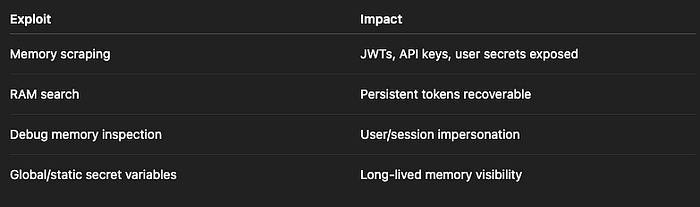
Risk Level: CRITICAL
🛡️ How to Fix It
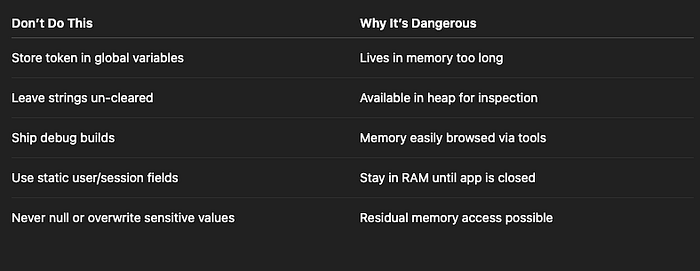
✅ Fix 1: Minimize Lifetime of Sensitive Variables
Avoid keeping tokens in global/static variables:
// ❌ Avoid this
String token = await secureStorage.read(key: "auth_token");

// ✅ Instead
Future<void> fetchData() async {
  final token = await secureStorage.read(key: "auth_token");
  final response = await api.getData(token);
}
Let the token exist only in the scope it's needed.
✅ Fix 2: Nullify Sensitive Strings After Use (Manually)
Since Dart doesn't automatically clear strings from memory:
String token = await secureStorage.read(key: "auth_token");

// After use
token = ""; // Forces overwrite (not guaranteed)
This doesn't guarantee zeroing memory, but reduces the string's lifetime in RAM.
✅ Fix 3: Avoid Keeping Secrets in Memory During App Lifecycle
Don't keep session tokens in memory unless absolutely necessary. Instead:
- Read from secure storage only when needed
- Store in a local stateful service with expiration
- Force garbage collection by removing references (
null,"")
✅ Fix 4: Disable Dev Tools in Release Builds
Ensure no Observatory, Dart DevTools, or Flutter Inspector ports are open in production:
flutter build apk --release
Never deploy a dev or debug build to staging/production.
✅ Fix 5: Use Native-Side Memory-Hardened Operations
For ultra-sensitive operations (encryption, signing), consider moving to native code using C/C++ or Rust, with memory-zeroing support.
✅ Fix 6: Monitor for Rooted Devices
Check if device is rooted and restrict memory-critical flows:
bool isRooted = await RootChecker.isDeviceRooted();
if (isRooted) {
  // Limit functionality
}
❌ Anti-Patterns to Avoid
✅ Developer Checklist
- Never store tokens in global/static memory
- Use short-lived memory scope for secrets
- Overwrite or nullify sensitive strings after use
- Disable all dev tools in release builds
- Check and limit functionality on rooted devices
- Avoid keeping secrets in memory across lifecycle
- Perform sensitive operations in native + zeroed memory
👀 Up Next
🔐 Part 18: Flutter Asset Injection — How Attackers Tamper with Your App's Static Resources
Thank you for reading this article
If I missed something or made an error, please let me know in the comments. I'm always eager to learn and improve.
Give a clap 👏 if you found this article helpful.