🧠 Part 16: Dynamic Code Execution in Flutter — How Attackers Inject and Run Arbitrary Dart at…
FlutterPulseThis article was translated specially for the channel FlutterPulseYou'll find lots of interesting things related to Flutter on this channel. Don't hesitate to subscribe!🚀

Flutter apps are generally considered "safe" from dynamic execution threats because Dart is AOT (ahead-of-time) compiled in release builds…
🔙 Check Previous Part [Hijacking Native Behavior at Runtime]
Flutter apps are generally considered "safe" from dynamic execution threats because Dart is AOT (ahead-of-time) compiled in release builds. But under the hood, Dart still relies on runtime environments, native bindings, and Flutter engine internals that can be exploited.
With tools like Frida, attackers can inject or trigger runtime Dart or native code within your Flutter app — allowing unauthorized execution of methods, manipulation of state, or direct memory alteration without modifying the APK.
Let's explore how dynamic execution is possible in Flutter and how to prevent it.
🔍 What's the Problem?
While Flutter disables dart:mirrors and code reflection in release builds, that doesn't make it immune to runtime modification. Here's how attackers still achieve dynamic execution:
- Hook into native method channels
- Intercept or override plugin calls
- Use Frida to dynamically invoke Dart methods from native memory
- Hook Dart runtime functions in libapp.so using tools like Ghidra or frida-gum
- Inject native libraries or overwrite function pointers in memory
🕵️♂️ Real-World Exploit Scenarios
💣 Exploit 1: Trigger Dart Call via Native Method Hooking
Suppose your app has a native channel like:
static const platform = MethodChannel('secure');

Future<String> getSecureToken() async {
  return await platform.invokeMethod('getToken');
}
Under the hood, this maps to a native method.
An attacker injects Frida script to override the native return and even execute Dart logic:
Interceptor.attach(Module.findExportByName("libflutter.so", "Dart_InvokeFunction"), {
  onEnter: function (args) {
    console.log("Dart function about to be invoked");
  }
});
💣 Exploit 2: Dart Function Pointer Hijack in Memory
Advanced attackers reverse libapp.so to identify Dart VM function offsets, and then inject code at runtime:
- Inject payload to allocate memory
- Replace function pointer in the isolate
- Trigger function call
This enables arbitrary Dart logic to execute inside your app at runtime.
💣 Exploit 3: Invoke eval() in Debug Mode or Dev Builds
Some developers mistakenly ship Flutter apps in debug mode (e.g., for internal testing), and expose unsafe logic like:
String execute(String code) {
  return eval(code); // ❌ Dart does not support this natively, but can be exposed via native bridge
}
A custom native plugin or reflection-like bridge can allow remote code execution.
💣 Exploit 4: Frida + DartNative Invoke Combination
With Frida, an attacker can call internal DartNative bindings, overriding standard behavior — especially for:
- Navigation
- Authentication
- API request triggers
- Configuration flag toggles
📉 Real-World Impact
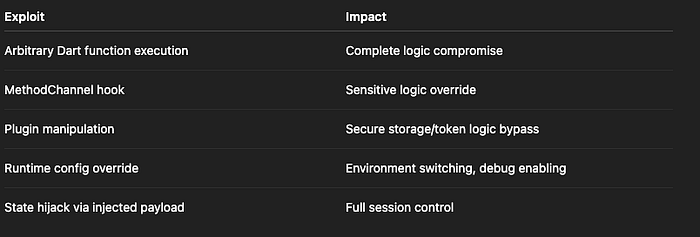
Risk Level: CRITICAL
🛡️ How to Fix It
✅ Fix 1: Always Build in Release Mode for Production
Only release builds offer:
- AOT compilation (no Dart VM or runtime reflection)
- Tree-shaking
- Obfuscation
- JIT and debugging disabled
Use:
flutter build apk --release --obfuscate --split-debug-info=build/symbols
✅ Fix 2: Disable Dev/Debug Flags at Runtime
Check for dev flags accidentally enabled in release builds:
bool isDebug = false;
assert(() {
  isDebug = true;
  return true;
}());

if (isDebug) {
  throw Exception("Debug mode detected in release!");
}
✅ Fix 3: Harden Native Plugin Channels
Ensure your native method handlers do not expose general-purpose execution logic:
Avoid:
case "eval":
  String code = call.argument("code");
  result.success(eval(code)); // ❌
✅ Fix 4: Obfuscate Dart Code
This makes function and class names unreadable in libapp.so:
flutter build apk --obfuscate --split-debug-info=build/symbols
It won't prevent hooking but adds friction.
✅ Fix 5: Detect Memory Injection or Dynamic Library Injection
Use native code to:
- Scan
/proc/self/mapsfor unknown .so files - Check
/proc/self/memor symbol tables for overwritten function addresses - Detect memory region modifications
✅ Fix 6: Use Isolate Binding + Signature Checks for Plugin Execution
If you must call sensitive native methods from Dart, validate their origin using:
- Method caller hash
- Session signature
- Server-generated cryptographic token
❌ Anti-Patterns to Avoid
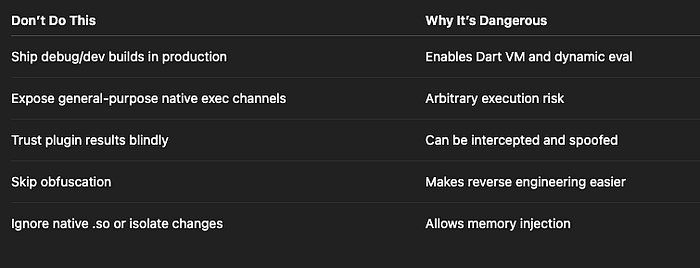
✅ Developer Checklist
- Use release build only in production
- Obfuscate Dart code + strip native symbols
- Don't expose dynamic method invocation via platform channels
- Detect memory injection via runtime scanning
- Harden and validate all plugin entrypoints
- Avoid general-purpose eval-style behavior
- Monitor app integrity via checksums or remote verification
👀 Up Next
🧬 Part 17: Runtime Memory Token Extraction — Sniffing Sensitive Data from RAM in Flutter Apps
Thank you for reading this article
If I missed something or made an error, please let me know in the comments. I'm always eager to learn and improve.
Give a clap 👏 if you found this article helpful.