🛡️ Part 13: SSL Pinning Bypass in Flutter — How Attackers Spoof Certificates to Intercept…
FlutterPulseThis article was translated specially for the channel FlutterPulseYou'll find lots of interesting things related to Flutter on this channel. Don't hesitate to subscribe!🚀

Your Flutter app uses HTTPS, right?
🔙 Check Previous Part [Firebase Anonymous Auth Hijacking]
But did you know:
Even HTTPS isn't enough if SSL pinning is not properly implemented or is easily bypassed?
Attackers can intercept encrypted traffic between your app and server using man-in-the-middle (MITM) techniques, spoof TLS certificates, and steal or modify sensitive data — especially if your Flutter app:
- Doesn't use SSL pinning
- Implements it incorrectly or only at the plugin level
- Is vulnerable to Frida or certificate forging-based bypasses
This article uncovers how SSL/TLS pinning works in Flutter, how attackers break it, and how to defend against advanced bypass strategies.
🔍 What's the Problem?
Most developers rely on HTTPS and assume it's secure by default.
But tools like:
- Charles Proxy
- Burp Suite
- mitmproxy
- Frida with certificate override
- Custom CA injection on rooted devices
...can intercept all app traffic, even if it's over HTTPS, unless the app validates server identity via SSL pinning.
🕵️♂️ Real-World Exploit Scenarios
💣 Exploit 1: MITM on a Device Without Pinning
On a real or emulator device:
adb install myapp.apk
adb reverse tcp:8080 tcp:8080 # redirect traffic to proxy
In Charles/Burp, attacker installs their CA certificate → Flutter app accepts it as trusted root.
Result: Traffic decrypted.
💣 Exploit 2: Frida Script to Bypass SSL Pinning
If the app implements pinning (even native), this Frida script can override certificate checks:
Java.perform(function () {
  var TrustManagerImpl = Java.use('com.android.org.conscrypt.TrustManagerImpl');
  TrustManagerImpl.checkTrustedRecursive.implementation = function () {
    console.log("SSL Pinning bypassed");
    return;
  };
});
Result: Certificate is blindly accepted, app sends/receives decrypted traffic via attacker proxy.
💣 Exploit 3: Weak or No SSL Pinning in Flutter Plugins
Most HTTP calls in Flutter use packages like:
httpdiohttp_client_helper
Without explicit pinning, they rely on system CA list → attacker just needs to add a custom CA to the device.
📉 Real-World Impact
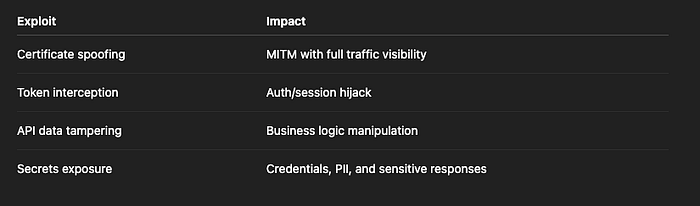
Risk Level: CRITICAL
🛡️ How to Fix It
✅ Fix 1: Implement SSL Pinning in Flutter Using dio or http
Dio Example:
final dio = Dio();
(dio.httpClientAdapter as DefaultHttpClientAdapter).onHttpClientCreate = (client) {
  SecurityContext sc = SecurityContext(withTrustedRoots: false);
  sc.setTrustedCertificates('assets/cert.pem'); // Your pinned cert

  return HttpClient(context: sc);
};
http Example:
final client = HttpClient(context: SecurityContext()
  ..setTrustedCertificates('assets/cert.pem'));

final request = await client.getUrl(Uri.parse("https://api.example.com"));
⚠️ You must include only your certificate, not the system trust store.
✅ Fix 2: Use Public Key Pinning Instead of Certificate Pinning
Certificates expire; public keys don't (as often).
Use SHA-256 fingerprint of your server's public key:
openssl x509 -in cert.pem -pubkey -noout | openssl pkey -pubin -outform DER | openssl dgst -sha256 -binary | base64
Then compare this hash manually in your code before trusting the connection.
✅ Fix 3: Use Third-Party Libraries for Pinning
Plugins like ssl_pinning_plugin offer easier ways to manage cert pinning.
But beware: these can still be bypassed on rooted devices without native-side enforcement or runtime hardening.
✅ Fix 4: Detect Frida and Debugger Attaching
Use native code to detect Frida presence:
public static boolean isFridaPresent() {
  return Build.FINGERPRINT.contains("generic") ||
         checkFridaProcesses();
}
Or monitor /proc/<pid>/maps for frida-agent.so.
✅ Fix 5: Don't Ignore SSL Errors or Use badCertificateCallback
This is a critical mistake:
HttpClient()
  ..badCertificateCallback = (cert, host, port) => true; // ❌ NEVER DO THIS
This disables all validation and makes MITM trivial.
❌ Anti-Patterns to Avoid
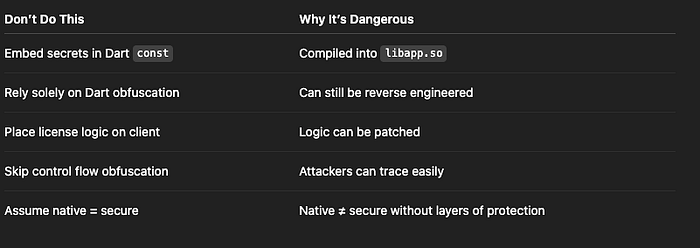
✅ Developer Checklist
- Pin SSL certificates or public keys in all network calls
- Disable system CA trust when pinning
- Never use
badCertificateCallback = true - Rotate certificates safely with overlapping periods
- Detect Frida or debugger presence
- Validate fingerprint or cert expiration in app builds
- Log/report SSL pinning failures in production builds
👀 Up Next
Thank you for reading this article
If I missed something or made an error, please let me know in the comments. I'm always eager to learn and improve.
Give a clap 👏 if you found this article helpful.