🧾 Part 10: Flutter SharedPreferences Credential Dump — How Rooted Devices Expose User Tokens & PII
FlutterPulseThis article was translated specially for the channel FlutterPulseYou'll find lots of interesting things related to Flutter on this channel. Don't hesitate to subscribe!🚀

Many Flutter apps rely on SharedPreferences for quick, persistent storage of user-related data — tokens, flags, onboarding states, etc.
🔙 Check Previous Part [How Secrets Leak Through APK Decompilation]
But here's the catch:
SharedPreferences data is stored as plain-text on disk.
On rooted devices, malicious actors can extract all this data in seconds — including JWT tokens, login flags, and even PII (personally identifiable information).
This article explores how SharedPreferences-based attacks work, how data is exfiltrated, and how to mitigate them.
🔍 What's the Problem?
Flutter's SharedPreferences stores key-value data in platform-native storage:
- On Android: XML files at
/data/data/<package_name>/shared_prefs/<prefs_name>.xml - On iOS: UserDefaults plist, which is somewhat better protected (unless jailbroken)
If you're saving this:
await prefs.setString("token", "eyJhbGciOi...JWT");…it's saved as-is in plaintext.
On rooted Android devices, this is fully accessible via ADB or apps with elevated privileges.
🕵️♂️ Real-World Exploit Scenarios
💣 Exploit 1: Token Extraction via ADB
adb shell
su
cat /data/data/com.example.myapp/shared_prefs/MyAppPreferences.xml
Output:
<string name="token">eyJhbGciOiJIUzI1NiIsIn...</string>
Now the attacker has full access to:
- User's session
- Authenticated APIs
- User role or privilege level
💣 Exploit 2: PII Harvest via Preference Dump
If your app stores:
prefs.setString("email", user.email);
prefs.setString("phone", user.phone);
prefs.setBool("isAdmin", true);
…that's essentially handing attackers a database of user details.
💣 Exploit 3: Token Reuse or Session Hijack
Attackers can copy the token from one device, replay it on another, and impersonate users — especially dangerous if:
- You use long-lived tokens
- There's no device/session binding
- You don't rotate tokens after re-login
📉 Real-World Impact
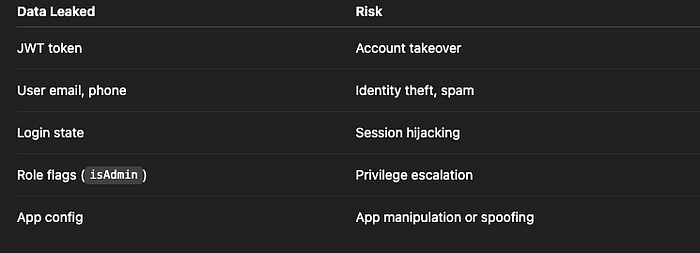
Risk Level: HIGH
🛡️ How to Fix It
✅ Fix 1: Use Secure Storage for Sensitive Data
Instead of SharedPreferences, use flutter_secure_storage:
final storage = FlutterSecureStorage();
await storage.write(key: "token", value: jwt);
This uses:
- Android Keystore (AES + encrypted SharedPrefs)
- iOS Keychain
Even on rooted devices, it's much harder to extract.
✅ Fix 2: Encrypt Sensitive Data Before Saving
If you must use SharedPreferences for performance:
- Encrypt the value using AES before writing
- Store the encryption key in native keystore or obfuscate in memory
Use encrypt + flutter_secure_storage combo:
final encryptedToken = encryptToken(jwt, yourKey);
prefs.setString("token", encryptedToken);
✅ Fix 3: Keep Tokens Short-Lived
Use access tokens with:
- Expiry of a few minutes
- Auto-refresh mechanism
- Backend session validation
This way, even if an attacker steals the token — it's useless after a short time.
✅ Fix 4: Bind Sessions to Device or IP
On your backend:
- Track device fingerprint or identifier
- Invalidate tokens used from a different device/IP/location
- Rotate token on login/logout
✅ Fix 5: Detect Rooted Devices
Use packages like:
import 'package:root_check/root_check.dart';
bool rooted = await RootCheck.isDeviceRooted;
Limit app features or block altogether on rooted devices.
❌ Anti-Patterns to Avoid
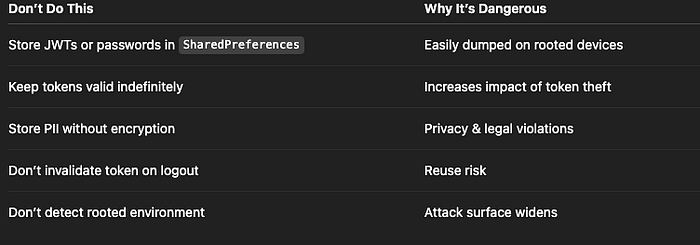
✅ Developer Checklist
- Store sensitive data using
flutter_secure_storage - Never store auth tokens or passwords in
SharedPreferences - Encrypt all local sensitive values if fallback to prefs
- Implement short token lifetimes and refresh tokens
- Bind sessions to device or location when feasible
- Detect rooted devices and enforce security policies
👀 Up Next
💥 Part 11: WebView JavaScript Bridge Injection — How Flutter Allows JS-to-Dart Code Execution
Thank you for reading this article
If I missed something or made an error, please let me know in the comments. I'm always eager to learn and improve.
Give a clap 👏 if you found this article helpful.