🔓 Part 1: Offline Login Bypass in Flutter — How SharedPreferences Can Let Attackers Skip…
FlutterPulseThis article was translated specially for the channel FlutterPulseYou'll find lots of interesting things related to Flutter on this channel. Don't hesitate to subscribe!🚀

Welcome to Part 1 of the Flutter App Hacking & Security series. In this article, we'll dissect a critical vulnerability that allows…
Welcome to Part 1 of the Flutter App Hacking & Security series. In this article, we'll dissect a critical vulnerability that allows attackers to bypass login flows entirely — no password, no fingerprint, not even internet access required.
It all boils down to one thing: trusting local flags stored in SharedPreferences.
⚠️ What's the Vulnerability?
Many Flutter apps store login status or tokens in SharedPreferences like this:
prefs.setBool('isLoggedIn', true);
prefs.setString('auth_token', jwtToken);
The problem? These files are unencrypted, readable on rooted or emulated devices, and often not validated against the backend.
🧪 Attack Scenario: Offline Login Bypass
Goal:
Access the app's main screens without logging in, even when offline.
Tools Needed:
- Android emulator or rooted device
adb(Android Debug Bridge)
🛠️ Step-by-Step Exploit
- Install and open the target Flutter app. Log in normally once.
This ensures the app writes flags likeisLoggedIn = true. - Pull the app's local storage:
adb shell
run-as com.example.myapp
cd shared_prefs
cat FlutterSharedPreferences.xml
You'll see something like:
<string name="flutter.isLoggedIn">true</string>
<string name="flutter.auth_token">ey_fake_jwt_token</string>
- Now simulate a "logged-in" state:
Still in adb shell, run:
echo '<?xml version="1.0" encoding="utf-8"?>
<map>
  <string name="flutter.isLoggedIn">true</string>
  <string name="flutter.auth_token">ey_fake_jwt_token</string>
</map>' > shared_prefs/FlutterSharedPreferences.xml
- Relaunch the app — no login screen. You're in.
Even offline.
🧠 Why This Works
- SharedPreferences is plaintext XML stored in internal storage.
- Flutter apps often trust the flag blindly, and don't call the backend to verify.
- No encryption, no expiry, no validation — making it trivial to manipulate.d
📉 Real-World Impact
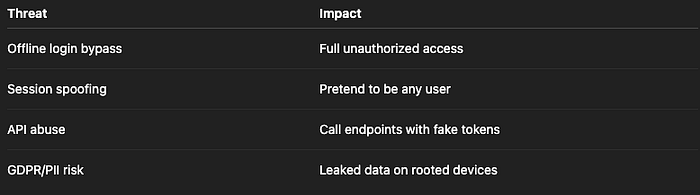
Risk Level: HIGH
🛡️ How to Fix It
✅ Fix 1: Always Validate Session with Backend
final storage = FlutterSecureStorage();

Future<bool> validateSession() async {
  final token = await storage.read(key: 'auth_token');
  if (token == null) return false;
  final response = await http.get(
    Uri.parse('https://api.example.com/auth/validate'),
    headers: { 'Authorization': 'Bearer $token' },
  );
  return response.statusCode == 200;
}
🔒 Only allow login if the server confirms the session is valid.
✅ Fix 2: Use Secure Storage Instead of SharedPreferences
import 'package:flutter_secure_storage/flutter_secure_storage.dart';

final storage = FlutterSecureStorage();
await storage.write(key: 'auth_token', value: jwt);
Encrypted via Android Keystore or iOS Keychain.
✅ Fix 3: Invalidate on Token Expiry or Network Loss
If validation fails — log out.
if (!await validateSession()) {
  await storage.deleteAll();
  Navigator.pushReplacementNamed(context, '/login');
}
🚫 Anti-Patterns to Avoid
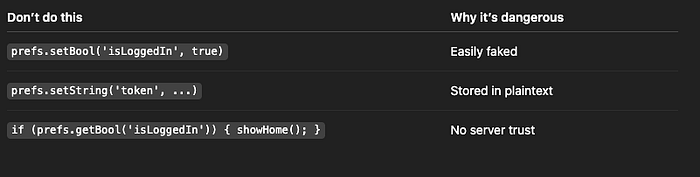
✅ Developer Checklist
- Avoid storing auth flags locally
- Always validate tokens on server
- Encrypt all tokens using secure storage
- Handle logout gracefully on invalid sessions
- Don't rely on SharedPreferences for security decisions
👀 Up Next
🔐 Part 2: Biometric Authentication Bypass — How Frida Can Trick Flutter Apps Into Believing a Face/Fingerprint Check Passed
Thank you for reading this article
If I missed something or made an error, please let me know in the comments. I'm always eager to learn and improve.
Give a clap 👏 if you found this article helpful.